Peter Grafe

TikTok Skills in Claude: The BlueAlpha Marketing Plugin

Nine agent skills that turn TikTok Ads data into audits, creative fatigue detection, audience tier maps, and incrementality tests inside Claude.

πŸ’‘ TL;DR β€” The BlueAlpha Marketing Plugin for TikTok puts a team of specialized marketing agents inside Claude. Nine skills connect directly to the TikTok Marketing API and handle the jobs that eat your week β€” account audits, creative fatigue detection, audience tier maps with attribution-completeness scoring, geo expansion, incrementality testing, campaign creation, and automated reporting. Each one follows the same loop: Analyze β†’ Decide β†’ Act. Under the hood, this is the Decision Engine β€” the system that turns every signal in your TikTok account into a real decision and produces a deployment-ready spec. All of it runs inside Claude β€” no dashboards, no exports, no manual data prep.


Every TikTok advertiser hits the same wall. The platform UI tells you what happened. It doesn't tell you what to do next. You end up with a dozen tabs open β€” campaign manager, creative library, audience insights, a spreadsheet someone built last quarter β€” trying to synthesize a decision that should take ten minutes.

The BlueAlpha TikTok skills close that gap. Claude connects directly to your TikTok Ads account via MCP (Model Context Protocol), pulls the data, runs the analysis, and returns a structured recommendation inside the conversation. You don't export anything. You don't copy-paste numbers. You type a prompt and get back a decision.


All 9 TikTok skills in the BlueAlpha Marketing Plugin

Account health & optimization

  • tiktok-auto-optimize

  • tiktok-full-monty

Creative performance

  • tiktok-creative-fatigue-watchdog

  • tiktok-creative-refresh

Audience & targeting

  • tiktok-audience-intelligence

  • tiktok-geo-expansion

  • tiktok-incrementality-test

Campaign creation

  • tiktok-content-to-campaign

Reporting

  • tiktok-performance-digest


The Analyze β†’ Decide β†’ Act loop

Every BlueAlpha skill follows the same three-step pattern:

1. Analyze β€” Claude calls the TikTok Ads API directly through MCP. No manual exports, no copy-paste. It pulls campaigns, adgroups, creative metrics, audience delivery reports, and interest category taxonomies in real time.

2. Decide β€” The skill applies BlueAlpha's decision logic: efficiency scores, severity tiers, attribution completeness gauges, spend waste estimates. You get a tier map (Gold/Silver/Bronze/Cut or Critical/High/Moderate/Healthy), not a data dump.

3. Act β€” Every output ends with a three-bucket action plan: Auto-approve (safe to execute now), Recommend (needs a quick review), Needs discussion (bigger structural moves). You know exactly what to do and in what order.


Who is the BlueAlpha TikTok plugin for?

  • Performance marketers running TikTok spend above $10K/month who want a faster weekly optimization cycle

  • Media buyers managing multiple accounts who need a structured read without manually pulling reports

  • Growth leads who own the full funnel and need to tie TikTok creative health back to CPA trends

  • Agency teams who want to show clients a clear, documented optimization rationale β€” not just a screenshot of the dashboard

BlueAlpha delivers the plugin in two modes. Self-Drive means your team uses the agents directly inside Claude β€” you own the decisions, BlueAlpha onboards, models, and stays close. Co-Pilot means a senior BlueAlpha growth partner runs the loop for you, reading what the agents surface and telling you exactly what to do. Same Decision Engine either way. The choice is who's in the seat β€” your team or ours.


How to pick the right skill

If you want to…

Use this skill

Get a full account health check in one shot

tiktok-auto-optimize

Find out which creatives are dying before CTR drops

tiktok-creative-fatigue-watchdog

Get a brief for net-new creative based on what's working

tiktok-creative-refresh

Understand who's actually converting (age, geo, placement)

tiktok-audience-intelligence

Identify new geos to test

tiktok-geo-expansion

Validate that TikTok is driving real incremental revenue

tiktok-incrementality-test

Send leadership a weekly TikTok performance narrative

tiktok-performance-digest

Turn a blog post or content piece into a TikTok campaign spec

tiktok-content-to-campaign

Run everything at once

tiktok-full-monty


How does the BlueAlpha marketing plugin connect to TikTok Ads?

Every skill in the BlueAlpha Marketing Plugin is backed by an MCP connector that gives Claude direct, permissioned access to the TikTok Marketing API. MCP-native means the whole system lives inside Claude, Codex, or any AI workspace your team already uses β€” no separate login, no dashboard to check. This is what makes it a Decision Engine rather than another reporting layer: the decision lives where the conversation happens.

The BlueAlpha TikTok connector gives Claude the ability to:

  • Pull campaigns, adgroups, ads, and creative-level performance with full breakdown support

  • Audit account structure and score every campaign on objective alignment, pacing, and creative health

  • Compute hook rate, hold rate, and completion rate trends across the active creative set

  • Calculate iOS SKAdNetwork attribution completeness and flag confidence levels on demographic reads

  • Pull AUDIENCE reports across age, gender, placements, DMAs, provinces, and interest categories

  • Identify expansion-candidate geos using TikTok's targeting taxonomy

  • Design geo-split incrementality tests with matched controls and MDE calculation

Where relevant, skills also cross-reference a Meridian MMM (marketing mix model) via the BlueAlpha MMM connector to validate TikTok platform ROAS against causal incrementality data. The MMM is optional β€” every skill works without it, but the recommendations get sharper when causal measurement is underneath.

TikTok announced its own official TikTok Ads MCP server at TikTok World in May 2026, which validates the category. That server is positioned as infrastructure for letting external AI agents run campaigns autonomously β€” set bids, adjust budgets, modify targeting, create ad assets. The BlueAlpha plugin sits at a different layer. It ships nine TikTok-specific skills that turn API access into decisions: full-account audit with severity tiers, leading-indicator creative fatigue detection, attribution-completeness scoring, audience tier maps with explicit confidence levels, geo expansion analysis, incrementality test design, and content-to-campaign activation. Setup is also different. The BlueAlpha connector handles authentication behind a single sign-in β€” no developer token, no OAuth configuration, no token refresh management.


How do I install the BlueAlpha Marketing Plugin?

There are two pieces to install: the BlueAlpha MCP connector (so Claude can read your TikTok Ads data and your Meridian MMM) and the BlueAlpha Marketing Plugin itself (the nine TikTok skills that put that data to work). Total setup time is about a minute. Steps 1 and 3 are the same regardless of which Claude product you use; Step 2 has two paths depending on whether you're in Cowork or Claude Code.

Step 1 β€” Install the BlueAlpha MCP connector

  1. Open Settings in the Claude desktop app

  2. Go to Connectors β†’ Add custom connector

  3. Name it: BlueAlpha MCP

  4. URL: https://mcp.bluealpha.ai/mcp

  5. Click Connect and sign in with your BlueAlpha account

That single sign-in wires Claude up to your TikTok Ads accounts (and your Meridian MMM, if you have one). No keys, no IDs, no config files.

Step 2 β€” Install the plugin

Pick the path that matches the Claude product you're using.

Option A β€” Cowork (drag-and-drop)

  1. Go to github.com/bluealpha-labs/bluealpha-plugins

  2. Click Releases on the right rail and open the latest release

  3. Expand Assets and click bluealpha-marketing-plugin.plugin to download

  4. Drag the downloaded file into an open Cowork session and click Install when prompted

That's it. No CLI, no settings menu β€” one drag.

Option B β€” Claude Code (slash commands)

Inside Claude Code, run these two commands:

/plugin marketplace add <https://github.com/bluealpha-labs/bluealpha-plugins.git>
/plugin install bluealpha-marketing-plugin
/plugin marketplace add <https://github.com/bluealpha-labs/bluealpha-plugins.git>
/plugin install bluealpha-marketing-plugin

The first registers the GitHub repo as a marketplace; the second installs the plugin from it.

Step 3 β€” Try a skill

Invoking a skill is as simple as typing something like:

"Run tiktok-auto-optimize on my TikTok account, last 14 days, moderate risk tolerance."

Claude will route that to the right skill, load the workflow, and walk you through the Analyze β†’ Decide β†’ Act loop.


Skill reference β€” example prompts

tiktok-auto-optimize

/tiktok-auto-optimize or optimize my TikTok account

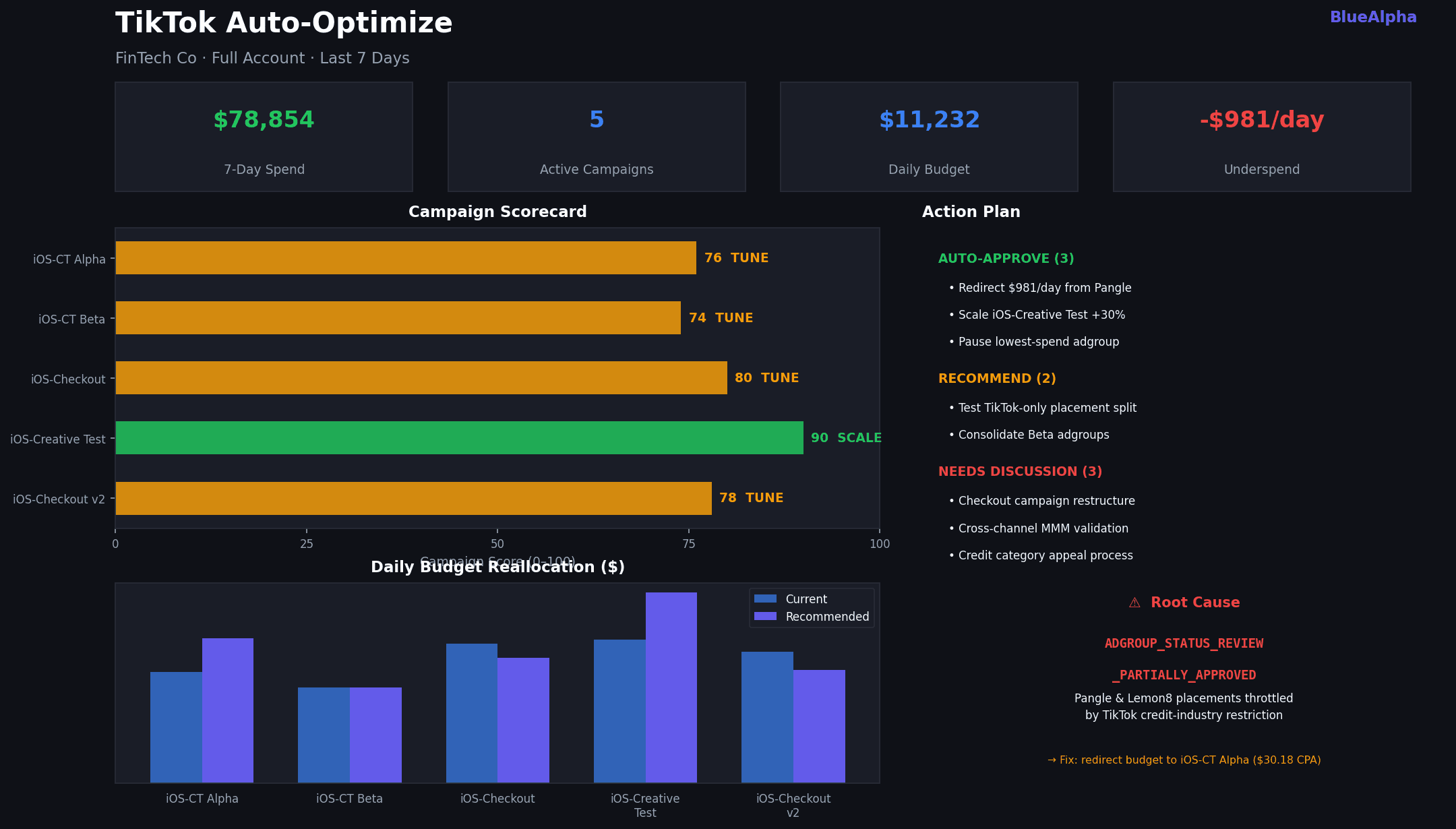
Runs a complete optimization cycle across your entire TikTok account. It audits campaign and adgroup structure (naming, objective alignment, budget mode), diagnoses pacing and underspend, identifies budget reallocation opportunities, assesses creative health across the top 10 adgroups, and compiles a risk-tiered action plan. The output separates what you can approve immediately from what needs a conversation.
TikTok Skills in Claude - auto-optimize

Real example β€” FinTech Co (iOS app, $11K daily budget): Auto-Optimize pulled all 5 active campaigns and immediately flagged $981/day in underspend. The root cause wasn't budget β€” it was ADGROUP_STATUS_REVIEW_PARTIALLY_APPROVED on Pangle and Lemon8 placements, a restriction TikTok applies to financial services advertisers in the credit category. Two Checkout campaigns were pacing at 76–77% as a result. The skill scored every campaign (iOS-Creative Test led at 90/100, scale-ready), mapped budget reallocation to the three best-performing adgroups, and delivered 8 action items sorted by risk: 3 auto-approve, 2 recommend, 3 needs discussion. The whole run β€” live API calls, analysis, output β€” took under 90 seconds inside Claude.


tiktok-creative-fatigue-watchdog

/tiktok-creative-fatigue-watchdog or check my TikTok creatives for fatigue β€” last 14 days

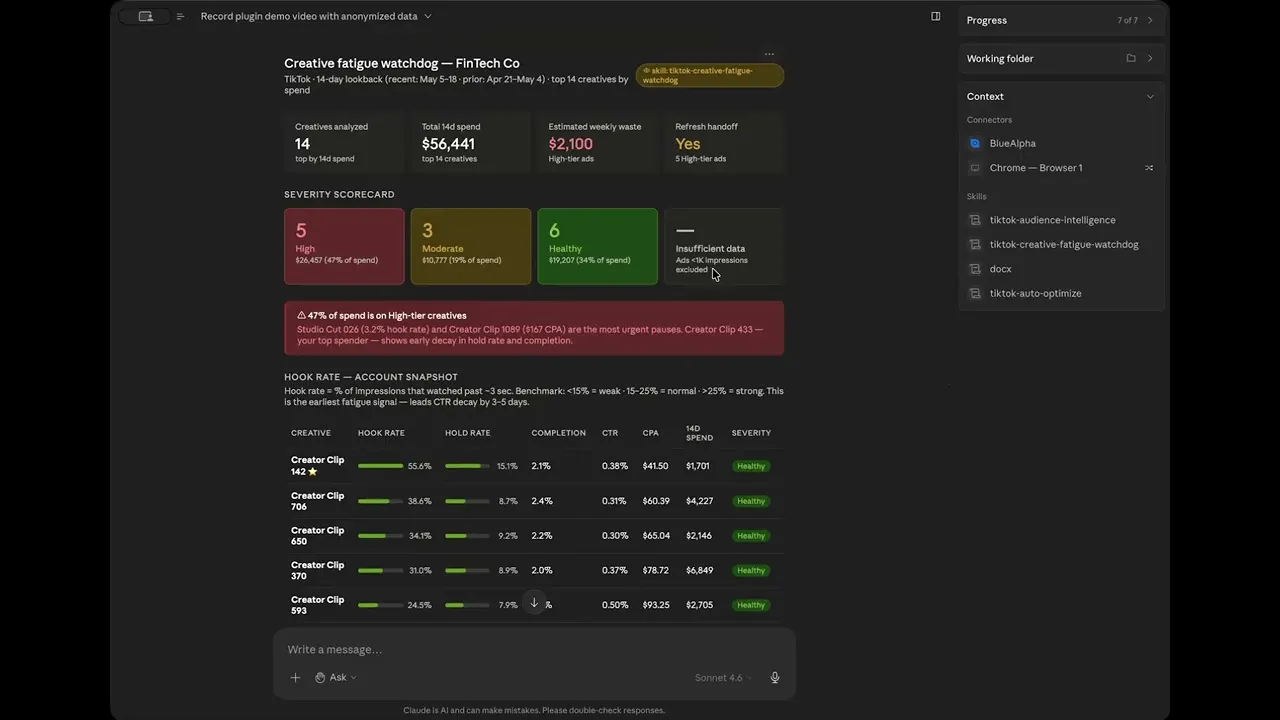
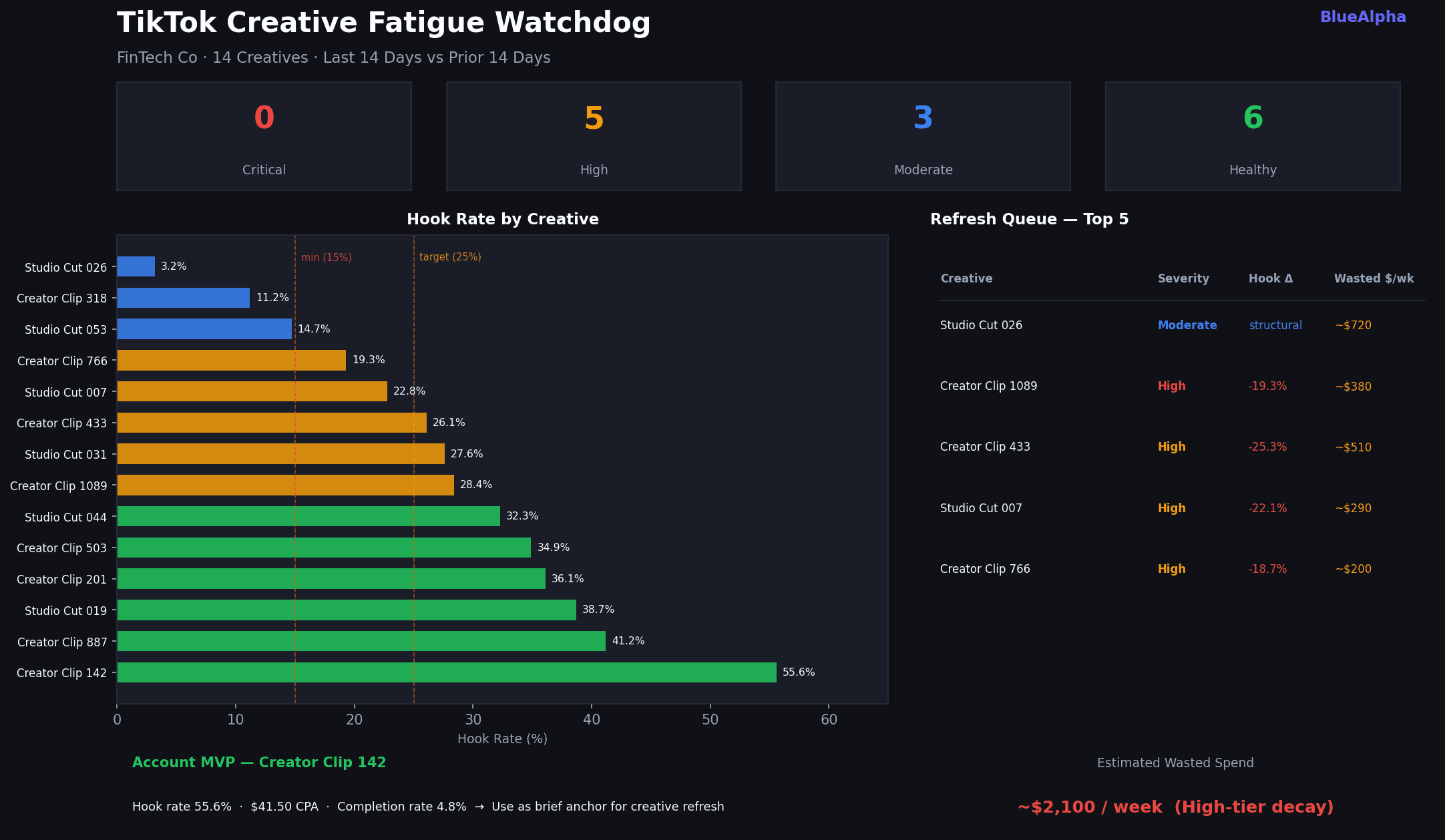
Pulls the top 100 creatives by spend for a 14-day recent window and a prior 14-day window, then computes hook rate (video_views_p25 / impressions), hold rate (video_views_p50 / impressions), and completion rate for each. It calculates trend deltas β€” how much each signal has decayed β€” and classifies every creative into four severity tiers: Critical, High, Moderate, or Healthy. The output includes a wasted spend estimate, a prioritized refresh queue, and a healthy creative profile that feeds directly into tiktok-creative-refresh.

Hook rate leads CTR by 3–5 days. By the time you see CTR fall in the TikTok dashboard, you've already burned 4–5 days of spend.
TikTok Skills in Claude - creative fatigue

Real example β€” FinTech Co (14 active creatives, $56K 14d spend): The Watchdog found 5 High-severity creatives and 3 Moderate. Creator Clip 142 was the standout: 55.6% hook rate, $41.50 CPA β€” the account benchmark. Total estimated wasted spend from High-tier decay: ~$2,100/week. Creator Clip 433, the top spender at $7,587 over 14 days, showed hold rate declining -25.3% from the prior window β€” early decay in the highest-spend asset, exactly the kind of signal that's invisible in the TikTok UI until it's too late.


tiktok-creative-refresh

/tiktok-creative-refresh or generate a creative refresh brief based on my fatigue watchdog results

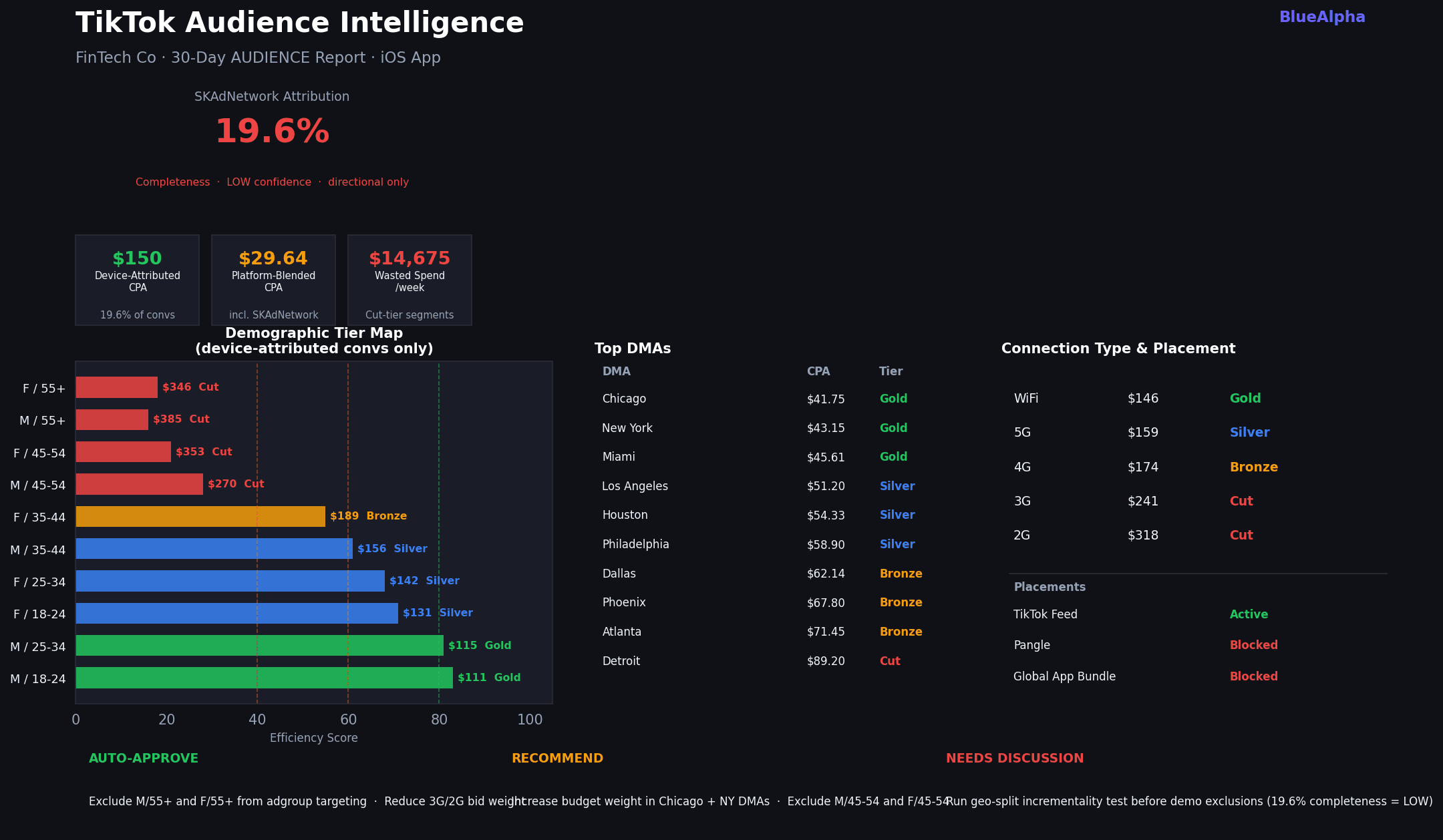
Takes the output of the Fatigue Watchdog (or runs it fresh) and turns it into a production-ready creative brief. It extracts the winning attributes from Healthy-tier creatives β€” hook style, format, video length proxy, CTA patterns β€” and uses them as the brief foundation. Output includes 3–5 new creative concepts with hook directions, suggested formats (UGC vs. studio), length targets, and music/sound notes, plus a test budget and timeline per concept.
TikTok Skills in Claude - creative refresh


tiktok-audience-intelligence

/tiktok-audience-intelligence or run audience intelligence on my TikTok account β€” last 30 days

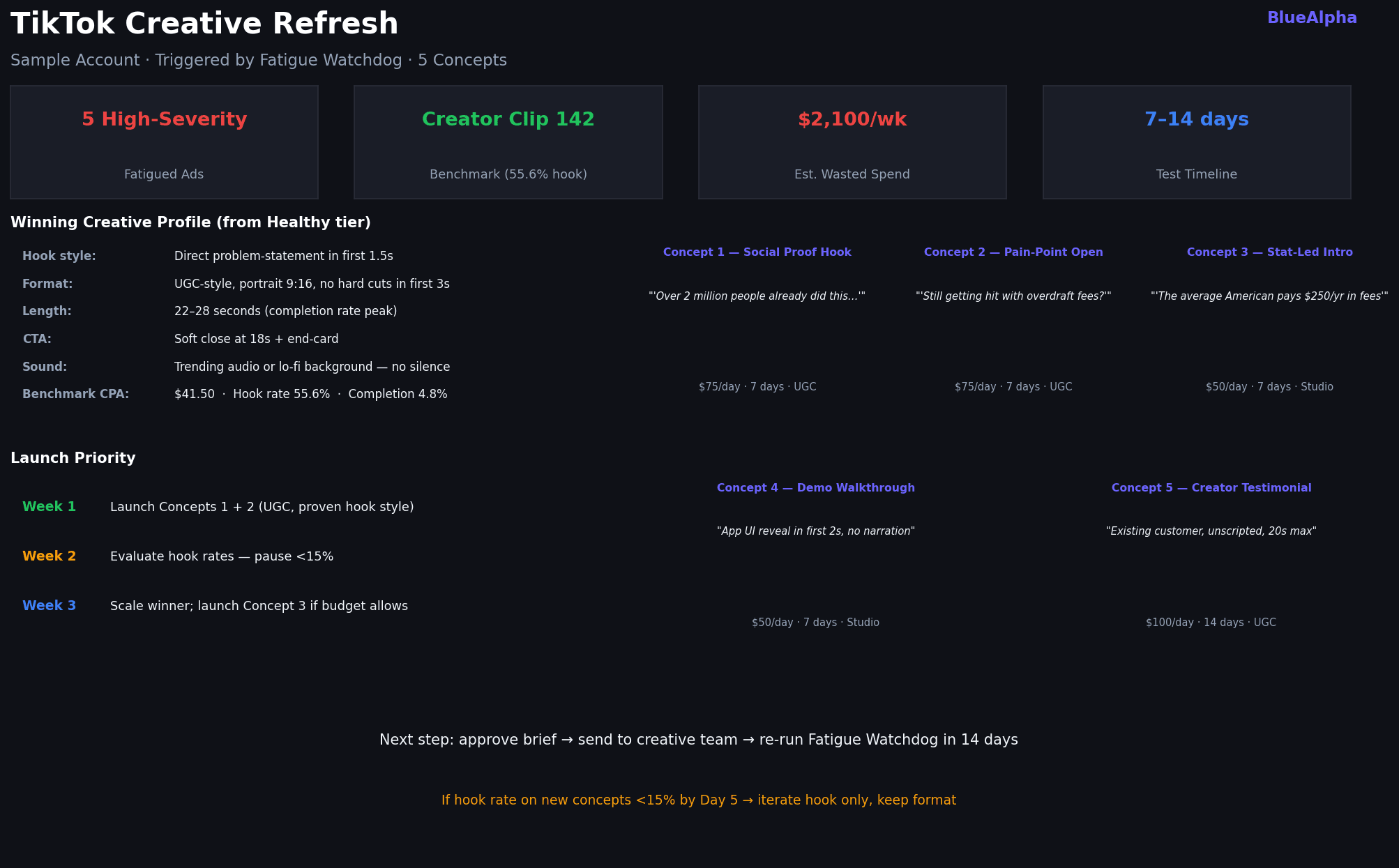
Pulls the TikTok AUDIENCE report across all key dimensions β€” age Γ— gender, placements, DMAs, provinces, interest categories, and connection type β€” and builds a tier map for each. Before scoring, it computes the iOS SKAdNetwork attribution completeness: the share of conversions TikTok can attribute to a specific demographic vs. the "NONE/Unknown" bucket. For iOS app-promotion accounts, this often runs below 30%. The skill is explicit about confidence levels: >70% = act on it, 40–70% = directional, <40% = run an incrementality test before making demographic exclusions.
TikTok Skills in Claude - audience intelligence

Real example β€” FinTech Co (iOS app, 30-day window): Attribution completeness came in at 19.6% β€” meaning 80.4% of conversions landed in the SKAdNetwork unknown bucket. The demographic tier map was flagged as directional only. That said, the signal was clear: Male 18–24 (Gold, $111 CPA) and Male 25–34 (Gold, $115 CPA, 618 device-attributed conversions) were the top performers. Cut-tier segments β€” Female 55+, Male 55+, Male 45–54, Female 45–54 β€” represented an estimated $14,675/week in wasted spend. The geo read was strong: Chicago ($41.75 CPA), New York ($43.15), and Miami ($45.61) led the DMA tier map. WiFi users converted at $146 CPA vs. $174 for 4G β€” a 16% gap consistent with at-home, planning-mode financial app sign-ups.


tiktok-geo-expansion

/tiktok-geo-expansion or identify new geographic markets worth testing on TikTok

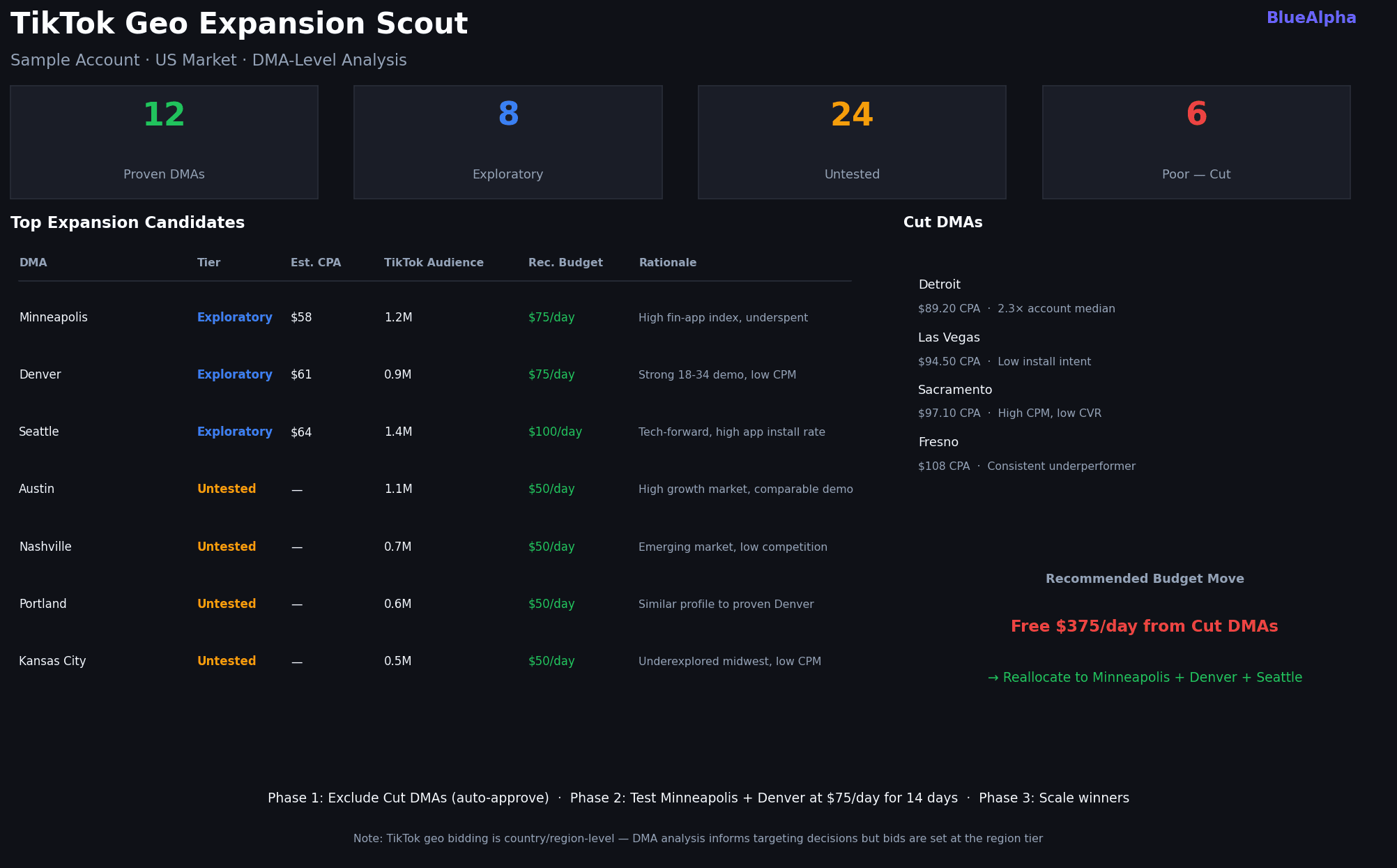
Analyzes current geo performance across countries, DMAs, and provinces, then cross-references with TikTok's targeting taxonomy to identify expansion candidates. It segments existing geos into Proven (strong CPA, high volume), Exploratory (decent CPA, low volume β€” worth scaling), Untested (available in TikTok targeting but no current spend), and Poor (cut). Output is a ranked expansion shortlist with suggested test budgets, estimated audience sizes, and a test timeline.
TikTok Skills in Claude - incrementality test


tiktok-incrementality-test

/tiktok-incrementality-test or design a geo-based incrementality test for TikTok β€” 4-week holdout

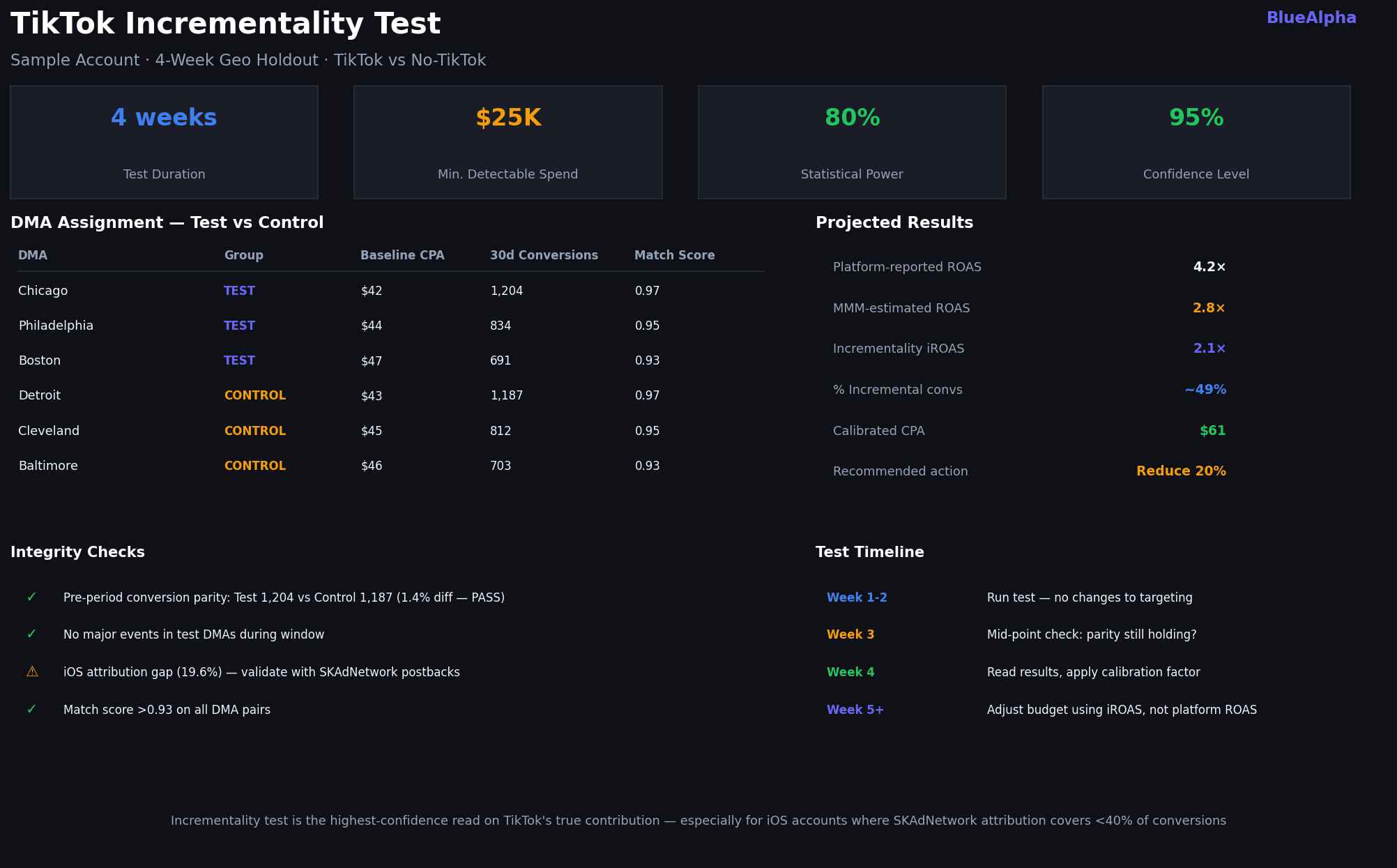
Designs a geo-split holdout test to measure true incremental lift from TikTok spend. It selects matched test and control DMAs based on historical conversion similarity, calculates the minimum detectable effect for your budget and timeline, and produces a pre-registered test plan with integrity checks. After the test runs, it reads the results, applies statistical significance testing, and gives you a calibrated CPA you can trust β€” not the platform-reported number.

TikTok Skills in Claude - incrementality test


tiktok-performance-digest

/tiktok-performance-digest or generate my weekly TikTok performance digest

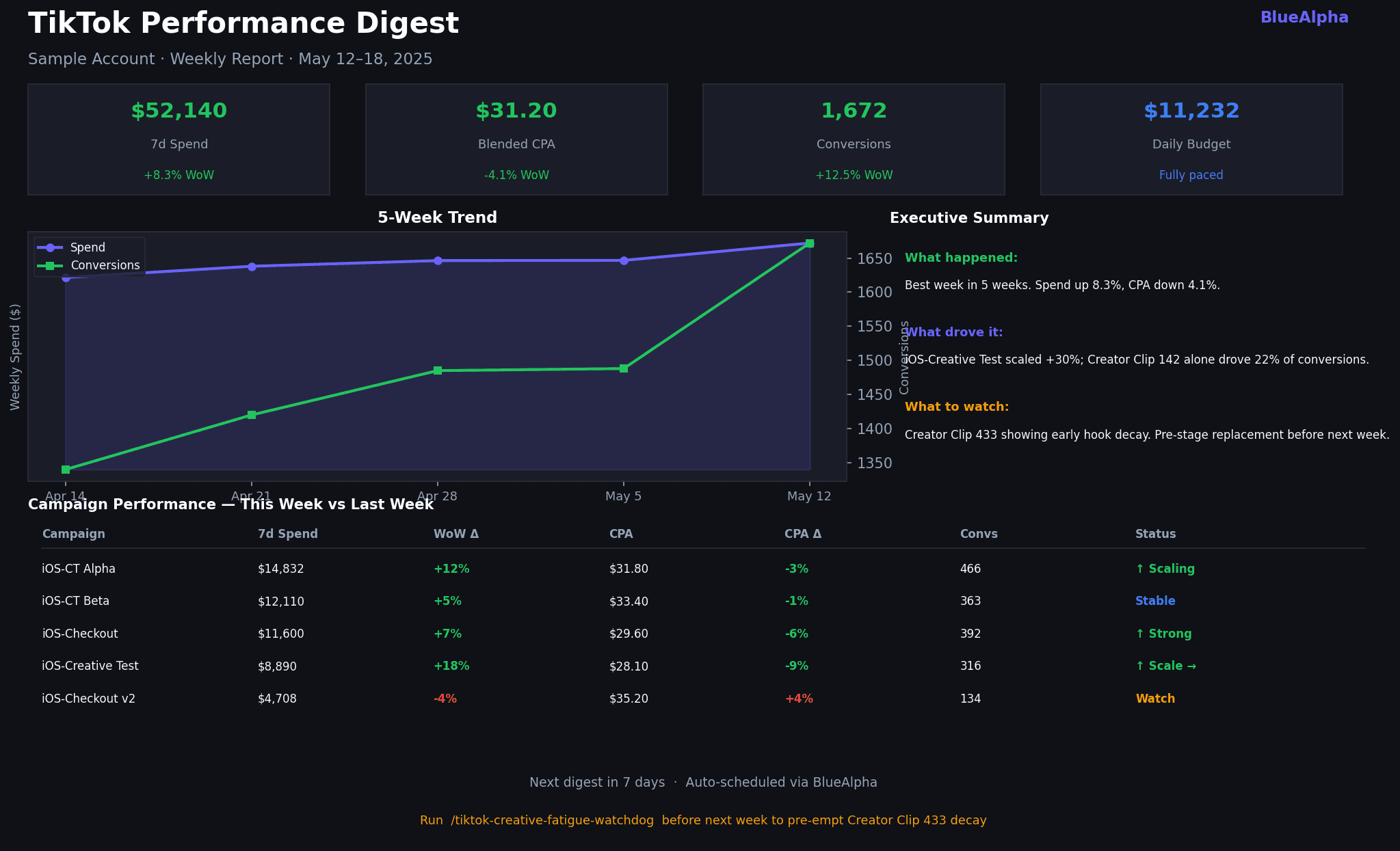
Produces a weekly (or monthly) performance narrative in the BlueAlpha format: what happened, what drove it, and what to watch. It pulls 7-day and 30-day campaign, creative, and audience trends, identifies the top movers (up and down), flags any anomalies, and writes a 3–4 paragraph executive summary alongside a structured metrics table. Designed to be copy-pasted directly into a Slack update or client report.
TikTok Skills in Claude - performance digest


tiktok-content-to-campaign

/tiktok-content-to-campaign or promote this blog post as a TikTok campaign β€” build the full spec

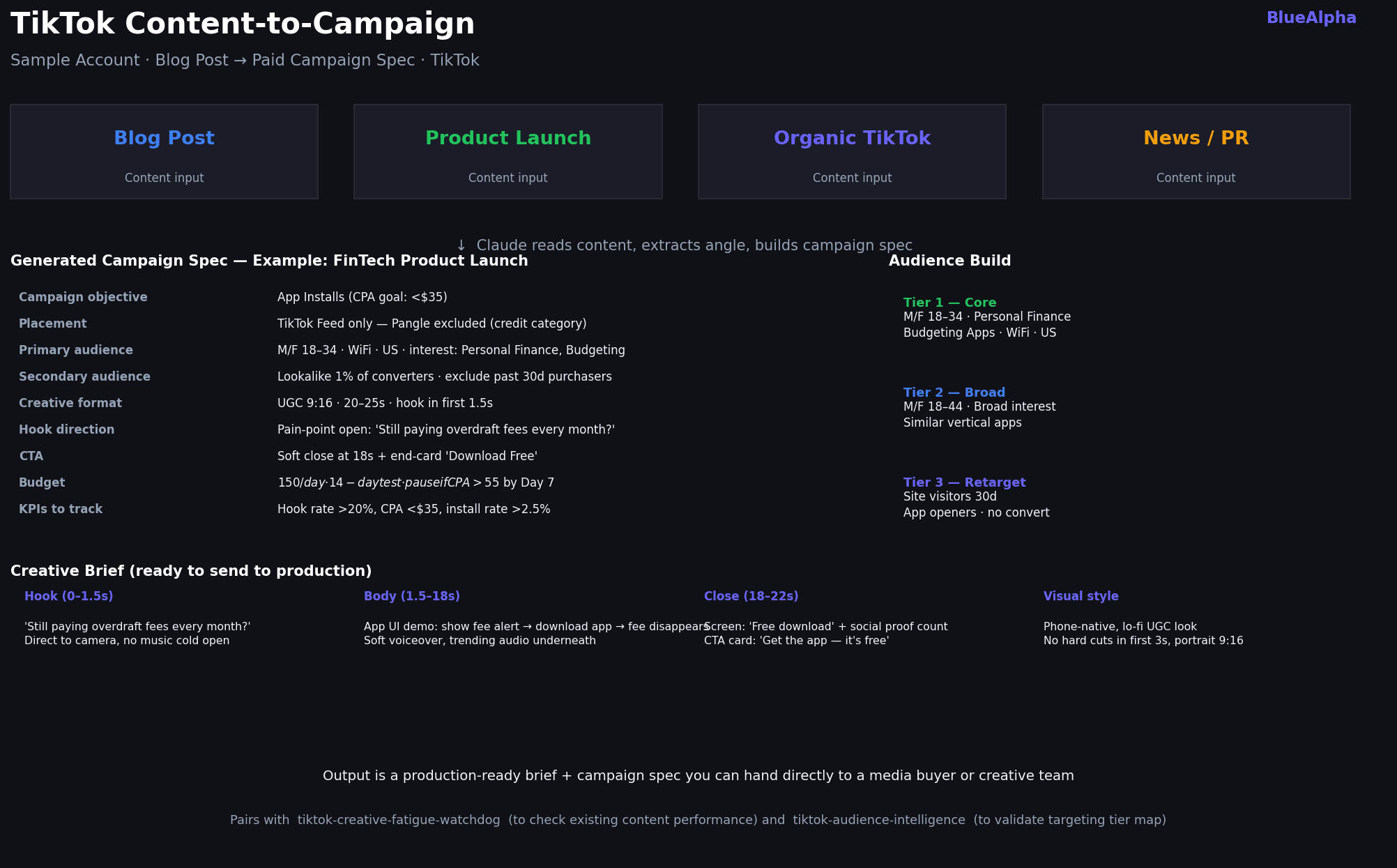
Turns any content piece β€” a blog post, product launch announcement, organic TikTok video, or news item β€” into a complete paid campaign spec. Claude reads the content, extracts the core angle and value proposition, and builds a production-ready output: campaign objective, audience tiers (core, broad, retarget), placement settings, creative brief (hook direction, body, close, visual style), KPIs, daily budget, and a pause rule for the test window. The output goes directly to a media buyer or creative team β€” no reformatting needed.

TikTok Skills in Claude - content to campaign


tiktok-full-monty

/tiktok-full-monty or run the full TikTok analysis on my account

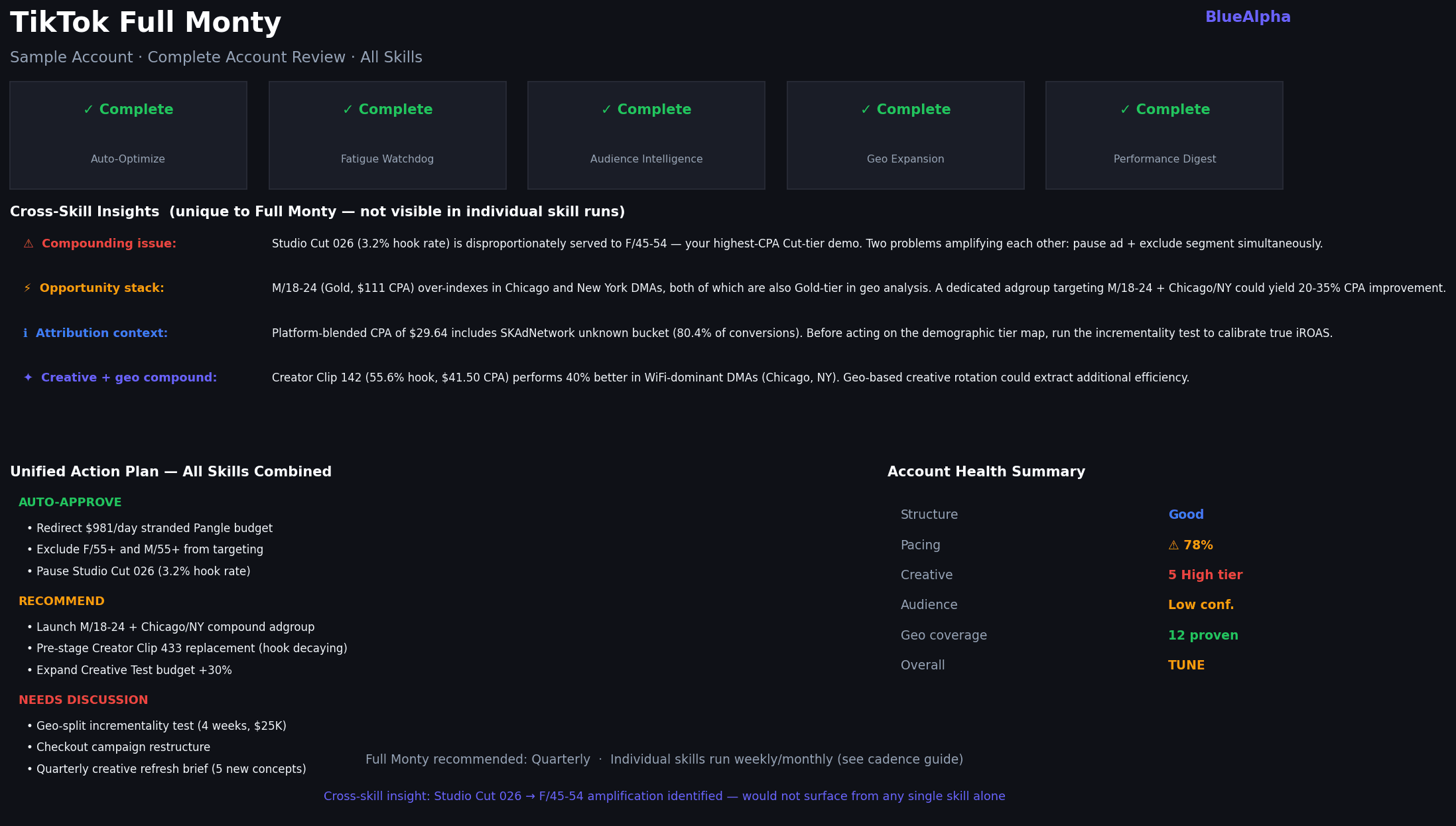
Runs 5 skills in sequence: Auto-Optimize β†’ Creative Fatigue Watchdog β†’ Audience Intelligence β†’ Geo Expansion β†’ Performance Digest. Produces a single unified report with cross-skill callouts β€” e.g., when a fatigued creative clusters in a high-performing demographic, or when a Cut-tier DMA is receiving budget that could flow to an Exploratory geo. Use this for quarterly account reviews or onboarding a new account.
TikTok Skills in Claude - full monty


Why aren't the BlueAlpha skills just TikTok's built-in optimization tools?

TikTok's native tools β€” Smart+ autopilot, automated rules, audience insights β€” are designed to optimize within the platform's own attribution model and toward TikTok's objective (more spend, more reported conversions). They're useful, but they have three structural limits:

They can't see across channels. TikTok's tools only know about TikTok. BlueAlpha skills can cross-reference your TikTok audience tier map against a Meridian MMM in the same session β€” so when a Gold-tier demographic looks efficient on platform CPA, you can immediately check whether TikTok-as-a-channel is actually driving incremental revenue or just claiming credit.

They don't surface what they can't attribute. The iOS SKAdNetwork attribution gap is real and systematic. For iOS app advertisers, 60–80% of conversions land in anonymous buckets. TikTok's built-in audience insights quietly excludes these and shows you clean-looking demographic data. The Audience Intelligence skill explicitly computes attribution completeness and flags confidence levels β€” so you know whether the demographic read you're acting on represents 20% or 80% of your actual conversion volume.

They optimize for metrics, not decisions. Auto-Optimize found $981/day in underspend. The root cause wasn't a budget issue β€” it was a platform restriction (ADGROUP_STATUS_REVIEW_PARTIALLY_APPROVED) on Pangle placements for financial services advertisers. TikTok's automated rules would have suggested increasing budgets. The BlueAlpha skill identified the actual constraint and recommended a targeted fix: redirect the stranded budget to the iOS-CT Alpha adgroup, which had a $30.18 CPA and room to scale.


Why BlueAlpha isn't just another TikTok tool

There are two kinds of products in performance marketing, and BlueAlpha is neither.

The first is rigorous but passive β€” statistically sound measurement that stops at the dashboard. The insight is accurate; nothing happens with it. The second is actionable but shallow β€” AI tools with fast recommendations built on platform attribution that doesn't survive iOS SKAdNetwork gaps or a skeptical CFO.

BlueAlpha is the third option: causal measurement underneath, real agents producing deployment-ready specs, MCP-native. Not a measurement vendor. Not a dashboard with a chatbot. The decision layer under the next generation of marketing.

This is what we call Agentic-Led Growth β€” the GTM motion that follows Sales-Led and Product-Led Growth. The agents do the analytical work. The human makes the call. The engine delivers.


FAQ

Do I need a TikTok Business Center account or just an Ads Manager login?

You need Business Center access to generate an API key. Ads Manager-only logins don't have API permissions. If you're an agency, you'll need advertiser-level access granted through the Business Center to the account you want to analyze.

Will the skills make changes to my TikTok account automatically?

No β€” all skills are read-only by default. The action plan output tells you what to do, but nothing is executed until you explicitly confirm. Write actions (pausing ads, adjusting budgets) are in the roadmap for a future plugin version.

How does the iOS SKAdNetwork attribution gap affect the analysis?

For iOS app-promotion campaigns, TikTok uses SKAdNetwork to report conversions on Apple devices. These conversions arrive without device-level signal (no age, no gender, no DMA), so they land in "Unknown" buckets. The Audience Intelligence skill measures what percentage of your conversions are device-attributed vs. unknown. Below 40% completeness, the demographic tier map is unreliable for making exclusion decisions β€” the skill will flag this and recommend a geo-split incrementality test instead.

Can I run the skills on multiple TikTok accounts?

Yes. The MCP connector surfaces all advertiser accounts associated with your Business Center login. When you run a skill, Claude will list available advertisers and ask you to confirm which one to analyze.

How often should I run each skill?

Auto-Optimize: weekly, or before any significant budget change. Creative Fatigue Watchdog: weekly for accounts spending >$50K/month on TikTok, bi-weekly for $10K–$50K, monthly below that. Audience Intelligence: monthly, or after any major campaign structure change. Performance Digest: weekly. Full Monty: quarterly.

What if I don't have a Meridian MMM connected?

The MMM cross-check step in each skill is optional. If no model is connected, the skills skip the incrementality validation section and note it as a gap in the output. All other analysis runs normally.

Where can I find the full setup documentation?

The complete installation walkthrough, authentication scopes, troubleshooting, and the full tool reference live on the BlueAlpha MCP documentation page.

What can the BlueAlpha plugin do that TikTok's official MCP can't?

TikTok's official MCP server (announced at TikTok World in May 2026) opens TikTok Ads Manager to external AI agents for autonomous campaign management β€” setting bids, adjusting budgets, modifying targeting, creating ad assets. It's infrastructure for letting an agent run a campaign. The BlueAlpha plugin sits at a different layer. It ships nine TikTok-specific skills that turn API access into decisions: full-account audit with severity tiers, leading-indicator creative fatigue detection, iOS SKAdNetwork attribution-completeness scoring, audience tier maps with explicit confidence levels, geo expansion analysis, incrementality test design with statistical significance testing, and content-to-campaign activation. The BlueAlpha connector also handles authentication behind a single sign-in β€” no developer token, no OAuth configuration, no token refresh management.


Your next step

If you have the BlueAlpha Marketing Plugin installed, run:

If you don't have the plugin yet, install it from the Cowork plugin marketplace and connect your TikTok Ads account in Settings β†’ Connectors. The first Auto-Optimize run on a live account typically surfaces 3–5 actionable items within 2 minutes.

Questions? Book a demo or find us on the Cowork plugin marketplace.

πŸ’‘ TL;DR β€” The BlueAlpha Marketing Plugin for TikTok puts a team of specialized marketing agents inside Claude. Nine skills connect directly to the TikTok Marketing API and handle the jobs that eat your week β€” account audits, creative fatigue detection, audience tier maps with attribution-completeness scoring, geo expansion, incrementality testing, campaign creation, and automated reporting. Each one follows the same loop: Analyze β†’ Decide β†’ Act. Under the hood, this is the Decision Engine β€” the system that turns every signal in your TikTok account into a real decision and produces a deployment-ready spec. All of it runs inside Claude β€” no dashboards, no exports, no manual data prep.


Every TikTok advertiser hits the same wall. The platform UI tells you what happened. It doesn't tell you what to do next. You end up with a dozen tabs open β€” campaign manager, creative library, audience insights, a spreadsheet someone built last quarter β€” trying to synthesize a decision that should take ten minutes.

The BlueAlpha TikTok skills close that gap. Claude connects directly to your TikTok Ads account via MCP (Model Context Protocol), pulls the data, runs the analysis, and returns a structured recommendation inside the conversation. You don't export anything. You don't copy-paste numbers. You type a prompt and get back a decision.


All 9 TikTok skills in the BlueAlpha Marketing Plugin

Account health & optimization

  • tiktok-auto-optimize

  • tiktok-full-monty

Creative performance

  • tiktok-creative-fatigue-watchdog

  • tiktok-creative-refresh

Audience & targeting

  • tiktok-audience-intelligence

  • tiktok-geo-expansion

  • tiktok-incrementality-test

Campaign creation

  • tiktok-content-to-campaign

Reporting

  • tiktok-performance-digest


The Analyze β†’ Decide β†’ Act loop

Every BlueAlpha skill follows the same three-step pattern:

1. Analyze β€” Claude calls the TikTok Ads API directly through MCP. No manual exports, no copy-paste. It pulls campaigns, adgroups, creative metrics, audience delivery reports, and interest category taxonomies in real time.

2. Decide β€” The skill applies BlueAlpha's decision logic: efficiency scores, severity tiers, attribution completeness gauges, spend waste estimates. You get a tier map (Gold/Silver/Bronze/Cut or Critical/High/Moderate/Healthy), not a data dump.

3. Act β€” Every output ends with a three-bucket action plan: Auto-approve (safe to execute now), Recommend (needs a quick review), Needs discussion (bigger structural moves). You know exactly what to do and in what order.


Who is the BlueAlpha TikTok plugin for?

  • Performance marketers running TikTok spend above $10K/month who want a faster weekly optimization cycle

  • Media buyers managing multiple accounts who need a structured read without manually pulling reports

  • Growth leads who own the full funnel and need to tie TikTok creative health back to CPA trends

  • Agency teams who want to show clients a clear, documented optimization rationale β€” not just a screenshot of the dashboard

BlueAlpha delivers the plugin in two modes. Self-Drive means your team uses the agents directly inside Claude β€” you own the decisions, BlueAlpha onboards, models, and stays close. Co-Pilot means a senior BlueAlpha growth partner runs the loop for you, reading what the agents surface and telling you exactly what to do. Same Decision Engine either way. The choice is who's in the seat β€” your team or ours.


How to pick the right skill

If you want to…

Use this skill

Get a full account health check in one shot

tiktok-auto-optimize

Find out which creatives are dying before CTR drops

tiktok-creative-fatigue-watchdog

Get a brief for net-new creative based on what's working

tiktok-creative-refresh

Understand who's actually converting (age, geo, placement)

tiktok-audience-intelligence

Identify new geos to test

tiktok-geo-expansion

Validate that TikTok is driving real incremental revenue

tiktok-incrementality-test

Send leadership a weekly TikTok performance narrative

tiktok-performance-digest

Turn a blog post or content piece into a TikTok campaign spec

tiktok-content-to-campaign

Run everything at once

tiktok-full-monty


How does the BlueAlpha marketing plugin connect to TikTok Ads?

Every skill in the BlueAlpha Marketing Plugin is backed by an MCP connector that gives Claude direct, permissioned access to the TikTok Marketing API. MCP-native means the whole system lives inside Claude, Codex, or any AI workspace your team already uses β€” no separate login, no dashboard to check. This is what makes it a Decision Engine rather than another reporting layer: the decision lives where the conversation happens.

The BlueAlpha TikTok connector gives Claude the ability to:

  • Pull campaigns, adgroups, ads, and creative-level performance with full breakdown support

  • Audit account structure and score every campaign on objective alignment, pacing, and creative health

  • Compute hook rate, hold rate, and completion rate trends across the active creative set

  • Calculate iOS SKAdNetwork attribution completeness and flag confidence levels on demographic reads

  • Pull AUDIENCE reports across age, gender, placements, DMAs, provinces, and interest categories

  • Identify expansion-candidate geos using TikTok's targeting taxonomy

  • Design geo-split incrementality tests with matched controls and MDE calculation

Where relevant, skills also cross-reference a Meridian MMM (marketing mix model) via the BlueAlpha MMM connector to validate TikTok platform ROAS against causal incrementality data. The MMM is optional β€” every skill works without it, but the recommendations get sharper when causal measurement is underneath.

TikTok announced its own official TikTok Ads MCP server at TikTok World in May 2026, which validates the category. That server is positioned as infrastructure for letting external AI agents run campaigns autonomously β€” set bids, adjust budgets, modify targeting, create ad assets. The BlueAlpha plugin sits at a different layer. It ships nine TikTok-specific skills that turn API access into decisions: full-account audit with severity tiers, leading-indicator creative fatigue detection, attribution-completeness scoring, audience tier maps with explicit confidence levels, geo expansion analysis, incrementality test design, and content-to-campaign activation. Setup is also different. The BlueAlpha connector handles authentication behind a single sign-in β€” no developer token, no OAuth configuration, no token refresh management.


How do I install the BlueAlpha Marketing Plugin?

There are two pieces to install: the BlueAlpha MCP connector (so Claude can read your TikTok Ads data and your Meridian MMM) and the BlueAlpha Marketing Plugin itself (the nine TikTok skills that put that data to work). Total setup time is about a minute. Steps 1 and 3 are the same regardless of which Claude product you use; Step 2 has two paths depending on whether you're in Cowork or Claude Code.

Step 1 β€” Install the BlueAlpha MCP connector

  1. Open Settings in the Claude desktop app

  2. Go to Connectors β†’ Add custom connector

  3. Name it: BlueAlpha MCP

  4. URL: https://mcp.bluealpha.ai/mcp

  5. Click Connect and sign in with your BlueAlpha account

That single sign-in wires Claude up to your TikTok Ads accounts (and your Meridian MMM, if you have one). No keys, no IDs, no config files.

Step 2 β€” Install the plugin

Pick the path that matches the Claude product you're using.

Option A β€” Cowork (drag-and-drop)

  1. Go to github.com/bluealpha-labs/bluealpha-plugins

  2. Click Releases on the right rail and open the latest release

  3. Expand Assets and click bluealpha-marketing-plugin.plugin to download

  4. Drag the downloaded file into an open Cowork session and click Install when prompted

That's it. No CLI, no settings menu β€” one drag.

Option B β€” Claude Code (slash commands)

Inside Claude Code, run these two commands:

/plugin marketplace add <https://github.com/bluealpha-labs/bluealpha-plugins.git>
/plugin install bluealpha-marketing-plugin

The first registers the GitHub repo as a marketplace; the second installs the plugin from it.

Step 3 β€” Try a skill

Invoking a skill is as simple as typing something like:

"Run tiktok-auto-optimize on my TikTok account, last 14 days, moderate risk tolerance."

Claude will route that to the right skill, load the workflow, and walk you through the Analyze β†’ Decide β†’ Act loop.


Skill reference β€” example prompts

tiktok-auto-optimize

/tiktok-auto-optimize or optimize my TikTok account

Runs a complete optimization cycle across your entire TikTok account. It audits campaign and adgroup structure (naming, objective alignment, budget mode), diagnoses pacing and underspend, identifies budget reallocation opportunities, assesses creative health across the top 10 adgroups, and compiles a risk-tiered action plan. The output separates what you can approve immediately from what needs a conversation.

TikTok Skills in Claude - auto-optimize

Real example β€” FinTech Co (iOS app, $11K daily budget): Auto-Optimize pulled all 5 active campaigns and immediately flagged $981/day in underspend. The root cause wasn't budget β€” it was ADGROUP_STATUS_REVIEW_PARTIALLY_APPROVED on Pangle and Lemon8 placements, a restriction TikTok applies to financial services advertisers in the credit category. Two Checkout campaigns were pacing at 76–77% as a result. The skill scored every campaign (iOS-Creative Test led at 90/100, scale-ready), mapped budget reallocation to the three best-performing adgroups, and delivered 8 action items sorted by risk: 3 auto-approve, 2 recommend, 3 needs discussion. The whole run β€” live API calls, analysis, output β€” took under 90 seconds inside Claude.


tiktok-creative-fatigue-watchdog

/tiktok-creative-fatigue-watchdog or check my TikTok creatives for fatigue β€” last 14 days

Pulls the top 100 creatives by spend for a 14-day recent window and a prior 14-day window, then computes hook rate (video_views_p25 / impressions), hold rate (video_views_p50 / impressions), and completion rate for each. It calculates trend deltas β€” how much each signal has decayed β€” and classifies every creative into four severity tiers: Critical, High, Moderate, or Healthy. The output includes a wasted spend estimate, a prioritized refresh queue, and a healthy creative profile that feeds directly into tiktok-creative-refresh.

Hook rate leads CTR by 3–5 days. By the time you see CTR fall in the TikTok dashboard, you've already burned 4–5 days of spend.

TikTok Skills in Claude - creative fatigue

Real example β€” FinTech Co (14 active creatives, $56K 14d spend): The Watchdog found 5 High-severity creatives and 3 Moderate. Creator Clip 142 was the standout: 55.6% hook rate, $41.50 CPA β€” the account benchmark. Total estimated wasted spend from High-tier decay: ~$2,100/week. Creator Clip 433, the top spender at $7,587 over 14 days, showed hold rate declining -25.3% from the prior window β€” early decay in the highest-spend asset, exactly the kind of signal that's invisible in the TikTok UI until it's too late.


tiktok-creative-refresh

/tiktok-creative-refresh or generate a creative refresh brief based on my fatigue watchdog results

Takes the output of the Fatigue Watchdog (or runs it fresh) and turns it into a production-ready creative brief. It extracts the winning attributes from Healthy-tier creatives β€” hook style, format, video length proxy, CTA patterns β€” and uses them as the brief foundation. Output includes 3–5 new creative concepts with hook directions, suggested formats (UGC vs. studio), length targets, and music/sound notes, plus a test budget and timeline per concept.

TikTok Skills in Claude - creative refresh


tiktok-audience-intelligence

/tiktok-audience-intelligence or run audience intelligence on my TikTok account β€” last 30 days

Pulls the TikTok AUDIENCE report across all key dimensions β€” age Γ— gender, placements, DMAs, provinces, interest categories, and connection type β€” and builds a tier map for each. Before scoring, it computes the iOS SKAdNetwork attribution completeness: the share of conversions TikTok can attribute to a specific demographic vs. the "NONE/Unknown" bucket. For iOS app-promotion accounts, this often runs below 30%. The skill is explicit about confidence levels: >70% = act on it, 40–70% = directional, <40% = run an incrementality test before making demographic exclusions.

TikTok Skills in Claude - audience intelligence

Real example β€” FinTech Co (iOS app, 30-day window): Attribution completeness came in at 19.6% β€” meaning 80.4% of conversions landed in the SKAdNetwork unknown bucket. The demographic tier map was flagged as directional only. That said, the signal was clear: Male 18–24 (Gold, $111 CPA) and Male 25–34 (Gold, $115 CPA, 618 device-attributed conversions) were the top performers. Cut-tier segments β€” Female 55+, Male 55+, Male 45–54, Female 45–54 β€” represented an estimated $14,675/week in wasted spend. The geo read was strong: Chicago ($41.75 CPA), New York ($43.15), and Miami ($45.61) led the DMA tier map. WiFi users converted at $146 CPA vs. $174 for 4G β€” a 16% gap consistent with at-home, planning-mode financial app sign-ups.


tiktok-geo-expansion

/tiktok-geo-expansion or identify new geographic markets worth testing on TikTok

Analyzes current geo performance across countries, DMAs, and provinces, then cross-references with TikTok's targeting taxonomy to identify expansion candidates. It segments existing geos into Proven (strong CPA, high volume), Exploratory (decent CPA, low volume β€” worth scaling), Untested (available in TikTok targeting but no current spend), and Poor (cut). Output is a ranked expansion shortlist with suggested test budgets, estimated audience sizes, and a test timeline.

TikTok Skills in Claude - incrementality test


tiktok-incrementality-test

/tiktok-incrementality-test or design a geo-based incrementality test for TikTok β€” 4-week holdout

Designs a geo-split holdout test to measure true incremental lift from TikTok spend. It selects matched test and control DMAs based on historical conversion similarity, calculates the minimum detectable effect for your budget and timeline, and produces a pre-registered test plan with integrity checks. After the test runs, it reads the results, applies statistical significance testing, and gives you a calibrated CPA you can trust β€” not the platform-reported number.

TikTok Skills in Claude - incrementality test


tiktok-performance-digest

/tiktok-performance-digest or generate my weekly TikTok performance digest

Produces a weekly (or monthly) performance narrative in the BlueAlpha format: what happened, what drove it, and what to watch. It pulls 7-day and 30-day campaign, creative, and audience trends, identifies the top movers (up and down), flags any anomalies, and writes a 3–4 paragraph executive summary alongside a structured metrics table. Designed to be copy-pasted directly into a Slack update or client report.

TikTok Skills in Claude - performance digest


tiktok-content-to-campaign

/tiktok-content-to-campaign or promote this blog post as a TikTok campaign β€” build the full spec

Turns any content piece β€” a blog post, product launch announcement, organic TikTok video, or news item β€” into a complete paid campaign spec. Claude reads the content, extracts the core angle and value proposition, and builds a production-ready output: campaign objective, audience tiers (core, broad, retarget), placement settings, creative brief (hook direction, body, close, visual style), KPIs, daily budget, and a pause rule for the test window. The output goes directly to a media buyer or creative team β€” no reformatting needed.

TikTok Skills in Claude - content to campaign


tiktok-full-monty

/tiktok-full-monty or run the full TikTok analysis on my account

Runs 5 skills in sequence: Auto-Optimize β†’ Creative Fatigue Watchdog β†’ Audience Intelligence β†’ Geo Expansion β†’ Performance Digest. Produces a single unified report with cross-skill callouts β€” e.g., when a fatigued creative clusters in a high-performing demographic, or when a Cut-tier DMA is receiving budget that could flow to an Exploratory geo. Use this for quarterly account reviews or onboarding a new account.

TikTok Skills in Claude - full monty


Why aren't the BlueAlpha skills just TikTok's built-in optimization tools?

TikTok's native tools β€” Smart+ autopilot, automated rules, audience insights β€” are designed to optimize within the platform's own attribution model and toward TikTok's objective (more spend, more reported conversions). They're useful, but they have three structural limits:

They can't see across channels. TikTok's tools only know about TikTok. BlueAlpha skills can cross-reference your TikTok audience tier map against a Meridian MMM in the same session β€” so when a Gold-tier demographic looks efficient on platform CPA, you can immediately check whether TikTok-as-a-channel is actually driving incremental revenue or just claiming credit.

They don't surface what they can't attribute. The iOS SKAdNetwork attribution gap is real and systematic. For iOS app advertisers, 60–80% of conversions land in anonymous buckets. TikTok's built-in audience insights quietly excludes these and shows you clean-looking demographic data. The Audience Intelligence skill explicitly computes attribution completeness and flags confidence levels β€” so you know whether the demographic read you're acting on represents 20% or 80% of your actual conversion volume.

They optimize for metrics, not decisions. Auto-Optimize found $981/day in underspend. The root cause wasn't a budget issue β€” it was a platform restriction (ADGROUP_STATUS_REVIEW_PARTIALLY_APPROVED) on Pangle placements for financial services advertisers. TikTok's automated rules would have suggested increasing budgets. The BlueAlpha skill identified the actual constraint and recommended a targeted fix: redirect the stranded budget to the iOS-CT Alpha adgroup, which had a $30.18 CPA and room to scale.


Why BlueAlpha isn't just another TikTok tool

There are two kinds of products in performance marketing, and BlueAlpha is neither.

The first is rigorous but passive β€” statistically sound measurement that stops at the dashboard. The insight is accurate; nothing happens with it. The second is actionable but shallow β€” AI tools with fast recommendations built on platform attribution that doesn't survive iOS SKAdNetwork gaps or a skeptical CFO.

BlueAlpha is the third option: causal measurement underneath, real agents producing deployment-ready specs, MCP-native. Not a measurement vendor. Not a dashboard with a chatbot. The decision layer under the next generation of marketing.

This is what we call Agentic-Led Growth β€” the GTM motion that follows Sales-Led and Product-Led Growth. The agents do the analytical work. The human makes the call. The engine delivers.


FAQ

Do I need a TikTok Business Center account or just an Ads Manager login?

You need Business Center access to generate an API key. Ads Manager-only logins don't have API permissions. If you're an agency, you'll need advertiser-level access granted through the Business Center to the account you want to analyze.

Will the skills make changes to my TikTok account automatically?

No β€” all skills are read-only by default. The action plan output tells you what to do, but nothing is executed until you explicitly confirm. Write actions (pausing ads, adjusting budgets) are in the roadmap for a future plugin version.

How does the iOS SKAdNetwork attribution gap affect the analysis?

For iOS app-promotion campaigns, TikTok uses SKAdNetwork to report conversions on Apple devices. These conversions arrive without device-level signal (no age, no gender, no DMA), so they land in "Unknown" buckets. The Audience Intelligence skill measures what percentage of your conversions are device-attributed vs. unknown. Below 40% completeness, the demographic tier map is unreliable for making exclusion decisions β€” the skill will flag this and recommend a geo-split incrementality test instead.

Can I run the skills on multiple TikTok accounts?

Yes. The MCP connector surfaces all advertiser accounts associated with your Business Center login. When you run a skill, Claude will list available advertisers and ask you to confirm which one to analyze.

How often should I run each skill?

Auto-Optimize: weekly, or before any significant budget change. Creative Fatigue Watchdog: weekly for accounts spending >$50K/month on TikTok, bi-weekly for $10K–$50K, monthly below that. Audience Intelligence: monthly, or after any major campaign structure change. Performance Digest: weekly. Full Monty: quarterly.

What if I don't have a Meridian MMM connected?

The MMM cross-check step in each skill is optional. If no model is connected, the skills skip the incrementality validation section and note it as a gap in the output. All other analysis runs normally.

Where can I find the full setup documentation?

The complete installation walkthrough, authentication scopes, troubleshooting, and the full tool reference live on the BlueAlpha MCP documentation page.

What can the BlueAlpha plugin do that TikTok's official MCP can't?

TikTok's official MCP server (announced at TikTok World in May 2026) opens TikTok Ads Manager to external AI agents for autonomous campaign management β€” setting bids, adjusting budgets, modifying targeting, creating ad assets. It's infrastructure for letting an agent run a campaign. The BlueAlpha plugin sits at a different layer. It ships nine TikTok-specific skills that turn API access into decisions: full-account audit with severity tiers, leading-indicator creative fatigue detection, iOS SKAdNetwork attribution-completeness scoring, audience tier maps with explicit confidence levels, geo expansion analysis, incrementality test design with statistical significance testing, and content-to-campaign activation. The BlueAlpha connector also handles authentication behind a single sign-in β€” no developer token, no OAuth configuration, no token refresh management.


Your next step

If you have the BlueAlpha Marketing Plugin installed, run:

If you don't have the plugin yet, install it from the Cowork plugin marketplace and connect your TikTok Ads account in Settings β†’ Connectors. The first Auto-Optimize run on a live account typically surfaces 3–5 actionable items within 2 minutes.

Questions? Book a demo or find us on the Cowork plugin marketplace.

Do next week's marketing work in the next hour.

Do next week's marketing work in the next hour.

Do next week's marketing work in the next hour.