Google Ads Brand Defense in Claude: BlueAlpha competitive-counterpunch Tutorial
Detect when competitors bid on your brand terms, assess threat severity with auction insights and CPC trends, and build a proportional defense plan.
TL;DR — competitive-counterpunch detects when competitors gain auction share on your brand, quantifies the threat with an impression share breakdown and weekly CPC trend analysis, assigns a severity level (low, medium, high), and builds a proportional defense plan — from "monitor and do nothing" to a full counter-conquest campaign. The key insight from the demo: the biggest brand defense vulnerability isn't always an active attack. Sometimes it's a paused brand campaign sitting there with a $100/day budget that was never activated, leaving your brand searches entirely to organic with zero paid defense. This is the defensive arm of what BlueAlpha calls the Decision Engine — the system that turns every signal in your ad account into a real decision.
Watch the full walkthrough (8 min):
Most brand defense panic starts the same way: someone forwards a screenshot of a competitor ad above your brand listing, and the team scrambles to "do something." The problem is that most responses are either too aggressive (launching a full bidding war over a 5% overlap that would have resolved itself) or too passive (ignoring chronic competitive pressure that's slowly eroding your impression share). This skill replaces gut reactions with data — it tells you exactly how severe the threat is and sizes the response to match.
All ten Google Ads skills in the BlueAlpha Marketing Plugin
auto-optimize— Runs a full optimization cycle on a Google Ads account: structural audit, underspend diagnosis, budget reallocation, recommendations review, and creative health check.full-monty— Runs every skill in sequence for a comprehensive top-to-bottom audit plus a strategic deployment plan for the next quarter.audience-intelligence— Analyzes audience performance across Google Ads and recommends bid modifiers, new segments, exclusions, and observation-to-targeting moves.brand-refresh-pipeline— Detects creative fatigue, audits brand voice, and generates fresh responsive search ad copy for any campaign.competitive-conquest— Researches competitors, identifies messaging gaps, and designs conquest campaign specs that target competitor brand terms.competitive-counterpunch— Detects when competitors gain auction share on your brand and plans a proportional defensive response.content-to-campaign— Turns any piece of content (blog, case study, webinar, comparison page) into a paid campaign complete with keywords and ad copy.geo-expansion-scout— Identifies new geographic markets worth entering by analyzing geo performance, keyword volume, and competitive density.incrementality-test-runner— Designs and monitors geo-based incrementality tests in Google Ads with integrity checks and lift analysis.seo-paid-bridge— Finds where organic and paid search overlap or leave gaps, then specs complementary paid campaigns that maximize total search click share.
This article is part of the full series.
Why use Claude for Google Ads brand defense?
Making brand defense decisions manually means pulling auction insights from the Google Ads UI, eyeballing CPC trends in a spreadsheet, guessing at whether the competitor's presence is escalating or stable, and deciding how much to increase bids — all while the team pressures you to "do something now." The result is usually either an overreaction that wastes budget or an underreaction that lets the problem grow.
Claude with the BlueAlpha Marketing Plugin pulls all the data in one pass — auction insights, search terms for competitor leakage, weekly CPC trends — assigns a severity level based on actual thresholds, and recommends a specific set of countermeasures sized to the threat. The same AI that diagnoses the problem also writes the defense plan, and if you've already run competitive-conquest in the same conversation, it coordinates offense and defense into a single posture.
How does Claude connect to your Google Ads data?
The BlueAlpha Marketing Plugin uses the Model Context Protocol (MCP) — an open standard that lets Claude talk directly to external tools and APIs. For competitive-counterpunch, Claude uses the BlueAlpha MCP (Google Ads API for auction insights, campaign performance, search terms, and CPC trends). Every call goes through your authenticated accounts, scoped to the customer ID you specify.
For setup instructions (installing the plugin, authenticating your MCC, and connecting your first account), see The BlueAlpha Google Ads Marketing Plugin for Claude.
What the competitive-counterpunch skill does
The skill runs in four phases and produces a severity-matched defense plan.
Identify the brand campaign and gather data. Checks the account for a brand campaign, pulls its status and historical performance. If the brand campaign is paused or missing, that's already a critical finding. Pulls auction insights from the active nonbrand campaign to identify competitive pressure, pulls search terms to check for competitor brand leakage via broad match, and pulls weekly CPC trends to detect escalation.
Analyze threat findings. Classifies each signal into a severity-tagged finding — critical vulnerability, chronic pressure, no acute attack, clean brand separation, CPC stable/escalating. Each finding includes the specific data that drove the classification and why it matters.
Recommend countermeasures. Produces a numbered, prioritized list of defensive actions sized to the severity — from reactivating a paused brand campaign to deploying a counter-conquest campaign. Each countermeasure includes an impact estimate.
Set escalation triggers and monitoring cadence. Defines specific thresholds that should trigger escalation (competitor enters brand auction, brand CPC spikes >2x) and de-escalation (competitor exits, impression share recovers). This prevents both panic-driven overreaction and complacent under-monitoring.
How does competitive-counterpunch pair with competitive-conquest?
In the demo, competitive-counterpunch runs immediately after competitive-conquest in the same conversation. This is the intended workflow — conquest is offense (targeting competitor brand terms), counterpunch is defense (protecting your own brand terms). The skill carries all context forward from the conquest run: the customer ID, the competitor landscape, the campaign structure, and the conquest campaign spec. This means it doesn't need a widget or any additional configuration — it already knows your account, your competitors, and what you're about to launch.
The pairing matters strategically: the moment you launch a conquest campaign bidding on competitor brand terms, you should expect at least one of those competitors to retaliate by bidding on yours. Running counterpunch immediately after conquest ensures your defense is ready before the offense goes live.
When should you use competitive-counterpunch?
Immediately after running
competitive-conquest. This is the most common trigger and exactly how the demo works. You've just built a conquest campaign — now make sure your brand is defended before you launch it.When your brand impression share drops. Something changed in the auction — find out what.
When brand CPC is trending up without a clear reason. Usually means more competitors are entering the auction.
When someone forwards a screenshot of a competitor ad above your brand listing. The classic panic trigger — let the data tell you whether it's actually a problem.
On a quarterly cadence as part of a
full-montystrategy review. Competitive dynamics shift — the defense posture needs periodic reassessment.
What do you need before you start?
Google Ads customer ID. Required — the skill pulls auction insights, search terms, and CPC trends from it.
Prior context from
competitive-conquest(recommended but not required). If you've already run conquest in the same conversation, counterpunch carries all context forward automatically — no widget, no additional configuration. If you're running it standalone, you'll need to specify the customer ID and any relevant campaign details.Brand campaign name or ID (helpful but not required). The skill identifies brand campaigns automatically by scanning campaign names and structures in the account.
Step-by-step: running competitive-counterpunch in Claude
Video walkthrough of this entire flow:
Here's exactly what happens when you invoke the skill, matching the flow shown in the video walkthrough. In the demo, this runs immediately after competitive-conquest in the same conversation, so Claude already has full context on the account (customer ID 5612407843) and the competitive landscape.
Step 1. Invoke the skill
Type the slash command:
/competitive-counterpunch
Claude acknowledges the skill, reads the workflow file, and notes that it has everything it needs from context — the account, the competitor landscape from the conquest work, and the campaign structure. Unlike competitive-conquest, there is no interactive widget. The skill carries all context forward from the previous run.
Step 2. Watch the data gathering
Claude runs through a multi-step data collection sequence, narrating its reasoning as it goes:
Find the brand campaign. Claude checks the account for a brand campaign and discovers "Google Search - Brand" (campaign ID 23341399848) — but it's paused, with a $100/day budget and zero historical spend. This is already flagged as a finding before any auction data is pulled.
Pull auction insights from the nonbrand campaign. Since the brand campaign has no data (it was never active), Claude pulls auction insights from the active nonbrand campaign to assess competitive pressure there instead.
Pull search terms for competitor leakage. Claude pulls the search terms report and greps for competitor brand names (haus, recast, prescient, northbeam, rockerbox, measured, etc.) to check whether competitor brand terms are leaking into the nonbrand campaign via broad match.
Analyze search terms with a subagent. Claude spawns a subagent to analyze the large search terms file for threat patterns — competitor brand mentions, unusual query patterns, and potential brand confusion.
Pull weekly CPC trends. Claude pulls 7 weeks of weekly performance data (clicks, CPC, cost, conversions) to check for escalation patterns — a CPC spike would indicate competitors are suddenly bidding more aggressively.
Step 3. Read the severity assessment
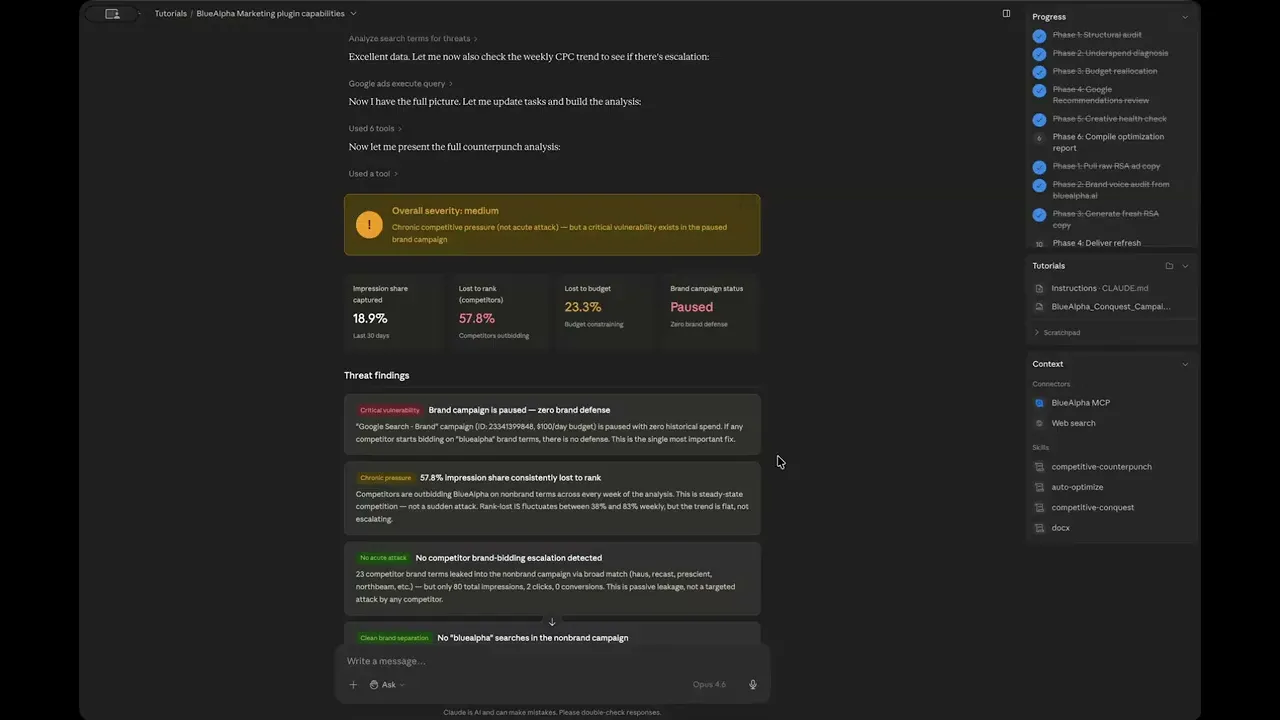
The analysis opens with a severity banner and four headline metrics:
Overall severity: MEDIUM
"Chronic competitive pressure (not acute attack) — but a critical vulnerability exists in the paused brand campaign"
The four headline metrics that drive the classification:
Impression share captured: 18.9% — Last 30 days. BlueAlpha is only capturing about one in five available impressions on its nonbrand terms.
Lost to rank (competitors): 57.8% — Competitors outbidding. More than half of available impressions are going to competitors who are bidding higher.
Lost to budget: 23.3% — Budget constraining. Nearly a quarter of impressions are lost because the daily budget runs out.
Brand campaign status: Paused — Zero brand defense. The brand campaign exists but has never been activated.

Step 4. Review the threat findings
Below the headline metrics, Claude presents five severity-tagged findings. Each one includes a colored severity label, a headline, and a detailed explanation:
Finding 1 — Critical vulnerability: Brand campaign is paused — zero brand defense.
The "Google Search - Brand" campaign (ID: 23341399848, $100/day budget) is paused with zero historical spend. If any competitor starts bidding on "bluealpha" brand terms, there is no defense. This is the single most important fix.
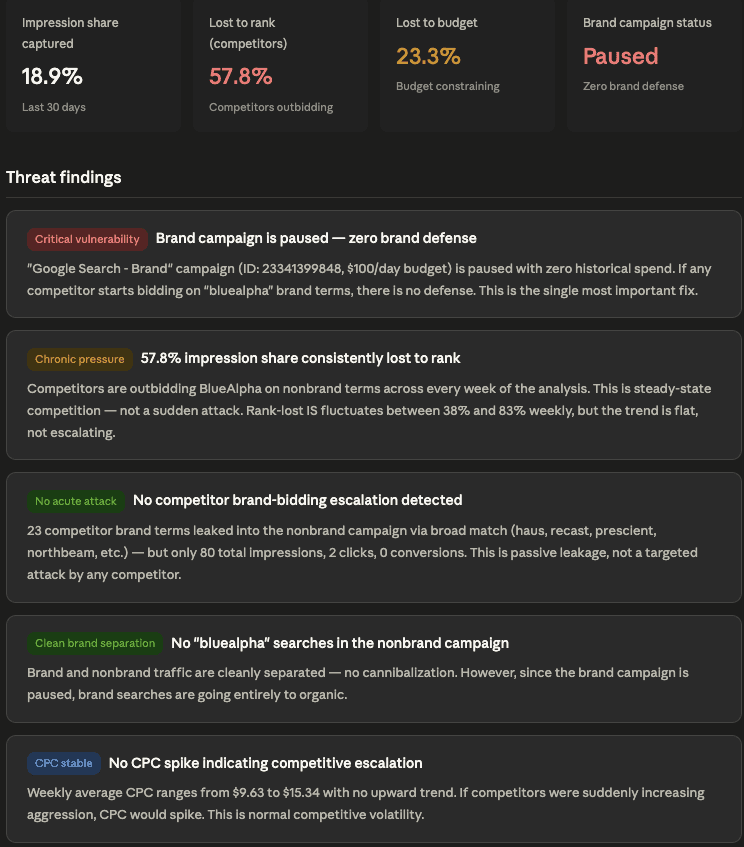
Finding 2 — Chronic pressure: 57.8% impression share consistently lost to rank.
Competitors are outbidding BlueAlpha on nonbrand terms across every week of the analysis. This is steady-state competition — not a sudden attack. Rank-lost IS fluctuates between 38% and 83% weekly, but the trend is flat, not escalating.
Finding 3 — No acute attack: No competitor brand-bidding escalation detected.
23 competitor brand terms leaked into the nonbrand campaign via broad match (haus, recast, prescient, northbeam, etc.) — but only 80 total impressions, 2 clicks, 0 conversions. This is passive leakage, not a targeted attack by any competitor.
Finding 4 — Clean brand separation: No "bluealpha" searches in the nonbrand campaign.
Brand and nonbrand traffic are cleanly separated — no cannibalization. However, since the brand campaign is paused, brand searches are going entirely to organic.
Finding 5 — CPC stable: No CPC spike indicating competitive escalation.
Weekly average CPC ranges from $9.63 to $15.34 with no upward trend. If competitors were suddenly increasing aggression, CPC would spike. This is normal competitive volatility.
The combination of these five findings is what makes the analysis valuable: there's no active attack (findings 3 and 5), but there's a critical vulnerability (finding 1) and chronic competitive pressure (finding 2). The severity is MEDIUM — not because someone is attacking, but because the defense infrastructure isn't in place for when they do.
Step 5. Review the weekly performance trend
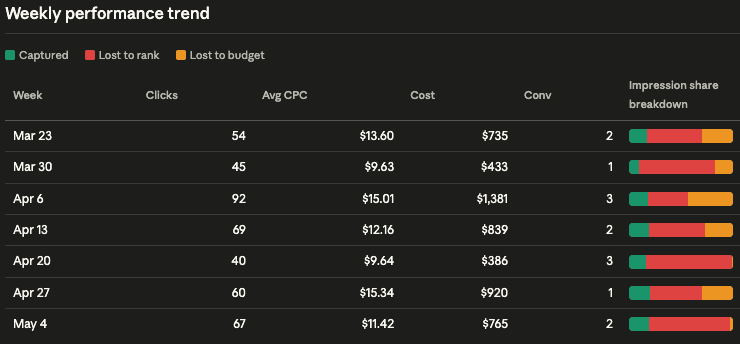
The skill produces a 7-week performance table showing the nonbrand campaign's trajectory. Each row includes clicks, average CPC, cost, conversions, and an impression share breakdown bar (captured in green, lost to rank in red, lost to budget in yellow):
Week | Clicks | Avg CPC | Cost | Conv |
|---|---|---|---|---|
Mar 23 | 54 | $13.60 | $735 | 2 |
Mar 30 | 45 | $9.63 | $433 | 1 |
Apr 6 | 92 | $15.01 | $1,381 | 3 |
Apr 13 | 69 | $12.16 | $839 | 2 |
Apr 20 | 40 | $9.64 | $386 | 3 |
Apr 27 | 60 | $15.34 | $920 | 1 |
May 4 | 67 | $11.42 | $765 | 2 |
The key insight from the trend table: CPC bounces between $9.63 and $15.34 with no upward trajectory. Clicks and conversions fluctuate week to week but don't show escalation. This is normal competitive volatility in a category with multiple players — not an attack pattern.
Step 6. Review the recommended countermeasures
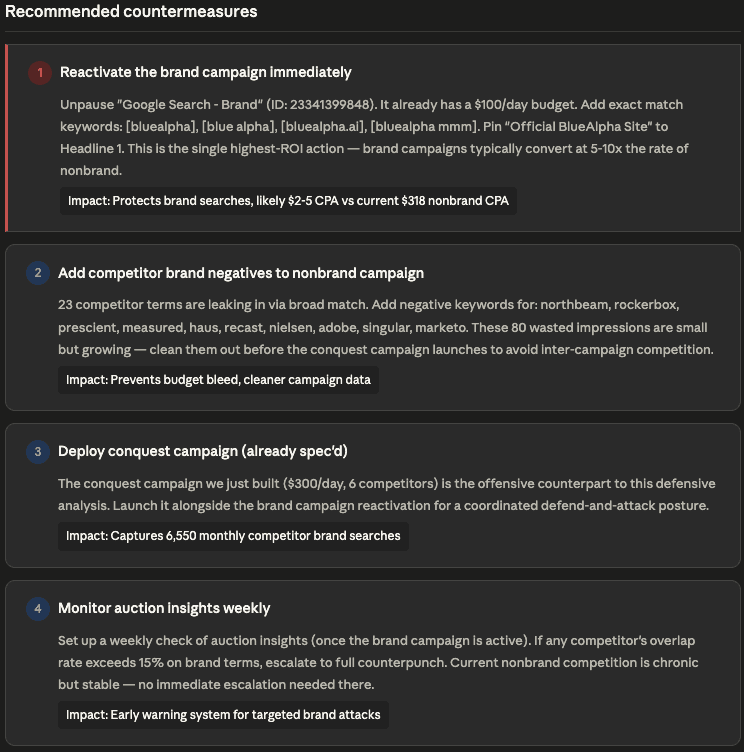
The skill produces four numbered countermeasures, each with a specific action, detailed instructions, and an impact estimate:
Countermeasure 1 — Reactivate the brand campaign immediately.
Unpause "Google Search - Brand" (ID: 23341399848). It already has a $100/day budget. Add exact match keywords: [bluealpha], [blue alpha], [bluealpha.ai], [bluealpha mmm]. Pin "Official BlueAlpha Site" to Headline 1. This is the single highest-ROI action — brand campaigns typically convert at 5–10x the rate of nonbrand. Impact: Protects brand searches, likely $2–5 CPA vs current $318 nonbrand CPA.
Countermeasure 2 — Add competitor brand negatives to nonbrand campaign.
23 competitor terms are leaking in via broad match. Add negative keywords for: northbeam, rockerbox, prescient, measured, haus, recast, nielsen, adobe, singular, marketo. These 80 wasted impressions are small but growing — clean them out before the conquest campaign launches to avoid inter-campaign competition. Impact: Prevents budget bleed, cleaner campaign data.
Countermeasure 3 — Deploy conquest campaign (already spec'd).
The conquest campaign built in the previous competitive-conquest run ($300/day, 6 competitors) is the offensive counterpart to this defensive analysis. Launch it alongside the brand campaign reactivation for a coordinated defend-and-attack posture. Impact: Captures 6,550 monthly competitor brand searches.
Countermeasure 4 — Monitor auction insights weekly.
Set up a weekly check of auction insights (once the brand campaign is active). If any competitor's overlap rate exceeds 15% on brand terms, escalate to full counterpunch. Current nonbrand competition is chronic but stable — no immediate escalation needed there. Impact: Early warning system for targeted brand attacks.
Notice how countermeasure 3 directly references the conquest campaign from the previous skill run. This is the coordinated defend-and-attack posture — brand defense goes live alongside competitor offense, with monitoring in place to catch retaliation.
Step 7. Review the escalation triggers
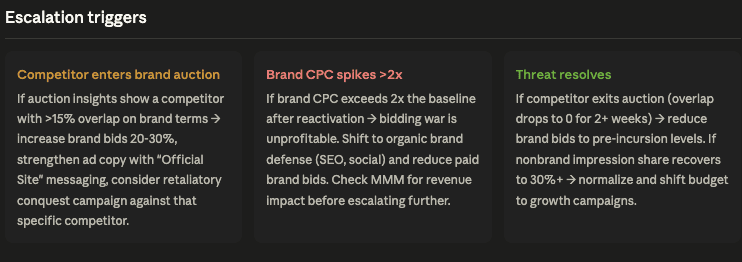
The skill finishes with three escalation trigger cards — specific thresholds that define when to escalate, de-escalate, or hold steady:
Trigger 1 — Competitor enters brand auction.
If auction insights show a competitor with >15% overlap on brand terms → increase brand bids 20–30%, strengthen ad copy with "Official Site" messaging, consider retaliatory conquest campaign against that specific competitor.
Trigger 2 — Brand CPC spikes >2x.
If brand CPC exceeds 2x the baseline after reactivation → the bidding war is unprofitable. Shift to organic brand defense (SEO, social) and reduce paid brand bids. Check MMM for revenue impact before escalating further.
Trigger 3 — Threat resolves.
If competitor exits auction (overlap drops to 0 for 2+ weeks) → reduce brand bids to pre-incursion levels. If nonbrand impression share recovers to 30%+ → normalize and shift budget to growth campaigns.
Step 8. Read the bottom line
The skill closes with a plain-language summary: There's no active competitive attack happening. The 57.8% impression share lost to rank is chronic category competition, not a targeted incursion. CPC is stable, no new competitors are surging. The real finding is the paused brand campaign — BlueAlpha is leaving brand searches entirely to organic, with zero paid defense if a competitor decides to bid on "bluealpha." Given that a conquest campaign targeting 6 competitors is about to launch, at least one of them may retaliate by bidding on BlueAlpha's brand. The brand campaign needs to be live before the conquest campaign launches.
Priority order: (1) Reactivate brand campaign, (2) Add competitor negatives to nonbrand, (3) Launch conquest campaign, (4) Set up weekly auction insights monitoring.
Step 9. The follow-up question that matters
In the demo, the user asks the natural follow-up: "Given that no one is actually attacking us, do I even need the brand campaign or can it stay paused?"
Claude's response captures the strategic nuance: right now, organic is capturing brand searches cleanly and nobody is bidding on "bluealpha." The brand campaign recommendation isn't about today — it's about what happens after the conquest campaign launches. When you start bidding on competitor brand terms with 2,400–2,900 monthly searches, their marketing teams will see you in their auction insights reports. The standard playbook for a competitor who notices you conquesting them is to retaliate by bidding on your brand within a week.
The practical recommendation: keep the brand campaign paused for now, but have it ready to unpause the same week the conquest campaign goes live. Think of it as insurance you don't pay for until you need it. The $100/day budget won't spend much on low brand volume anyway — maybe $5–10/day — but it means a competitor retaliating on your name gets pushed below you instead of sitting alone in your brand SERP. If 30 days post-launch nobody retaliates, it's fine to leave it paused indefinitely.
Example prompts
After running competitive-conquest (recommended flow):
/competitive-counterpunch
Standalone with customer ID:
"Run competitive-counterpunch on customer 561-240-7843. Check for competitive threats on our brand and nonbrand campaigns."
When you've seen a competitor ad on your brand:
"Run competitive-counterpunch on 123-456-7890 brand campaign. I'm seeing competitor.com above us on branded searches."
After launching a conquest campaign:
"We launched conquest against Northbeam and Rockerbox last week. Run competitive-counterpunch to check if they're retaliating on our brand terms."
Proactive monitoring:
"Run competitive-counterpunch on 555-555-5555. No specific threat — just a quarterly brand defense check."
Gotchas and tips
Run it immediately after
competitive-conquest. This is the designed workflow. The skill carries all context forward — no reconfiguration needed. Defense should always be ready before offense goes live.Don't overreact to chronic pressure. In the demo, 57.8% impression share lost to rank sounds alarming, but the CPC trend is flat and there's no escalation. The skill's severity model prevents panic-driven spend increases on steady-state competition.
A paused brand campaign is worse than no brand campaign. It creates a false sense of security. If you set one up, activate it. If you're not ready to spend on brand, don't create the campaign shell — it just confuses the account history.
Competitor brand leakage via broad match is normal. 23 competitor terms leaking into the nonbrand campaign at 80 impressions is noise, not a threat. Add the negatives to clean up data, but don't treat it as an attack signal.
Brand campaigns are the highest-ROI line item in most accounts. In the demo, the counterpunch analysis estimates $2–5 CPA for brand terms vs. $318 CPA on nonbrand. That's a 60–160x efficiency gap.
The escalation triggers are as important as the countermeasures. Knowing when to escalate (competitor >15% overlap on brand) and when to de-escalate (competitor exits for 2+ weeks) prevents both bidding wars and complacency.
Brand bidding wars have no winner except Google. The counterpunch is designed to restore equilibrium, not to destroy the competitor. De-escalate as soon as the competitor backs off.
FAQ
How does the skill determine if there's an active attack vs. chronic competition?
It looks at three signals: whether impression share lost to rank is escalating week over week (not just high), whether CPC is spiking (not just volatile), and whether competitor brand terms are appearing in search terms with increasing frequency. In the demo, all three were stable — high competitive pressure, but no escalation. That's chronic competition, not an attack.
What if I don't have a brand campaign at all?
The skill will flag this as a critical vulnerability, just like it flagged the paused brand campaign in the demo. The first countermeasure will be to create and activate one. You can't defend a position you're not holding.
Does the skill work without running competitive-conquest first?
Yes, but it's less powerful. Running it standalone means you specify the customer ID and the skill gathers all context from scratch. Running it after conquest means it already knows your competitors, your account structure, and the offensive campaign you're about to deploy — so it can coordinate defense with offense.
How is the severity level determined?
The skill classifies severity based on a combination of impression share overlap (on brand terms), CPC trend direction, and whether the competitive pressure is escalating or stable. MEDIUM in the demo was driven by the critical vulnerability (paused brand campaign) combined with chronic nonbrand pressure — even though there was no active attack.
What's the difference between impression share lost to rank and lost to budget?
Lost to rank means competitors are outbidding you — they're willing to pay more per click, so Google shows their ads instead of yours. Lost to budget means your daily budget ran out before all available impressions were served — you had eligible ads but no money left. In the demo, 57.8% lost to rank and 23.3% lost to budget together explain why BlueAlpha only captured 18.9% of available impressions.
How often should I run competitive-counterpunch?
After launching a conquest campaign, run it weekly for the first 30 days to catch retaliation early. After that, monthly is sufficient for stable situations. Run it immediately anytime you see a brand CPC spike or an impression share drop.
Does this work for Shopping and Performance Max brand defense?
The skill is focused on Search brand defense — auction insights, search terms, and CPC trends. Shopping and Performance Max have different competitive signals and aren't covered by this skill version. For PMax, watch your search term insights report manually for competitor brand leakage.
Related skills
If you want to go on offense and build a conquest campaign → run
competitive-conquestfirst. This is the designed pairing — offense then defense.If the high-severity response calls for comparison content → run
content-to-campaignto build a "Why [Your Brand] vs. X" landing page.If your brand campaign needs optimization before it can defend → run
auto-optimizeon it.If you want to refresh brand ad copy as part of the defense → run
brand-refresh-pipeline.If you want to validate whether the competitive pressure is actually impacting revenue → run
incrementality-test-runnerto design a geo-based lift test.
Your next step
If you've already run competitive-conquest, the natural next step is immediate:
/competitive-counterpunch
The skill will carry all context forward, pull the data, assign a severity level, and produce a defense plan in a few minutes. If you haven't run conquest yet, start there — the offense-then-defense sequence gives you a coordinated posture instead of isolated campaigns.
Need help getting set up? See the installation guide.
Want a growth partner to run the Decision Engine for you? Book a demo.

