Peter Grafe
The BlueAlpha Google Ads Marketing Plugin for Claude: Every Skill, Explained
Ten agent skills that turn Google Ads data into audits, budget moves, and incrementality tests inside Claude.
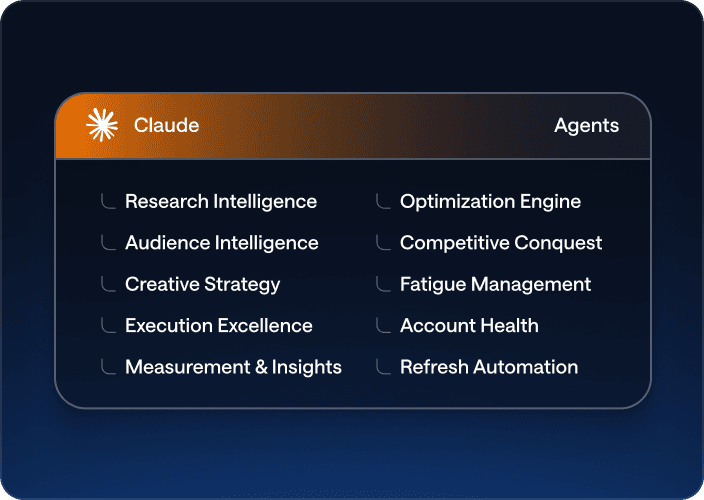
TL;DR — The BlueAlpha Marketing Plugin for Google Ads puts a team of specialized marketing agents inside Claude. Ten skills connect directly to the Google Ads API and handle the jobs that eat your week — account audits, budget reallocation, creative refreshes, competitive response, geo expansion, incrementality testing. Each one follows the same loop: Analyze → Decide → Act. Under the hood, this is what BlueAlpha calls the Decision Engine: the system that turns every signal in your ad account into a real decision and produces a deployment-ready spec. This page is the index. Pick the skill that matches your job-to-be-done and jump to the prompt that runs it.
If you manage Google Ads — whether in-house, at an agency, or as a freelancer — you spend a lot of your week doing the same handful of things: auditing structure, reallocating budget, refreshing creative, chasing competitors, planning geo expansion, and trying to prove incrementality. The BlueAlpha Marketing Plugin turns each of those workflows into a single Claude invocation that uses live Google Ads data, not guesses.
But this isn't just another set of AI automations bolted onto a dashboard. Performance marketing has more data than it knows what to do with — and the bottleneck was never data. It's the absence of a system that turns every signal into a decision fast enough to matter, and produces a deployment-ready spec. That's what BlueAlpha built: a Decision Engine delivered through Claude via MCP, where each skill is an agent that owns a specific decision surface. Your growth lead asks the decision; they don't dig for it.
All ten Google Ads skills in the BlueAlpha Marketing Plugin
Here's every skill in the plugin with a one-liner. Each one is an agent that owns a specific decision surface — grouped below by the type of decision it makes.
Analysis & optimization — surface what needs attention:
auto-optimize— Runs a full optimization cycle: structural audit, underspend diagnosis, budget reallocation, recommendations review, and creative health check. The weekly pulse of the Decision Engine.full-monty— Orchestrates every skill in sequence for a comprehensive top-to-bottom audit plus a strategic deployment plan for the next quarter.audience-intelligence— Analyzes audience performance across Google Ads and recommends bid modifiers, new segments, exclusions, and observation-to-targeting moves.seo-paid-bridge— Finds where organic and paid search overlap or leave gaps, then specs complementary paid campaigns that maximize total search click share.
Creative — detect fatigue, generate what's next:
brand-refresh-pipeline— Detects creative fatigue, audits brand voice, and generates fresh responsive search ad copy for any campaign.content-to-campaign— Turns any piece of content (blog, case study, webinar, comparison page) into a paid campaign complete with keywords and ad copy.
Competitive — watch the auction, plan the response:
competitive-conquest— Researches competitors, identifies messaging gaps, and designs conquest campaign specs that target competitor brand terms.competitive-counterpunch— Detects when competitors gain auction share on your brand and plans a proportional defensive response.
Budget & expansion — move money where causal measurement says it belongs:
geo-expansion-scout— Identifies new geographic markets worth entering by analyzing geo performance, keyword volume, and competitive density.
Testing & measurement — prove what's real:
incrementality-test-runner— Designs and monitors geo-based incrementality tests in Google Ads with integrity checks and lift analysis. The trust layer of the entire engine.
Analyze → Decide → Act
Every agent skill follows the same loop:
Analyze — The agent surfaces what needs attention. Anomalies, fatigue, budget drift, incrementality shifts, competitive moves. You don't go looking for problems; the agent brings them to you.
Decide — The agent produces a recommendation with the signal that backs it. Every decision is auditable — you see the data, the logic, and the confidence level.
Act — The agent produces a deployment-ready recommendation with the data behind it. Not a slide in a deck; a spec you can build in Google Ads Editor the same day.
A single Head of Growth with BlueAlpha manages what used to require a team of ten.
Who the plugin is for
The plugin was built for working marketers, not for analysts who want to write GAQL queries by hand. If any of the following sound like your week, this is built for you:
You manage one or more Google Ads accounts and can't keep up with weekly optimization.
You run an agency and want every account to get the same senior-level audit cadence without hiring more strategists.
You're a Head of Growth running seven channels and need ten times the capacity without ten times the headcount.
You're an in-house marketer who wants causal measurement underneath every decision, not platform attribution you don't fully trust.
Every skill is designed around the same principle: the human stays in the loop, Claude does the heavy lifting. The skills surface recommendations, present scorecards, and prepare campaign specs for your review.
BlueAlpha delivers the plugin in two modes. Self-Drive means your team uses the agents directly inside Claude — you own the decisions, BlueAlpha onboards, models, and stays close. Co-Pilot means a senior BlueAlpha growth partner runs the loop for you, reading what the agents surface and telling you exactly what to do. Same Decision Engine either way. The choice is who's in the seat — your team or ours.
How to pick the right skill
If you need to… | Run this skill |
|---|---|
Do a weekly or bi-weekly health check |
|
Rebuild the account from scratch with a full strategy |
|
Figure out which audiences are wasting budget |
|
Refresh tired ad copy |
|
Attack a competitor's brand term inventory |
|
Defend against a competitor bidding on your brand |
|
Turn a blog post, case study, or comparison page into a paid campaign |
|
Expand into new cities, states, or DMAs |
|
Prove (or disprove) incrementality with a geo holdout |
|
Stop bidding on keywords you already own organically — or start bidding where organic is weak |
|
How does the BlueAlpha marketing plugin connect to Google Ads?
Every skill in the BlueAlpha Marketing Plugin is backed by an MCP connector that gives Claude direct, permissioned access to the Google Ads API. MCP-native means the whole system lives inside Claude, Codex, or any AI workspace your team already uses — no separate login, no dashboard to check. This is what makes it a Decision Engine rather than another reporting layer: the decision lives where the conversation happens.
The BlueAlpha Google Ads connector gives Claude the ability to:
Audit campaign structure and score every campaign.
Diagnose underspend across five layers (hard issues, reach, bidding, quality, other).
Analyze audience and creative performance with built-in benchmarks.
Pull auction insights, geographic performance, and keyword coverage.
Generate keyword ideas from a URL or seed terms.
Prepare exact specs for campaigns, ad groups, keywords, and RSAs.
Apply or dismiss Google recommendations with a critical eye.
Monitor incrementality tests for geo leakage and change-history contamination.
Where relevant, skills also cross-reference a Meridian MMM (marketing mix model) via the BlueAlpha MMM connector to validate platform attribution against causal incrementality data. The MMM is optional — every skill works without it, but the recommendations get sharper when causal measurement is underneath.
Google released its own official Google Ads MCP server in April 2026, which validates the category. That server is read-only and ships three tools: list accounts, search (run a GAQL query), and get resource metadata. It is a solid foundation for pulling reports, but it cannot create campaigns, change bids, or push optimization decisions. The BlueAlpha connector gives Claude authenticated access to your Google Ads data. Skills can audit, diagnose, and produce deployment-ready recommendations. Execution is coming — write functions are being rolled out with proper guardrails. Setup is also different. Most open-source Google Ads MCP implementations require you to provision a developer token (a process that Google's own documentation warns can take weeks), configure OAuth credentials, and manage token refresh. The BlueAlpha connector handles all of that behind a single sign-in. One URL, no tokens, no config files.
The same plugin also ships TikTok Ads skills for managing TikTok campaigns and Meridian MMM skills for putting your mix model to work.
Getting connected
There are two pieces to install: the BlueAlpha MCP connector (so Claude can read your Google Ads data and your Meridian MMM) and the BlueAlpha Marketing Plugin itself (the ten skills that put that data to work). Total setup time is about a minute. Steps 1 and 3 are the same regardless of which Claude product you use; Step 2 has two paths depending on whether you're in Cowork or Claude Code.
Step 1 — Install the BlueAlpha MCP connector
Open Settings in the Claude desktop app
Go to Connectors → Add custom connector
Name it:
BlueAlpha MCPURL:
https://mcp.bluealpha.ai/mcpClick Connect and sign in with your BlueAlpha account
That single sign-in wires Claude up to your Google Ads accounts (and your Meridian MMM, if you have one). No keys, no IDs, no config files.
Step 2 — Install the plugin
Pick the path that matches the Claude product you're using.
Option A — Cowork (drag-and-drop)
Click Releases on the right rail and open the latest release (currently v0.2.0)
Expand Assets and click
bluealpha-marketing-plugin.pluginto downloadDrag the downloaded file into an open Cowork session and click Install when prompted
That's it. No CLI, no settings menu — one drag.
Option B — Claude Code (slash commands)
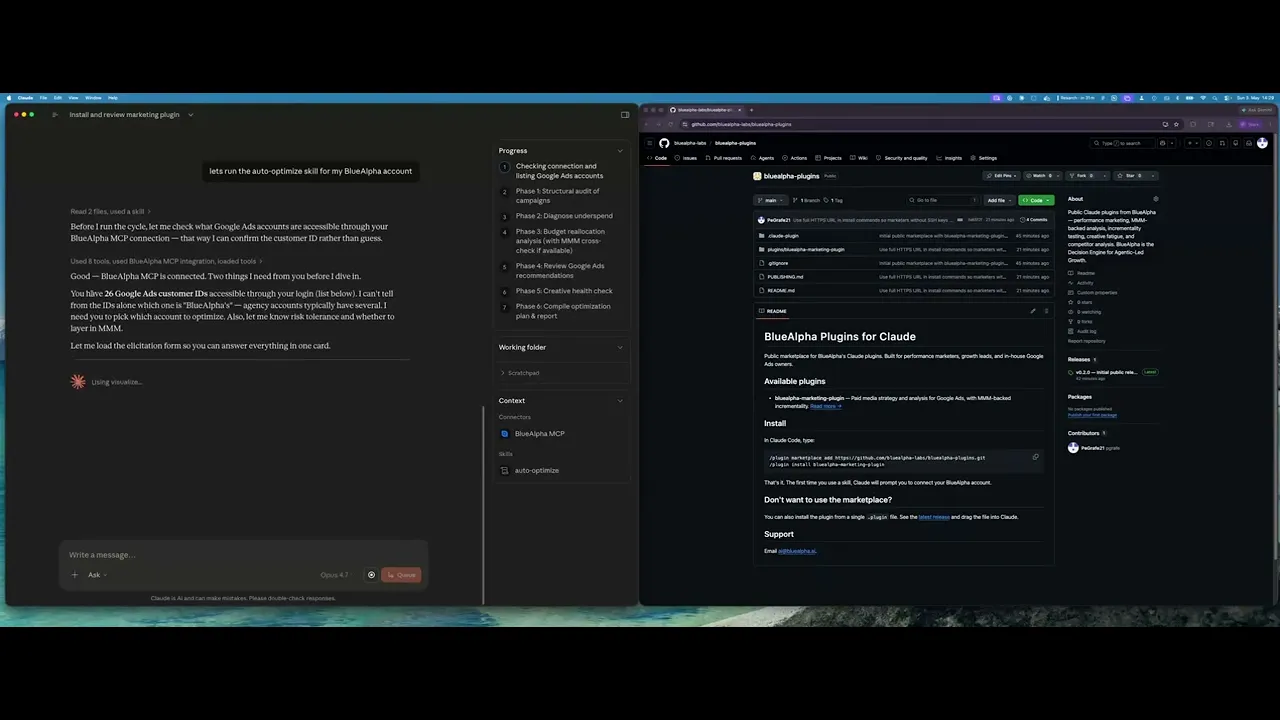
Inside Claude Code, run these two commands:
/plugin marketplace add <https://github.com/bluealpha-labs/bluealpha-plugins.git>
/plugin marketplace add <https://github.com/bluealpha-labs/bluealpha-plugins.git>
The first registers the GitHub repo as a marketplace; the second installs the plugin from it. If we publish more plugins to the same repo, you'll be able to install any of them from the same registered marketplace.
Step 3 — Try a skill
Invoking a skill is as simple as typing something like:
"Run auto-optimize on customer 123-456-7890, moderate risk tolerance, and cross-check with our Meridian MMM."
Claude will route that to the right skill, load the workflow, and walk you through the Analyze → Decide → Act loop.
Skill reference — example prompts
Every skill is invoked with a sentence. Below is a copy-paste prompt for each one, with placeholders you can fill in (<customer_id>, <competitor>, <URL>, <domain>). Claude routes each prompt to the right skill automatically — you don't need to call the skill by name.
auto-optimize — the weekly pulse
Audit my Google Ads account
<customer_id>. Last 30 days, moderate risk tolerance. Cross-check budget recommendations with our Meridian MMM if available.
full-monty — quarterly top-to-bottom
Run a full top-to-bottom Google Ads review on
<customer_id>. Include audit, audience analysis, competitive scan, creative health, geo opportunities, SEO/paid coverage, and an incrementality test recommendation. Output a quarterly deployment plan.
audience-intelligence — who's actually converting
Analyze audience performance across
<customer_id>over the last 60 days. Show me which segments are converting, which are wasting spend, and recommend bid modifiers, observation-to-targeting moves, and exclusions.
brand-refresh-pipeline — fix fatigue before it costs you
Detect creative fatigue in
<customer_id>and generate fresh responsive search ad copy for any campaign where current ads are degrading. Match BlueAlpha's brand voice.
competitive-conquest — go on offense
Build a conquest campaign spec targeting
<competitor>'s brand terms in<customer_id>. Research their messaging gaps and design RSAs that exploit them.
competitive-counterpunch — defend your brand
Check auction insights on my brand terms in
<customer_id>for the last 14 days. Flag any competitor that's gained share and plan a proportional defensive response.
content-to-campaign — turn content into campaigns
Take this blog post
<URL>and turn it into a paid campaign for<customer_id>. Generate keywords, RSA copy, audience targeting, and a budget recommendation.
geo-expansion-scout — find the next market
Identify new geographic markets worth entering for
<customer_id>. Look at geo performance in current markets, keyword volume in adjacent geos, and competitive density. Rank the top 5 with rationale.
incrementality-test-runner — prove what's real
Design a geo-based incrementality test for
<customer_id>. Recommend treatment vs control geos, test duration, MDE, budget, and success criteria. Then monitor it weekly with integrity checks.
seo-paid-bridge — close search gaps
Find where organic and paid search overlap or leave gaps for
<domain>in<customer_id>. Spec complementary paid campaigns that maximize total search click share.
Why BlueAlpha isn't just another marketing tool
There are two kinds of products in performance marketing, and BlueAlpha is neither.
The first is rigorous but passive — statistically sound measurement that stops at the dashboard. The insight is accurate; nothing happens with it. The second is actionable but shallow — AI tools with fast recommendations built on correlational attribution that doesn't survive iOS privacy or a skeptical CFO.
BlueAlpha is the third option: causal measurement underneath, real agents producing deployment-ready specs, MCP-native. Not a measurement vendor. Not a dashboard with a chatbot. The decision layer under the next generation of marketing.
The difference shows up in results. When BlueAlpha ran incrementality tests for Cann, AppLovin's platform-reported ROAS was 4.77x, but the actual incremental lift was zero — saving Cann $480K per year in misallocated spend. For Klover, BlueAlpha's measurement cut Meta iOS spend by 50% with zero lost conversions, freeing budget to scale Apple Search Ads by 10x. For Pettable, nine months of causal measurement reduced blended CAC by 14%, unlocking $2.12M in annualized savings. These are decisions the Decision Engine makes — grounded in incrementality, not platform attribution.
This is what we call Agentic-Led Growth — the GTM motion that follows Sales-Led and Product-Led Growth. The agents do the analytical work. The human makes the call. The engine delivers.
FAQ
What is the BlueAlpha Marketing Plugin for Claude?
It's a plugin for Claude that packages ten marketing workflows — audit, optimization, competitive, creative, content, geo, incrementality, and SEO-paid — into skills you can invoke with a sentence. Each skill is backed by the Google Ads API via an MCP connector. Together, they form what BlueAlpha calls the Decision Engine: a system that goes from signal to decision to deployment-ready spec in one conversation.
Do I need MMM data to use the plugin?
No. Every skill works on Google Ads data alone. If you have an MMM connected, the skills use it to validate platform attribution and sharpen their recommendations — but it's optional.
Will the plugin make changes to my Google Ads account automatically?
Not currently. The plugin reads your Google Ads data and produces recommendations, campaign specs, and optimization plans. You execute the changes in Google Ads Editor or the Ads UI. On-platform execution is on the roadmap.
How often should I run each skill?
auto-optimize is designed for weekly or bi-weekly cadence. brand-refresh-pipeline fits a 6-8 week rhythm. audience-intelligence runs monthly. full-monty is a quarterly exercise. Everything else is triggered by a specific event (new competitor, new content, new market).
Can I use the plugin with multiple Google Ads accounts?
Yes. The plugin supports MCC (manager) access and can switch between customer IDs within a single session.
Which Claude product do I run it in?
The plugin works inside Cowork mode in the Claude desktop app and in Claude Code. Both support plugin installation from marketplaces. MCP-native means the Decision Engine goes wherever Claude goes.
What is Agentic-Led Growth?
Agentic-Led Growth (ALG) is a go-to-market motion in which specialized AI agents handle the analytical and executional work that previously required large teams. It follows Sales-Led Growth and Product-Led Growth as the next evolution of how companies scale. Instead of adding headcount or building self-serve funnels, ALG deploys agents that turn every signal in the marketing stack into real decisions and deliver deployment-ready specs. BlueAlpha is the Decision Engine that powers it.
What can the BlueAlpha plugin do that Google's official Google Ads MCP can't?
Google's official MCP (released April 2026) is read-only and ships three tools: listing accounts, running a GAQL query, and getting resource metadata. It is a solid foundation for pulling reports. The BlueAlpha plugin ships ten skills that go beyond querying: full-account audit with scoring, budget reallocation with causal measurement validation, creative fatigue detection and RSA generation, competitive conquest campaign design, geo expansion analysis, and incrementality test design with integrity monitoring. The BlueAlpha connector also handles authentication behind a single sign-in — no developer token provisioning, no OAuth configuration, no token refresh management.
Your next step
Pick the skill that matches the job you're trying to get done today, copy the prompt above, and run it in Claude. If you're new to the plugin, start with auto-optimize — it's the most common entry point and the easiest way to see the Analyze → Decide → Act loop in action.
TL;DR — The BlueAlpha Marketing Plugin for Google Ads puts a team of specialized marketing agents inside Claude. Ten skills connect directly to the Google Ads API and handle the jobs that eat your week — account audits, budget reallocation, creative refreshes, competitive response, geo expansion, incrementality testing. Each one follows the same loop: Analyze → Decide → Act. Under the hood, this is what BlueAlpha calls the Decision Engine: the system that turns every signal in your ad account into a real decision and produces a deployment-ready spec. This page is the index. Pick the skill that matches your job-to-be-done and jump to the prompt that runs it.
If you manage Google Ads — whether in-house, at an agency, or as a freelancer — you spend a lot of your week doing the same handful of things: auditing structure, reallocating budget, refreshing creative, chasing competitors, planning geo expansion, and trying to prove incrementality. The BlueAlpha Marketing Plugin turns each of those workflows into a single Claude invocation that uses live Google Ads data, not guesses.
But this isn't just another set of AI automations bolted onto a dashboard. Performance marketing has more data than it knows what to do with — and the bottleneck was never data. It's the absence of a system that turns every signal into a decision fast enough to matter, and produces a deployment-ready spec. That's what BlueAlpha built: a Decision Engine delivered through Claude via MCP, where each skill is an agent that owns a specific decision surface. Your growth lead asks the decision; they don't dig for it.
All ten Google Ads skills in the BlueAlpha Marketing Plugin
Here's every skill in the plugin with a one-liner. Each one is an agent that owns a specific decision surface — grouped below by the type of decision it makes.
Analysis & optimization — surface what needs attention:
auto-optimize— Runs a full optimization cycle: structural audit, underspend diagnosis, budget reallocation, recommendations review, and creative health check. The weekly pulse of the Decision Engine.full-monty— Orchestrates every skill in sequence for a comprehensive top-to-bottom audit plus a strategic deployment plan for the next quarter.audience-intelligence— Analyzes audience performance across Google Ads and recommends bid modifiers, new segments, exclusions, and observation-to-targeting moves.seo-paid-bridge— Finds where organic and paid search overlap or leave gaps, then specs complementary paid campaigns that maximize total search click share.
Creative — detect fatigue, generate what's next:
brand-refresh-pipeline— Detects creative fatigue, audits brand voice, and generates fresh responsive search ad copy for any campaign.content-to-campaign— Turns any piece of content (blog, case study, webinar, comparison page) into a paid campaign complete with keywords and ad copy.
Competitive — watch the auction, plan the response:
competitive-conquest— Researches competitors, identifies messaging gaps, and designs conquest campaign specs that target competitor brand terms.competitive-counterpunch— Detects when competitors gain auction share on your brand and plans a proportional defensive response.
Budget & expansion — move money where causal measurement says it belongs:
geo-expansion-scout— Identifies new geographic markets worth entering by analyzing geo performance, keyword volume, and competitive density.
Testing & measurement — prove what's real:
incrementality-test-runner— Designs and monitors geo-based incrementality tests in Google Ads with integrity checks and lift analysis. The trust layer of the entire engine.
Analyze → Decide → Act
Every agent skill follows the same loop:
Analyze — The agent surfaces what needs attention. Anomalies, fatigue, budget drift, incrementality shifts, competitive moves. You don't go looking for problems; the agent brings them to you.
Decide — The agent produces a recommendation with the signal that backs it. Every decision is auditable — you see the data, the logic, and the confidence level.
Act — The agent produces a deployment-ready recommendation with the data behind it. Not a slide in a deck; a spec you can build in Google Ads Editor the same day.
A single Head of Growth with BlueAlpha manages what used to require a team of ten.
Who the plugin is for
The plugin was built for working marketers, not for analysts who want to write GAQL queries by hand. If any of the following sound like your week, this is built for you:
You manage one or more Google Ads accounts and can't keep up with weekly optimization.
You run an agency and want every account to get the same senior-level audit cadence without hiring more strategists.
You're a Head of Growth running seven channels and need ten times the capacity without ten times the headcount.
You're an in-house marketer who wants causal measurement underneath every decision, not platform attribution you don't fully trust.
Every skill is designed around the same principle: the human stays in the loop, Claude does the heavy lifting. The skills surface recommendations, present scorecards, and prepare campaign specs for your review.
BlueAlpha delivers the plugin in two modes. Self-Drive means your team uses the agents directly inside Claude — you own the decisions, BlueAlpha onboards, models, and stays close. Co-Pilot means a senior BlueAlpha growth partner runs the loop for you, reading what the agents surface and telling you exactly what to do. Same Decision Engine either way. The choice is who's in the seat — your team or ours.
How to pick the right skill
If you need to… | Run this skill |
|---|---|
Do a weekly or bi-weekly health check |
|
Rebuild the account from scratch with a full strategy |
|
Figure out which audiences are wasting budget |
|
Refresh tired ad copy |
|
Attack a competitor's brand term inventory |
|
Defend against a competitor bidding on your brand |
|
Turn a blog post, case study, or comparison page into a paid campaign |
|
Expand into new cities, states, or DMAs |
|
Prove (or disprove) incrementality with a geo holdout |
|
Stop bidding on keywords you already own organically — or start bidding where organic is weak |
|
How does the BlueAlpha marketing plugin connect to Google Ads?
Every skill in the BlueAlpha Marketing Plugin is backed by an MCP connector that gives Claude direct, permissioned access to the Google Ads API. MCP-native means the whole system lives inside Claude, Codex, or any AI workspace your team already uses — no separate login, no dashboard to check. This is what makes it a Decision Engine rather than another reporting layer: the decision lives where the conversation happens.
The BlueAlpha Google Ads connector gives Claude the ability to:
Audit campaign structure and score every campaign.
Diagnose underspend across five layers (hard issues, reach, bidding, quality, other).
Analyze audience and creative performance with built-in benchmarks.
Pull auction insights, geographic performance, and keyword coverage.
Generate keyword ideas from a URL or seed terms.
Prepare exact specs for campaigns, ad groups, keywords, and RSAs.
Apply or dismiss Google recommendations with a critical eye.
Monitor incrementality tests for geo leakage and change-history contamination.
Where relevant, skills also cross-reference a Meridian MMM (marketing mix model) via the BlueAlpha MMM connector to validate platform attribution against causal incrementality data. The MMM is optional — every skill works without it, but the recommendations get sharper when causal measurement is underneath.
Google released its own official Google Ads MCP server in April 2026, which validates the category. That server is read-only and ships three tools: list accounts, search (run a GAQL query), and get resource metadata. It is a solid foundation for pulling reports, but it cannot create campaigns, change bids, or push optimization decisions. The BlueAlpha connector gives Claude authenticated access to your Google Ads data. Skills can audit, diagnose, and produce deployment-ready recommendations. Execution is coming — write functions are being rolled out with proper guardrails. Setup is also different. Most open-source Google Ads MCP implementations require you to provision a developer token (a process that Google's own documentation warns can take weeks), configure OAuth credentials, and manage token refresh. The BlueAlpha connector handles all of that behind a single sign-in. One URL, no tokens, no config files.
The same plugin also ships TikTok Ads skills for managing TikTok campaigns and Meridian MMM skills for putting your mix model to work.
Getting connected
There are two pieces to install: the BlueAlpha MCP connector (so Claude can read your Google Ads data and your Meridian MMM) and the BlueAlpha Marketing Plugin itself (the ten skills that put that data to work). Total setup time is about a minute. Steps 1 and 3 are the same regardless of which Claude product you use; Step 2 has two paths depending on whether you're in Cowork or Claude Code.
Step 1 — Install the BlueAlpha MCP connector
Open Settings in the Claude desktop app
Go to Connectors → Add custom connector
Name it:
BlueAlpha MCPURL:
https://mcp.bluealpha.ai/mcpClick Connect and sign in with your BlueAlpha account
That single sign-in wires Claude up to your Google Ads accounts (and your Meridian MMM, if you have one). No keys, no IDs, no config files.
Step 2 — Install the plugin
Pick the path that matches the Claude product you're using.
Option A — Cowork (drag-and-drop)
Click Releases on the right rail and open the latest release (currently v0.2.0)
Expand Assets and click
bluealpha-marketing-plugin.pluginto downloadDrag the downloaded file into an open Cowork session and click Install when prompted
That's it. No CLI, no settings menu — one drag.
Option B — Claude Code (slash commands)
Inside Claude Code, run these two commands:
/plugin marketplace add <https://github.com/bluealpha-labs/bluealpha-plugins.git>
The first registers the GitHub repo as a marketplace; the second installs the plugin from it. If we publish more plugins to the same repo, you'll be able to install any of them from the same registered marketplace.
Step 3 — Try a skill
Invoking a skill is as simple as typing something like:
"Run auto-optimize on customer 123-456-7890, moderate risk tolerance, and cross-check with our Meridian MMM."
Claude will route that to the right skill, load the workflow, and walk you through the Analyze → Decide → Act loop.
Skill reference — example prompts
Every skill is invoked with a sentence. Below is a copy-paste prompt for each one, with placeholders you can fill in (<customer_id>, <competitor>, <URL>, <domain>). Claude routes each prompt to the right skill automatically — you don't need to call the skill by name.
auto-optimize — the weekly pulse
Audit my Google Ads account
<customer_id>. Last 30 days, moderate risk tolerance. Cross-check budget recommendations with our Meridian MMM if available.
full-monty — quarterly top-to-bottom
Run a full top-to-bottom Google Ads review on
<customer_id>. Include audit, audience analysis, competitive scan, creative health, geo opportunities, SEO/paid coverage, and an incrementality test recommendation. Output a quarterly deployment plan.
audience-intelligence — who's actually converting
Analyze audience performance across
<customer_id>over the last 60 days. Show me which segments are converting, which are wasting spend, and recommend bid modifiers, observation-to-targeting moves, and exclusions.
brand-refresh-pipeline — fix fatigue before it costs you
Detect creative fatigue in
<customer_id>and generate fresh responsive search ad copy for any campaign where current ads are degrading. Match BlueAlpha's brand voice.
competitive-conquest — go on offense
Build a conquest campaign spec targeting
<competitor>'s brand terms in<customer_id>. Research their messaging gaps and design RSAs that exploit them.
competitive-counterpunch — defend your brand
Check auction insights on my brand terms in
<customer_id>for the last 14 days. Flag any competitor that's gained share and plan a proportional defensive response.
content-to-campaign — turn content into campaigns
Take this blog post
<URL>and turn it into a paid campaign for<customer_id>. Generate keywords, RSA copy, audience targeting, and a budget recommendation.
geo-expansion-scout — find the next market
Identify new geographic markets worth entering for
<customer_id>. Look at geo performance in current markets, keyword volume in adjacent geos, and competitive density. Rank the top 5 with rationale.
incrementality-test-runner — prove what's real
Design a geo-based incrementality test for
<customer_id>. Recommend treatment vs control geos, test duration, MDE, budget, and success criteria. Then monitor it weekly with integrity checks.
seo-paid-bridge — close search gaps
Find where organic and paid search overlap or leave gaps for
<domain>in<customer_id>. Spec complementary paid campaigns that maximize total search click share.
Why BlueAlpha isn't just another marketing tool
There are two kinds of products in performance marketing, and BlueAlpha is neither.
The first is rigorous but passive — statistically sound measurement that stops at the dashboard. The insight is accurate; nothing happens with it. The second is actionable but shallow — AI tools with fast recommendations built on correlational attribution that doesn't survive iOS privacy or a skeptical CFO.
BlueAlpha is the third option: causal measurement underneath, real agents producing deployment-ready specs, MCP-native. Not a measurement vendor. Not a dashboard with a chatbot. The decision layer under the next generation of marketing.
The difference shows up in results. When BlueAlpha ran incrementality tests for Cann, AppLovin's platform-reported ROAS was 4.77x, but the actual incremental lift was zero — saving Cann $480K per year in misallocated spend. For Klover, BlueAlpha's measurement cut Meta iOS spend by 50% with zero lost conversions, freeing budget to scale Apple Search Ads by 10x. For Pettable, nine months of causal measurement reduced blended CAC by 14%, unlocking $2.12M in annualized savings. These are decisions the Decision Engine makes — grounded in incrementality, not platform attribution.
This is what we call Agentic-Led Growth — the GTM motion that follows Sales-Led and Product-Led Growth. The agents do the analytical work. The human makes the call. The engine delivers.
FAQ
What is the BlueAlpha Marketing Plugin for Claude?
It's a plugin for Claude that packages ten marketing workflows — audit, optimization, competitive, creative, content, geo, incrementality, and SEO-paid — into skills you can invoke with a sentence. Each skill is backed by the Google Ads API via an MCP connector. Together, they form what BlueAlpha calls the Decision Engine: a system that goes from signal to decision to deployment-ready spec in one conversation.
Do I need MMM data to use the plugin?
No. Every skill works on Google Ads data alone. If you have an MMM connected, the skills use it to validate platform attribution and sharpen their recommendations — but it's optional.
Will the plugin make changes to my Google Ads account automatically?
Not currently. The plugin reads your Google Ads data and produces recommendations, campaign specs, and optimization plans. You execute the changes in Google Ads Editor or the Ads UI. On-platform execution is on the roadmap.
How often should I run each skill?
auto-optimize is designed for weekly or bi-weekly cadence. brand-refresh-pipeline fits a 6-8 week rhythm. audience-intelligence runs monthly. full-monty is a quarterly exercise. Everything else is triggered by a specific event (new competitor, new content, new market).
Can I use the plugin with multiple Google Ads accounts?
Yes. The plugin supports MCC (manager) access and can switch between customer IDs within a single session.
Which Claude product do I run it in?
The plugin works inside Cowork mode in the Claude desktop app and in Claude Code. Both support plugin installation from marketplaces. MCP-native means the Decision Engine goes wherever Claude goes.
What is Agentic-Led Growth?
Agentic-Led Growth (ALG) is a go-to-market motion in which specialized AI agents handle the analytical and executional work that previously required large teams. It follows Sales-Led Growth and Product-Led Growth as the next evolution of how companies scale. Instead of adding headcount or building self-serve funnels, ALG deploys agents that turn every signal in the marketing stack into real decisions and deliver deployment-ready specs. BlueAlpha is the Decision Engine that powers it.
What can the BlueAlpha plugin do that Google's official Google Ads MCP can't?
Google's official MCP (released April 2026) is read-only and ships three tools: listing accounts, running a GAQL query, and getting resource metadata. It is a solid foundation for pulling reports. The BlueAlpha plugin ships ten skills that go beyond querying: full-account audit with scoring, budget reallocation with causal measurement validation, creative fatigue detection and RSA generation, competitive conquest campaign design, geo expansion analysis, and incrementality test design with integrity monitoring. The BlueAlpha connector also handles authentication behind a single sign-in — no developer token provisioning, no OAuth configuration, no token refresh management.
Your next step
Pick the skill that matches the job you're trying to get done today, copy the prompt above, and run it in Claude. If you're new to the plugin, start with auto-optimize — it's the most common entry point and the easiest way to see the Analyze → Decide → Act loop in action.