Peter Grafe

LinkedIn Ads Skills in Claude: The BlueAlpha LinkedIn Suite

Ten MCP-native LinkedIn Ads skills for Claude. Health scoring, demographic targeting, creative fatigue, auction overlap, bid audits, and a full quarterly audit - all inside the Marketing Org of 2050.

TL;DR — The BlueAlpha LinkedIn skills put a senior LinkedIn ad operator inside Claude. Ten skills connect directly to your LinkedIn ad accounts and handle the jobs that turn an account into decisions. The suite covers structural health audits, demographic targeting analysis, count-blocked campaign detection, creative fatigue scoring, auction overlap between your own campaigns, bid strategy audits, frequency saturation risk, Lead Gen Form health, weekly performance digests, and a unified quarterly audit that composes all nine into one report. Each skill follows the same loop: Analyze → Decide → Plan → Act. Under the hood, this is what makes BlueAlpha the Marketing Org of 2050: causal measurement, specialized agents, and a Decision Engine that turns every signal from your LinkedIn account into a real decision, a plan, and an executed change. This page is the index. Pick the skill that matches your job-to-be-done and jump to the prompt that runs it.


The video walkthrough was recorded in May 2026. Account metrics (spend totals, campaign counts, demographic findings) might differ between the video and the written examples - both reflect real data from the BlueAlpha account at their respective run dates.


If you've spent six figures on LinkedIn ads for a B2B product, you've felt the gap. You have an account with dozens of campaigns, hundreds of creatives, and a long list of audiences. You have a CFO asking whether the spend is working. You have a planning meeting on Monday where someone has to say what to cut, what to scale, and what to refresh — and LinkedIn Campaign Manager shows you twelve dashboards but no decisions. Because a dashboard is not a decision.

The BlueAlpha LinkedIn skills close that gap. Each one is an agent that turns one slice of your LinkedIn account into a real call: trust the campaign or pause it, scale the audience or exclude it, refresh the creative or double down on it, fix the structure or fix the bidding first. The skills don't replace your media buyer — they extend the operator's reach so every analysis happens in minutes instead of half-days, and so a single Head of Growth can run the loop that used to require a dedicated paid social team.

This isn't a new LinkedIn dashboard. It's the missing layer between the LinkedIn account you already have and the decisions you make every week. That layer is what BlueAlpha calls the Decision Engine — and the LinkedIn skills are how it lands.


All 10 LinkedIn skills in the BlueAlpha Suite

Here's every LinkedIn skill in the suite with a one-liner. Each one is an agent that owns a specific decision surface — grouped below by the kind of question it answers.


Read what's happening — the foundational analysis layer:

  • linkedin-auto-optimize — The account-level pre-flight check. Surfaces structural blockers (billing holds, audience count holds, no-creative campaigns), under-pacing campaigns, and dormant ACTIVE campaigns. Lead any LinkedIn conversation with this; never optimize creative on an account that's structurally broken.

  • linkedin-performance-digest — The Monday-morning LinkedIn read. Spend, impressions, LP clicks, leads, conversions period-over-period with named drivers and a what-to-watch list. The recurring artifact your leadership actually reads.

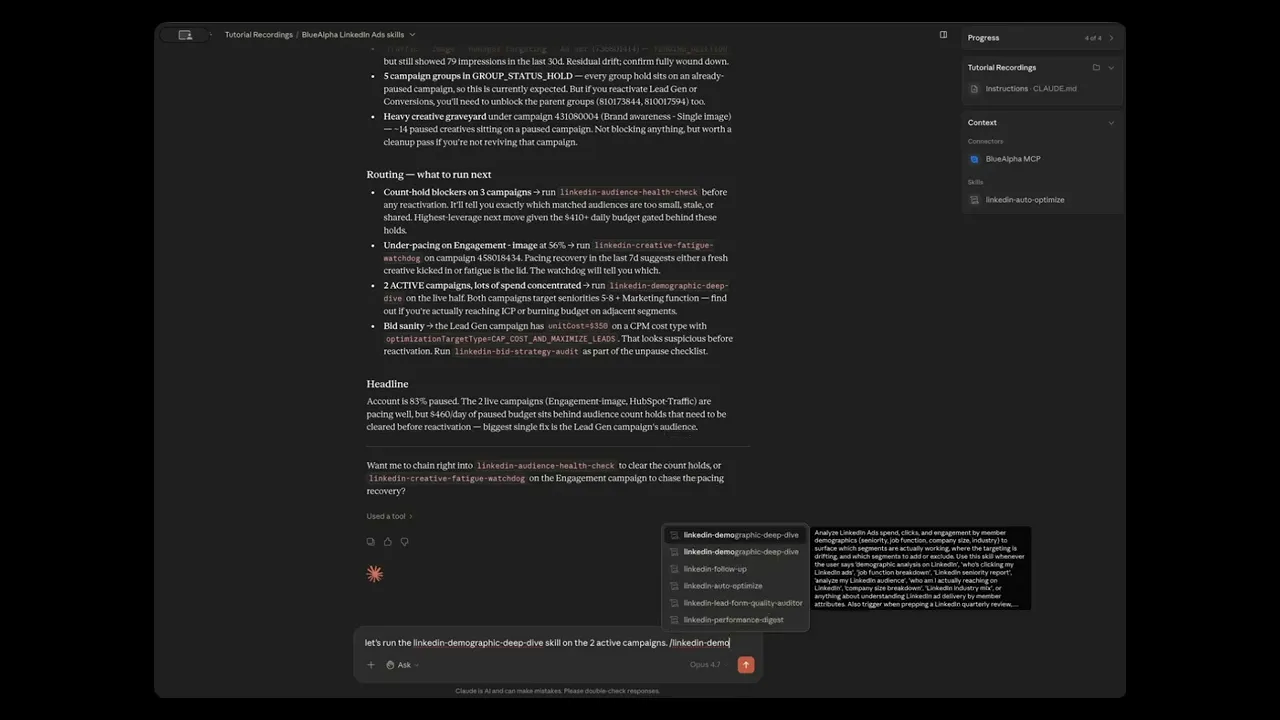
  • linkedin-demographic-deep-dive — The targeting-vs-actual report. Who you're paying to reach (intended targeting) vs who's actually clicking (LinkedIn's member demographics), broken down by seniority, job function, company size, and industry. Surfaces the dollars going to unintended segments.


Decide what to do with your audiences and bids — the targeting layer:

  • linkedin-audience-health-check — Matched-audience risk surface. Surfaces count-blocked campaigns, single-point-of-failure audiences, audiences shared across active campaigns (auction overlap risk), and the compound-risk audiences that are both. Includes a manual-validation checklist for the dimensions the API doesn't expose.

  • linkedin-targeting-overlap-finder — Cross-campaign auction overlap. Computes per-facet Jaccard similarity (seniorities, functions, industries, sizes, locations, matched audiences) between every pair of active campaigns and flags pairs above 60% overlap with a daily-budget estimate of the wasted auction competition.

  • linkedin-frequency-saturation-report — Cap configuration audit. Identifies matched-audience campaigns running without frequency caps (the highest saturation risk), caps set too tight (starving delivery), and caps set too loose (burning small audiences). Recommends caps per audience type and objective.

  • linkedin-bid-strategy-audit — Per-campaign bid configuration sanity check. Flags cost-type mismatches against the campaign's objective, suspicious unit costs, missing optimization targets, and the ROUND_ROBIN-vs-OPTIMIZED creative selection trap that most accounts step into.


Decide what to do with your creatives — the creative layer:

  • linkedin-creative-fatigue-watchdog — Per-creative CTR/engagement decay scoring using objective-appropriate metrics (CTR for Engagement, LP-click rate for Traffic, hook + completion rate for Video). Identifies fatigued creatives, weak-from-launch creatives, high-spend low-engagement waste, and top performers to double down on.

  • linkedin-lead-form-quality-auditor — Lead Gen Form surface audit. Surfaces creatives spending without producing leads, declining-volume forms, dormant Lead Gen creatives, cost-per-lead leaderboard, and orphan forms (referenced only by paused creatives — archive candidates).


Run the whole audit at once — the orchestrator:

  • linkedin-full-monty — Runs all nine sub-skills against shared data and composes the findings into a single comprehensive audit. The quarterly business review deliverable. Cross-skill prioritization — a count-held audience that's also shared in auction overlap gets ranked above either single-skill finding.


Analyze → Decide → Plan → Act

Every LinkedIn skill follows the same loop, the same one the MMM skills, the Google Ads skills, and the TikTok skills follow:

  1. Analyze — Every morning, agents surface what needs attention: anomalies in campaign pacing, creative fatigue, budget drift, competitive moves, and targeting leakage. You don't go digging through Campaign Manager; the agent brings the relevant slice to you.

  2. Decide — The relevant agent produces a recommendation with the signal that backs it. Every recommendation includes the dollar amount at stake, the underlying metric, and the rationale. You see the data, the logic, and the dollar impact before you act.

  3. Plan — The Planning Agent translates every decision into the forward roadmap. What's running this week, what's being tested next, what budget moves are queued. The plan is the living artifact your team and your leadership actually look at.

  4. Act — The agent produces a deployment-ready output: a list of audiences to expand, a creative refresh queue, a cap-policy table you can apply directly, a campaign-merge recommendation with cross-exclusions ready. Not a slide in a deck; a spec you can ship the same day.

A single Head of Growth with the BlueAlpha LinkedIn skills connected manages what used to require a dedicated LinkedIn media buyer plus a creative analyst plus the eternal back-and-forth with the agency on "what's the bid type supposed to be for Lead Gen again?"


Who the LinkedIn skills are for

The suite was built for people who run LinkedIn ad accounts, not for the people who write the platform documentation. If any of the following sound like your week, this is built for you:

  • You're a Head of Growth running LinkedIn alongside Google Ads and Meta. You don't have time to learn LinkedIn's quirks -- matched audience count holds, ROUND_ROBIN vs OPTIMIZED, dynamic vs matched segments. You need someone (or something) to tell you what to do.

  • You're a B2B CMO and you have a CFO asking whether the $30K/month you spend on LinkedIn is producing pipeline. You need an answer with dollars, not a screenshot of an impression chart.

  • You're a paid media manager who knows your account is leaking money but the LinkedIn UI surfaces twelve KPIs and zero recommendations — and your agency reports the same vanity metrics every month.

  • You're an agency operator running LinkedIn for 5-20 clients and the manual audit work has become the bottleneck on growing your book.

Every skill is designed around the same principle: the human stays in the loop, Claude does the heavy lifting. The skills surface health scores, present targeting actions, build refresh queues, and prepare specs for your review.

BlueAlpha delivers the suite in two modes. Self-Drive means your team uses the agents directly inside Claude — you own the decisions, BlueAlpha onboards and stays close. Co-Pilot means a senior BlueAlpha growth partner runs the loop for you, reading what the agents surface and telling you exactly what to do. Same Decision Engine either way. The choice is who's in the seat — your team or ours.


How to pick the right skill

If you need to…

Run this skill

Figure out if anything is structurally broken on the account

linkedin-auto-optimize

Write the Monday-morning LinkedIn update

linkedin-performance-digest

Know who's actually clicking your ads by job title / seniority / company size

linkedin-demographic-deep-dive

Diagnose why a campaign isn't delivering (audience count hold)

linkedin-audience-health-check

Find which of your own campaigns are bidding against each other

linkedin-targeting-overlap-finder

Find creatives that are wasting spend with engagement decay

linkedin-creative-fatigue-watchdog

Audit your bid types, optimization targets, and creative-selection settings

linkedin-bid-strategy-audit

Set the right frequency caps on matched-audience campaigns

linkedin-frequency-saturation-report

Audit your Lead Gen Forms for quality and orphan-form cleanup

linkedin-lead-form-quality-auditor

Run the full quarterly LinkedIn audit in one go

linkedin-full-monty


How does the BlueAlpha suite connect to your LinkedIn ad accounts?

Every LinkedIn skill in the BlueAlpha Marketing Plugin is backed by an MCP connector that gives Claude direct, permissioned access to your LinkedIn Ads account data. MCP-native means the whole system lives inside Claude, Codex, or any AI workspace your team already uses — no separate dashboard to check, no CSV export to email around.

The BlueAlpha LinkedIn connector gives Claude the ability to:

  • List every LinkedIn ad account the connected token can access (across business managers).

  • Pull campaign-level configuration — status, daily budget, pacing strategy, targeting criteria, cost type, optimization target, creative selection mode.

  • Read creative-level data — review status, serving status, intended status, Lead Gen Form references, content references.

  • Run analytics by single pivot (CAMPAIGN, CREATIVE, MEMBER_SENIORITY, MEMBER_JOB_FUNCTION, MEMBER_INDUSTRY, MEMBER_COMPANY_SIZE, and more) over any date range.

  • Run multi-pivot statistics finders for more nuanced segment slicing.

  • Detect serving statuses and holds (AUDIENCE_COUNT_HOLD, BILLING_HOLD, CAMPAIGN_GROUP_STATUS_HOLD) directly from the API.

The connector handles authentication, account access, and field-level permissions. One sign-in, no API keys to share, no ad account IDs to copy-paste. The account your media buyer logs into becomes the account your planning team can ask questions of.


How to install the BlueAlpha LinkedIn plugin

There are two pieces to install: the BlueAlpha MCP connector (so Claude can read your LinkedIn ad accounts) and the BlueAlpha Marketing Plugin itself (the skills that put that data to work). Total setup time is about a minute. Steps 1 and 3 are the same regardless of which Claude product you use; Step 2 has two paths depending on whether you're in Cowork or Claude Code.


Step 1 — Install the BlueAlpha MCP connector

  1. Open Settings in the Claude desktop app

  2. Go to ConnectorsAdd custom connector

  3. Name it: BlueAlpha MCP

  4. URL: https://mcp.bluealpha.ai/mcp

  5. Click Connect and sign in with your BlueAlpha account

That single sign-in wires Claude up to your LinkedIn ad accounts (and your Google Ads, Meta, and Meridian models if you have them). No keys, no IDs, no config files.


Step 2 — Install the plugin

Pick the path that matches the Claude product you're using.

Option A — Cowork (drag-and-drop)

  1. Go to github.com/bluealpha-labs/bluealpha-plugins

  2. Click Releases on the right rail and open the latest release

  3. Expand Assets and click bluealpha-marketing-plugin.plugin to download

  4. Drag the downloaded file into an open Cowork session and click Install when prompted

That's it. No CLI, no settings menu — one drag.

Option B — Claude Code (slash commands)

Inside Claude Code, run these two commands:

/plugin marketplace add <https://github.com/bluealpha-labs/bluealpha-plugins.git>
/plugin install bluealpha-marketing-plugin
/plugin marketplace add <https://github.com/bluealpha-labs/bluealpha-plugins.git>
/plugin install bluealpha-marketing-plugin

The first registers the GitHub repo as a marketplace; the second installs the plugin from it. The same plugin contains the Google Ads, MMM, and LinkedIn skills — you install once, the right skill triggers based on what you ask.


Step 3 — Try a skill

Invoking a skill is as simple as typing something like:

"Run auto-optimize on my LinkedIn account 515970088 and tell me what's blocking delivery."

Claude will route that to the right skill, load the workflow, and walk you through the Analyze → Decide → Plan → Act loop.


LinkedIn skill reference: prompts and real output

Every skill is invoked with a sentence. Below is a copy-paste prompt for each one, plus the real output from a run on the BlueAlpha account (account 515970088, USD, 4 active campaigns, $22,546 of spend over the trailing 90 days) so you know what output to expect.


linkedin-auto-optimize — is anything structurally broken?

Run auto-optimize on my LinkedIn account 515970088. Tell me whether any active campaigns are blocked from delivering, whether pacing is healthy, and what the account health score is.

The skill produces an overall 0–100 health score plus four sections: blockers (resolve first), pacing issues, structure hygiene, and routing recommendations to the deeper-dive skills. Lead every other LinkedIn conversation with this score.

LinkedIn Ads Skills in Claude - auto-optimize

Real example from BlueAlpha's account: the model scored 65/100 — Several issues, needs attention. Active delivery was healthy ($300/day budget at 100% utilization), but Traffic-Retargeting was under-pacing at 6% utilization ($3/day actual vs $50/day budgeted) and 6 paused campaigns had outstanding count-hold blockers totaling $410/day of paused delivery that would block resumption. Headline: "Active campaigns are delivering, but 1 campaign under-pacing significantly. 6 paused-campaign cleanup tasks queued. Investigate pacing first."


linkedin-performance-digest — the Monday-morning LinkedIn read

Generate the weekly performance digest for my LinkedIn account 515970088. Trailing 14 days vs prior 14 days. Format: headline, what happened, what drove it, what to watch.

The skill produces a single-page narrative report — not a metric dump. Spend, clicks, LP clicks, leads with period-over-period deltas, named-driver attribution (which campaigns and creatives moved the most), and a what-to-watch section for next period.

LinkedIn Ads Skills in Claude - performance digest

Real example: trailing 14 days vs prior 14 days showed spend +55% ($2,528 vs $1,626) and landing-page clicks +180% (84 vs 30) on the BlueAlpha account. CPC moved down to $4 from $5 and cost per landing-page click compressed from $54 to $30. The skill's headline named Traffic - Image - HubSpot targeting as the driver — new in the window, $826 spent, 33 LP clicks at 100% click-to-LP rate. The what-to-watch section was empty ("no leading indicators of trouble") since the only spend drops were on already-paused campaigns.


linkedin-demographic-deep-dive — who's actually clicking your ads?

Run the demographic deep-dive on my LinkedIn account 515970088, trailing 90 days. Tell me where my spend is leaking outside the intended targeting.

The skill produces a four-section report — who you're paying to reach (intended vs actual), who's actually engaging, where you're wasting, and where to expand — broken down across seniority, job function, company size, and industry pivots, with cross-pivot pattern detection.

LinkedIn Ads Skills in Claude - demographic deep-dive

Real example: BlueAlpha's account had zero conversions tracked across $22,546 of spend — the LinkedIn Insight Tag isn't recording conversions, so the optimizer is bidding on clicks, not outcomes. The skill ranked Insight Tag install as Action #1 across the entire account. The next biggest finding: a cross-pivot SMB cluster — Owner/Partner seniorities ($1,896 at 17% LP-click rate) AND small companies (2-10, 11-50 employees, $3,808 at 18% LP-click rate) both engaged at ~2× the account average (9.4%). These are almost certainly the same population — founders and solo-marketers at small businesses. Decision point flagged: lean in (add as deliberate include) or exclude (if ICP is enterprise-only). On the function side, Marketing (the intended target) got 47% of spend but 53% leaked to unintended functions — chiefly Business Development ($3,104 at 13.4% LP-click rate, a sleeper to add) and Engineering/Product Management ($965 at ~5% LP-click rate, waste to cut).


linkedin-audience-health-check — matched-audience risk surface

Audit the matched-audience health on my LinkedIn account 515970088. Find delivery-blocked campaigns, single-point-of-failure audiences, and any audiences shared across active campaigns.

The skill produces five sections: delivery-blocked campaigns (with audience URNs and daily budget at stake), audience usage map (risk-ranked from compound risk down to normal), stale/declining audiences (impression decay signal), targeting layer breakdown, and a manual validation checklist for what the API can't see (audience sizes, sync recency, match rates).

LinkedIn Ads Skills in Claude - audience health check

Real example: 3 campaigns delivery-blocked by AUDIENCE_COUNT_HOLD totaling ~$410/day of unblocked-able delivery (Lead Gen at $350/day, Conversions at $60/day, and a third paused-for-deletion campaign). The audience usage map flagged urn:li:adSegment:64784133 as a 🔥 compound-risk audience — shared between Engagement-image and Engagement-video (auction overlap), AND the sole matched audience for Engagement-video (single point of failure). Two additional audiences (76070549, 76320457) flagged as shared between Engagement-image and the HubSpot retargeting campaign — same auction overlap pattern. The manual validation checklist surfaced these three audiences as the high-priority ones to verify in Campaign Manager.


linkedin-targeting-overlap-finder — are my own campaigns competing?

Find the campaigns on my LinkedIn account 515970088 that are bidding against each other because their targeting overlaps. Compute Jaccard similarity per facet.

The skill produces a ranked list of overlapping campaign pairs above the 60% threshold, with per-facet Jaccard breakdown (seniorities, functions, industries, sizes, locations, matched audiences), a daily-budget estimate of the auction-overlap dollars at stake, and a specific recommendation per pair (consolidate, differentiate, exclude).

LinkedIn Ads Skills in Claude - targeting overlap finder

Real example: 2 overlapping pairs detected. Engagement - image ↔ Traffic - Image - HubSpot targeting at 70% overlap — 100% seniority, 100% job-function, 73% location, 29% matched-audience overlap. Estimated auction-overlap: $35/day = ~$1,050/month. Recommendation: add cross-exclusions since different objectives (Engagement vs Website Visit) but same population. Engagement - image ↔ Engagement - video at 62% overlap — same seniority and function, 50% location overlap, 14% matched-audience. Estimated auction-overlap: $31/day = ~$930/month. Recommendation: same objective + overlap = either consolidate or add cross-exclusions on matched audiences. Total auction-overlap waste across the account: ~$2K/month.


linkedin-creative-fatigue-watchdog — which creatives are wasting spend?

Score the creative fatigue on my LinkedIn account 515970088. Use objective-appropriate metrics — CTR for Engagement campaigns, LP-click rate for Traffic. Surface fatigued creatives, weak-from-launch creatives, and top performers.

The skill picks the right primary metric per campaign objective (a critical step — Engagement campaigns count social actions as clicks, so CTR is the right metric, not the narrower likes+comments sum that produces false fatigue alerts), then classifies each creative as fatigued, weak-from-launch, waste, or top performer.

LinkedIn Ads Skills in Claude - creative fatigue watchdog

Real example on BlueAlpha: 17 creatives in active campaigns, 4 with sufficient volume (≥500 impressions in each of the two 14-day comparison windows) to score. Zero false fatigue alerts — all four scored creatives showed stable CTR between windows. The skill's honest read: most of the active creative rotation is too new to have accumulated enough volume for fatigue scoring; the four scored were performing fine. Creative naming hygiene finding: 8 of 17 active creatives have empty name fields, which makes future runs and cross-tool reporting substantially harder — named creatives compound their value over time.


linkedin-bid-strategy-audit — are your bids configured correctly?

Audit the bid configurations on my LinkedIn account 515970088. Flag cost-type mismatches, suspicious unit costs, and missing optimization targets.

The skill checks each campaign's costType, unitCost, optimizationTargetType, creativeSelection, and pacingStrategy against the campaign's objectiveType using a best-practice table per objective.

LinkedIn Ads Skills in Claude - bid strategy audit

Real example: no cost-type mismatches and no suspicious bid amounts — BlueAlpha's account is on appropriate cost types per objective (CPC for Engagement and Traffic, CPM for Brand Awareness). But all 4 active campaigns are using ROUND_ROBIN creative selection instead of OPTIMIZED. Switching to OPTIMIZED lets LinkedIn auto-select the best-performing creative per audience member — typically a 15-30% engagement improvement on multi-creative campaigns. Headline: "4 optimization concerns — mostly creative selection tweaks. No critical mismatches."


linkedin-frequency-saturation-report — are your caps configured?

Audit the frequency caps on my LinkedIn account 515970088. Flag campaigns running without caps on matched audiences — the highest saturation risk.

The skill audits frequencyOptimizationPreference per campaign, classifies the audience type (matched / dynamic-retargeting / attribute-only), and flags campaigns where the cap configuration is mismatched against the audience type and objective.

LinkedIn Ads Skills in Claude - frequency saturation report

Real example: 3 of 4 active matched-audience campaigns have no frequency cap set — Engagement-image (3 matched audiences, $50/day), Engagement-video (1 matched audience = single-source, $50/day), and Traffic-HubSpot ($150/day, the highest-budget exposure). The skill correctly skipped the retargeting campaign (dynamic segments, where higher frequency is intentional) and recommended caps of 3-5 per 7 days for the matched-audience campaigns. Headline: "3 no-cap matched-audience issues. Set caps where missing first."


linkedin-lead-form-quality-auditor — are your Lead Gen Forms working?

Audit my LinkedIn Lead Gen Forms on account 515970088. Find creatives spending without producing leads, declining volume, and orphan forms.

The skill identifies every creative with leadgenCallToAction set, classifies each as spending-without-leads / declining / dormant / healthy, computes a cost-per-lead leaderboard, and maps every form URN to the creatives using it.

LinkedIn Ads Skills in Claude - lead gen form quality audit

Real example: 2 Lead Gen creatives in active campaigns referencing 2 unique form URNs. No spend-without-leads cases, no declining volume, no dormant creatives — a clean Lead Gen surface. But one orphan form detected: urn:li:adForm:1001234069 is only referenced by paused creatives — archive candidate if not in active rotation. The skill notes the API constraint (can't see form fields, completion rates, or lead-quality dimensions) and produces a manual validation checklist for Campaign Manager.


linkedin-full-monty — the complete quarterly audit

Run the full monty on my LinkedIn account 515970088. Compose the structure audit, audience health, overlap, frequency, creative fatigue, lead forms, demographic deep-dive, bid audit, and performance digest into one report.

The orchestrator runs each of the nine sub-skills against shared data (pulled once at the start) and composes the findings into a single 4–8 page audit. The value-add is the cross-skill prioritization: an audience that's count-blocked AND shared in auction overlap gets ranked above either single-skill finding.

LinkedIn Ads Skills in Claude - linkedin full monty

Real example: the full-monty on BlueAlpha's account produced an executive headline summarizing every sub-skill's lead finding, then nine sections in sequence. The cross-prioritized Top 5 actions for BlueAlpha:

  1. Install the LinkedIn Insight Tag — zero conversions tracked across $22K of spend (from demographic deep-dive)

  2. Decide on the SMB cluster — $3,808/quarter to small-company / founder audiences engaging at 2× the account average (from demographic deep-dive)

  3. Resolve count holds on the paused Lead Gen and Conversions campaigns — $410/day of paused delivery waiting to resume (from audience health)

  4. Address the Engagement-image ↔ HubSpot-targeting overlap — $35/day of auction competition (from overlap finder)

  5. Switch all 4 active campaigns from ROUND_ROBIN to OPTIMIZED creative selection + set frequency caps (from bid audit and frequency saturation, combined)


Why aren't the BlueAlpha LinkedIn skills just another LinkedIn dashboard?

There are two kinds of products in LinkedIn ad management, and BlueAlpha is neither.

The first is the platform itself — Campaign Manager. It surfaces metrics and lets you configure campaigns, but it doesn't make decisions for you. Every report you pull is a starting point for another conversation, not a recommendation. And LinkedIn's UI is famously dense — even experienced operators miss count holds, ROUND_ROBIN settings, and audience overlap because the dashboards don't surface them.

The second is the standard agency reporting stack — a weekly slide deck with screenshots from Campaign Manager pasted in, the same five vanity metrics every week, no specific actions. The format is real-time but the recommendations are confidently shallow.

BlueAlpha is the third option: causal measurement underneath, real agents producing deployment-ready specs, MCP-native. Not a measurement vendor. Not another dashboard. The decision layer underneath your LinkedIn account.

The difference shows up in results. When BlueAlpha ran incrementality tests for Cann, AppLovin's platform-reported ROAS was 4.77x, but the actual incremental lift was zero — saving Cann $480K per year in misallocated spend. For Klover, BlueAlpha's measurement cut Meta iOS spend by 50% with zero lost conversions, freeing budget to scale Apple Search Ads by 10x. For beehiiv, causal measurement caught a channel overreporting performance by 345%. For Pettable, nine months of causal measurement reduced blended CAC by 14%, unlocking $2.12M in annualized savings.

These aren't post-hoc readouts. They're what happens when causal measurement lives under the hood and specialized agents sit at the controls.

This is what we call Agent-Led Growth, Human-Led Strategy. The third GTM shift, after Sales-Led and Product-Led Growth. You set the strategy. The agents do the analytical work and execute. BlueAlpha is the Marketing Org of 2050 -- and the LinkedIn skills are one surface of the Decision Engine that runs it.


FAQ

Do I need to give BlueAlpha admin access to my LinkedIn account?

No. The connector uses LinkedIn's standard OAuth flow with read scopes — BlueAlpha can read your campaign configuration, creative data, and analytics, but cannot create, modify, or pause campaigns. All recommendations are surfaced to you for execution.

What if I run LinkedIn ads across multiple accounts (business managers, agencies)?

The connector lists every ad account the connected token can access. The skills accept an account_id parameter, so you can scope each invocation to one account. If you manage 20+ accounts, batch-running the same skill across all of them is on the roadmap.

Will the skills make changes to my LinkedIn account automatically?

Not currently. The LinkedIn skills produce recommendations, refresh queues, exclusion lists, and configuration changes for you to review and apply. On-platform execution is on the roadmap and will be opt-in per-account.

Some skills mention API constraints. What's the impact?

LinkedIn's API exposes most but not all of the data we'd want. Three skills work as configuration audits + indirect signals because of API gaps: linkedin-audience-health-check can't see audience sizes (only campaign-level holds), linkedin-frequency-saturation-report can't see unique reach (so it's a cap-config audit, not a true frequency measurement), and linkedin-lead-form-quality-auditor can't see form-level submission data (only creative-level lead counts). Each skill surfaces the limitation explicitly and produces a manual-validation checklist for the Campaign-Manager-only dimensions. All 10 skills produce real, actionable findings today — the findings on the BlueAlpha account above are all from skills running against the current API surface.

How often should I run each skill?

linkedin-auto-optimize and linkedin-performance-digest are weekly. linkedin-creative-fatigue-watchdog and linkedin-audience-health-check are bi-weekly. linkedin-targeting-overlap-finder, linkedin-frequency-saturation-report, and linkedin-bid-strategy-audit are monthly. linkedin-demographic-deep-dive, linkedin-lead-form-quality-auditor, and linkedin-full-monty are quarterly. Pair with the Cowork schedule tool to automate the weekly and bi-weekly cadence — the digest and auto-optimize land in your inbox every Monday morning.

Can the skills work without conversion tracking?

Yes, but with a caveat. When the LinkedIn Insight Tag isn't installed (or isn't capturing conversions), the skills fall back to landing-page-click rate as the performance proxy. They surface this limitation explicitly in every report and rank "Install the Insight Tag" as the #1 action. On the BlueAlpha account, this was the very first finding — zero conversions tracked across $22K of spend made every other recommendation downstream of measurement.

Do the LinkedIn skills work with the Google Ads, MMM, and Meta skills in the same plugin?

Yes — they ship in the same plugin (bluealpha-marketing-plugin), and they're designed to compose. The natural cross-platform planning loop is mmm-health-checkmmm-trust-routerlinkedin-auto-optimize (and equivalents for Google / Meta) → mmm-scenario-planner → channel-specific execution. The same Decision Engine reads every channel's data and produces unified cross-channel recommendations. Across all channels, seven agents own the decision surfaces: Causal Measurement, Planning, Creative, Testing, Competitive, Analyst, and Execution. The LinkedIn skills sit inside the Analyst and Execution agents' scope.

Which Claude product do I run it in?

The plugin works inside Cowork mode in the Claude desktop app and in Claude Code. Both support plugin installation from marketplaces. MCP-native means the Decision Engine goes wherever Claude goes.

What's Agent-Led Growth?

Agent-Led Growth (ALG) is a go-to-market motion in which specialized AI agents handle the analytical and executional work that previously required large teams. It follows Sales-Led Growth and Product-Led Growth as the next evolution of how companies scale. Instead of adding headcount or building self-serve funnels, ALG deploys agents that turn every signal in the marketing stack -- including LinkedIn -- into a decision, a plan, and an executed change. BlueAlpha is the Marketing Org of 2050 that powers it.


Your next step

Pick the skill that matches the question you're trying to answer today, copy the prompt above, and run it in Claude. If you're new to the LinkedIn skills, start with linkedin-auto-optimize — it's the right first move on any account you haven't audited, and it produces the health score that every downstream skill's caveats hang on.

If the account scores below 85, linkedin-audience-health-check is the second prompt to run. It identifies which audiences are causing the structural issues — the #1 cause of "why isn't my LinkedIn delivering?" on a B2B account.

If the account looks structurally fine, the highest-leverage planning skill is linkedin-demographic-deep-dive — it surfaces the targeting drift dollars that compound over time and gives you the specific job functions, seniorities, and company sizes to add or exclude.

If you haven't installed the plugin yet, setup takes about a minute. Browse the full prompt library for prompts across all channels. If you'd rather see the skills run on your account before installing, book a walkthrough.

TL;DR — The BlueAlpha LinkedIn skills put a senior LinkedIn ad operator inside Claude. Ten skills connect directly to your LinkedIn ad accounts and handle the jobs that turn an account into decisions. The suite covers structural health audits, demographic targeting analysis, count-blocked campaign detection, creative fatigue scoring, auction overlap between your own campaigns, bid strategy audits, frequency saturation risk, Lead Gen Form health, weekly performance digests, and a unified quarterly audit that composes all nine into one report. Each skill follows the same loop: Analyze → Decide → Plan → Act. Under the hood, this is what makes BlueAlpha the Marketing Org of 2050: causal measurement, specialized agents, and a Decision Engine that turns every signal from your LinkedIn account into a real decision, a plan, and an executed change. This page is the index. Pick the skill that matches your job-to-be-done and jump to the prompt that runs it.


The video walkthrough was recorded in May 2026. Account metrics (spend totals, campaign counts, demographic findings) might differ between the video and the written examples - both reflect real data from the BlueAlpha account at their respective run dates.


If you've spent six figures on LinkedIn ads for a B2B product, you've felt the gap. You have an account with dozens of campaigns, hundreds of creatives, and a long list of audiences. You have a CFO asking whether the spend is working. You have a planning meeting on Monday where someone has to say what to cut, what to scale, and what to refresh — and LinkedIn Campaign Manager shows you twelve dashboards but no decisions. Because a dashboard is not a decision.

The BlueAlpha LinkedIn skills close that gap. Each one is an agent that turns one slice of your LinkedIn account into a real call: trust the campaign or pause it, scale the audience or exclude it, refresh the creative or double down on it, fix the structure or fix the bidding first. The skills don't replace your media buyer — they extend the operator's reach so every analysis happens in minutes instead of half-days, and so a single Head of Growth can run the loop that used to require a dedicated paid social team.

This isn't a new LinkedIn dashboard. It's the missing layer between the LinkedIn account you already have and the decisions you make every week. That layer is what BlueAlpha calls the Decision Engine — and the LinkedIn skills are how it lands.


All 10 LinkedIn skills in the BlueAlpha Suite

Here's every LinkedIn skill in the suite with a one-liner. Each one is an agent that owns a specific decision surface — grouped below by the kind of question it answers.


Read what's happening — the foundational analysis layer:

  • linkedin-auto-optimize — The account-level pre-flight check. Surfaces structural blockers (billing holds, audience count holds, no-creative campaigns), under-pacing campaigns, and dormant ACTIVE campaigns. Lead any LinkedIn conversation with this; never optimize creative on an account that's structurally broken.

  • linkedin-performance-digest — The Monday-morning LinkedIn read. Spend, impressions, LP clicks, leads, conversions period-over-period with named drivers and a what-to-watch list. The recurring artifact your leadership actually reads.

  • linkedin-demographic-deep-dive — The targeting-vs-actual report. Who you're paying to reach (intended targeting) vs who's actually clicking (LinkedIn's member demographics), broken down by seniority, job function, company size, and industry. Surfaces the dollars going to unintended segments.


Decide what to do with your audiences and bids — the targeting layer:

  • linkedin-audience-health-check — Matched-audience risk surface. Surfaces count-blocked campaigns, single-point-of-failure audiences, audiences shared across active campaigns (auction overlap risk), and the compound-risk audiences that are both. Includes a manual-validation checklist for the dimensions the API doesn't expose.

  • linkedin-targeting-overlap-finder — Cross-campaign auction overlap. Computes per-facet Jaccard similarity (seniorities, functions, industries, sizes, locations, matched audiences) between every pair of active campaigns and flags pairs above 60% overlap with a daily-budget estimate of the wasted auction competition.

  • linkedin-frequency-saturation-report — Cap configuration audit. Identifies matched-audience campaigns running without frequency caps (the highest saturation risk), caps set too tight (starving delivery), and caps set too loose (burning small audiences). Recommends caps per audience type and objective.

  • linkedin-bid-strategy-audit — Per-campaign bid configuration sanity check. Flags cost-type mismatches against the campaign's objective, suspicious unit costs, missing optimization targets, and the ROUND_ROBIN-vs-OPTIMIZED creative selection trap that most accounts step into.


Decide what to do with your creatives — the creative layer:

  • linkedin-creative-fatigue-watchdog — Per-creative CTR/engagement decay scoring using objective-appropriate metrics (CTR for Engagement, LP-click rate for Traffic, hook + completion rate for Video). Identifies fatigued creatives, weak-from-launch creatives, high-spend low-engagement waste, and top performers to double down on.

  • linkedin-lead-form-quality-auditor — Lead Gen Form surface audit. Surfaces creatives spending without producing leads, declining-volume forms, dormant Lead Gen creatives, cost-per-lead leaderboard, and orphan forms (referenced only by paused creatives — archive candidates).


Run the whole audit at once — the orchestrator:

  • linkedin-full-monty — Runs all nine sub-skills against shared data and composes the findings into a single comprehensive audit. The quarterly business review deliverable. Cross-skill prioritization — a count-held audience that's also shared in auction overlap gets ranked above either single-skill finding.


Analyze → Decide → Plan → Act

Every LinkedIn skill follows the same loop, the same one the MMM skills, the Google Ads skills, and the TikTok skills follow:

  1. Analyze — Every morning, agents surface what needs attention: anomalies in campaign pacing, creative fatigue, budget drift, competitive moves, and targeting leakage. You don't go digging through Campaign Manager; the agent brings the relevant slice to you.

  2. Decide — The relevant agent produces a recommendation with the signal that backs it. Every recommendation includes the dollar amount at stake, the underlying metric, and the rationale. You see the data, the logic, and the dollar impact before you act.

  3. Plan — The Planning Agent translates every decision into the forward roadmap. What's running this week, what's being tested next, what budget moves are queued. The plan is the living artifact your team and your leadership actually look at.

  4. Act — The agent produces a deployment-ready output: a list of audiences to expand, a creative refresh queue, a cap-policy table you can apply directly, a campaign-merge recommendation with cross-exclusions ready. Not a slide in a deck; a spec you can ship the same day.

A single Head of Growth with the BlueAlpha LinkedIn skills connected manages what used to require a dedicated LinkedIn media buyer plus a creative analyst plus the eternal back-and-forth with the agency on "what's the bid type supposed to be for Lead Gen again?"


Who the LinkedIn skills are for

The suite was built for people who run LinkedIn ad accounts, not for the people who write the platform documentation. If any of the following sound like your week, this is built for you:

  • You're a Head of Growth running LinkedIn alongside Google Ads and Meta. You don't have time to learn LinkedIn's quirks -- matched audience count holds, ROUND_ROBIN vs OPTIMIZED, dynamic vs matched segments. You need someone (or something) to tell you what to do.

  • You're a B2B CMO and you have a CFO asking whether the $30K/month you spend on LinkedIn is producing pipeline. You need an answer with dollars, not a screenshot of an impression chart.

  • You're a paid media manager who knows your account is leaking money but the LinkedIn UI surfaces twelve KPIs and zero recommendations — and your agency reports the same vanity metrics every month.

  • You're an agency operator running LinkedIn for 5-20 clients and the manual audit work has become the bottleneck on growing your book.

Every skill is designed around the same principle: the human stays in the loop, Claude does the heavy lifting. The skills surface health scores, present targeting actions, build refresh queues, and prepare specs for your review.

BlueAlpha delivers the suite in two modes. Self-Drive means your team uses the agents directly inside Claude — you own the decisions, BlueAlpha onboards and stays close. Co-Pilot means a senior BlueAlpha growth partner runs the loop for you, reading what the agents surface and telling you exactly what to do. Same Decision Engine either way. The choice is who's in the seat — your team or ours.


How to pick the right skill

If you need to…

Run this skill

Figure out if anything is structurally broken on the account

linkedin-auto-optimize

Write the Monday-morning LinkedIn update

linkedin-performance-digest

Know who's actually clicking your ads by job title / seniority / company size

linkedin-demographic-deep-dive

Diagnose why a campaign isn't delivering (audience count hold)

linkedin-audience-health-check

Find which of your own campaigns are bidding against each other

linkedin-targeting-overlap-finder

Find creatives that are wasting spend with engagement decay

linkedin-creative-fatigue-watchdog

Audit your bid types, optimization targets, and creative-selection settings

linkedin-bid-strategy-audit

Set the right frequency caps on matched-audience campaigns

linkedin-frequency-saturation-report

Audit your Lead Gen Forms for quality and orphan-form cleanup

linkedin-lead-form-quality-auditor

Run the full quarterly LinkedIn audit in one go

linkedin-full-monty


How does the BlueAlpha suite connect to your LinkedIn ad accounts?

Every LinkedIn skill in the BlueAlpha Marketing Plugin is backed by an MCP connector that gives Claude direct, permissioned access to your LinkedIn Ads account data. MCP-native means the whole system lives inside Claude, Codex, or any AI workspace your team already uses — no separate dashboard to check, no CSV export to email around.

The BlueAlpha LinkedIn connector gives Claude the ability to:

  • List every LinkedIn ad account the connected token can access (across business managers).

  • Pull campaign-level configuration — status, daily budget, pacing strategy, targeting criteria, cost type, optimization target, creative selection mode.

  • Read creative-level data — review status, serving status, intended status, Lead Gen Form references, content references.

  • Run analytics by single pivot (CAMPAIGN, CREATIVE, MEMBER_SENIORITY, MEMBER_JOB_FUNCTION, MEMBER_INDUSTRY, MEMBER_COMPANY_SIZE, and more) over any date range.

  • Run multi-pivot statistics finders for more nuanced segment slicing.

  • Detect serving statuses and holds (AUDIENCE_COUNT_HOLD, BILLING_HOLD, CAMPAIGN_GROUP_STATUS_HOLD) directly from the API.

The connector handles authentication, account access, and field-level permissions. One sign-in, no API keys to share, no ad account IDs to copy-paste. The account your media buyer logs into becomes the account your planning team can ask questions of.


How to install the BlueAlpha LinkedIn plugin

There are two pieces to install: the BlueAlpha MCP connector (so Claude can read your LinkedIn ad accounts) and the BlueAlpha Marketing Plugin itself (the skills that put that data to work). Total setup time is about a minute. Steps 1 and 3 are the same regardless of which Claude product you use; Step 2 has two paths depending on whether you're in Cowork or Claude Code.


Step 1 — Install the BlueAlpha MCP connector

  1. Open Settings in the Claude desktop app

  2. Go to ConnectorsAdd custom connector

  3. Name it: BlueAlpha MCP

  4. URL: https://mcp.bluealpha.ai/mcp

  5. Click Connect and sign in with your BlueAlpha account

That single sign-in wires Claude up to your LinkedIn ad accounts (and your Google Ads, Meta, and Meridian models if you have them). No keys, no IDs, no config files.


Step 2 — Install the plugin

Pick the path that matches the Claude product you're using.

Option A — Cowork (drag-and-drop)

  1. Go to github.com/bluealpha-labs/bluealpha-plugins

  2. Click Releases on the right rail and open the latest release

  3. Expand Assets and click bluealpha-marketing-plugin.plugin to download

  4. Drag the downloaded file into an open Cowork session and click Install when prompted

That's it. No CLI, no settings menu — one drag.

Option B — Claude Code (slash commands)

Inside Claude Code, run these two commands:

/plugin marketplace add <https://github.com/bluealpha-labs/bluealpha-plugins.git>
/plugin install bluealpha-marketing-plugin

The first registers the GitHub repo as a marketplace; the second installs the plugin from it. The same plugin contains the Google Ads, MMM, and LinkedIn skills — you install once, the right skill triggers based on what you ask.


Step 3 — Try a skill

Invoking a skill is as simple as typing something like:

"Run auto-optimize on my LinkedIn account 515970088 and tell me what's blocking delivery."

Claude will route that to the right skill, load the workflow, and walk you through the Analyze → Decide → Plan → Act loop.


LinkedIn skill reference: prompts and real output

Every skill is invoked with a sentence. Below is a copy-paste prompt for each one, plus the real output from a run on the BlueAlpha account (account 515970088, USD, 4 active campaigns, $22,546 of spend over the trailing 90 days) so you know what output to expect.


linkedin-auto-optimize — is anything structurally broken?

Run auto-optimize on my LinkedIn account 515970088. Tell me whether any active campaigns are blocked from delivering, whether pacing is healthy, and what the account health score is.

The skill produces an overall 0–100 health score plus four sections: blockers (resolve first), pacing issues, structure hygiene, and routing recommendations to the deeper-dive skills. Lead every other LinkedIn conversation with this score.

LinkedIn Ads Skills in Claude - auto-optimize

Real example from BlueAlpha's account: the model scored 65/100 — Several issues, needs attention. Active delivery was healthy ($300/day budget at 100% utilization), but Traffic-Retargeting was under-pacing at 6% utilization ($3/day actual vs $50/day budgeted) and 6 paused campaigns had outstanding count-hold blockers totaling $410/day of paused delivery that would block resumption. Headline: "Active campaigns are delivering, but 1 campaign under-pacing significantly. 6 paused-campaign cleanup tasks queued. Investigate pacing first."


linkedin-performance-digest — the Monday-morning LinkedIn read

Generate the weekly performance digest for my LinkedIn account 515970088. Trailing 14 days vs prior 14 days. Format: headline, what happened, what drove it, what to watch.

The skill produces a single-page narrative report — not a metric dump. Spend, clicks, LP clicks, leads with period-over-period deltas, named-driver attribution (which campaigns and creatives moved the most), and a what-to-watch section for next period.

LinkedIn Ads Skills in Claude - performance digest

Real example: trailing 14 days vs prior 14 days showed spend +55% ($2,528 vs $1,626) and landing-page clicks +180% (84 vs 30) on the BlueAlpha account. CPC moved down to $4 from $5 and cost per landing-page click compressed from $54 to $30. The skill's headline named Traffic - Image - HubSpot targeting as the driver — new in the window, $826 spent, 33 LP clicks at 100% click-to-LP rate. The what-to-watch section was empty ("no leading indicators of trouble") since the only spend drops were on already-paused campaigns.


linkedin-demographic-deep-dive — who's actually clicking your ads?

Run the demographic deep-dive on my LinkedIn account 515970088, trailing 90 days. Tell me where my spend is leaking outside the intended targeting.

The skill produces a four-section report — who you're paying to reach (intended vs actual), who's actually engaging, where you're wasting, and where to expand — broken down across seniority, job function, company size, and industry pivots, with cross-pivot pattern detection.

LinkedIn Ads Skills in Claude - demographic deep-dive

Real example: BlueAlpha's account had zero conversions tracked across $22,546 of spend — the LinkedIn Insight Tag isn't recording conversions, so the optimizer is bidding on clicks, not outcomes. The skill ranked Insight Tag install as Action #1 across the entire account. The next biggest finding: a cross-pivot SMB cluster — Owner/Partner seniorities ($1,896 at 17% LP-click rate) AND small companies (2-10, 11-50 employees, $3,808 at 18% LP-click rate) both engaged at ~2× the account average (9.4%). These are almost certainly the same population — founders and solo-marketers at small businesses. Decision point flagged: lean in (add as deliberate include) or exclude (if ICP is enterprise-only). On the function side, Marketing (the intended target) got 47% of spend but 53% leaked to unintended functions — chiefly Business Development ($3,104 at 13.4% LP-click rate, a sleeper to add) and Engineering/Product Management ($965 at ~5% LP-click rate, waste to cut).


linkedin-audience-health-check — matched-audience risk surface

Audit the matched-audience health on my LinkedIn account 515970088. Find delivery-blocked campaigns, single-point-of-failure audiences, and any audiences shared across active campaigns.

The skill produces five sections: delivery-blocked campaigns (with audience URNs and daily budget at stake), audience usage map (risk-ranked from compound risk down to normal), stale/declining audiences (impression decay signal), targeting layer breakdown, and a manual validation checklist for what the API can't see (audience sizes, sync recency, match rates).

LinkedIn Ads Skills in Claude - audience health check

Real example: 3 campaigns delivery-blocked by AUDIENCE_COUNT_HOLD totaling ~$410/day of unblocked-able delivery (Lead Gen at $350/day, Conversions at $60/day, and a third paused-for-deletion campaign). The audience usage map flagged urn:li:adSegment:64784133 as a 🔥 compound-risk audience — shared between Engagement-image and Engagement-video (auction overlap), AND the sole matched audience for Engagement-video (single point of failure). Two additional audiences (76070549, 76320457) flagged as shared between Engagement-image and the HubSpot retargeting campaign — same auction overlap pattern. The manual validation checklist surfaced these three audiences as the high-priority ones to verify in Campaign Manager.


linkedin-targeting-overlap-finder — are my own campaigns competing?

Find the campaigns on my LinkedIn account 515970088 that are bidding against each other because their targeting overlaps. Compute Jaccard similarity per facet.

The skill produces a ranked list of overlapping campaign pairs above the 60% threshold, with per-facet Jaccard breakdown (seniorities, functions, industries, sizes, locations, matched audiences), a daily-budget estimate of the auction-overlap dollars at stake, and a specific recommendation per pair (consolidate, differentiate, exclude).

LinkedIn Ads Skills in Claude - targeting overlap finder

Real example: 2 overlapping pairs detected. Engagement - image ↔ Traffic - Image - HubSpot targeting at 70% overlap — 100% seniority, 100% job-function, 73% location, 29% matched-audience overlap. Estimated auction-overlap: $35/day = ~$1,050/month. Recommendation: add cross-exclusions since different objectives (Engagement vs Website Visit) but same population. Engagement - image ↔ Engagement - video at 62% overlap — same seniority and function, 50% location overlap, 14% matched-audience. Estimated auction-overlap: $31/day = ~$930/month. Recommendation: same objective + overlap = either consolidate or add cross-exclusions on matched audiences. Total auction-overlap waste across the account: ~$2K/month.


linkedin-creative-fatigue-watchdog — which creatives are wasting spend?

Score the creative fatigue on my LinkedIn account 515970088. Use objective-appropriate metrics — CTR for Engagement campaigns, LP-click rate for Traffic. Surface fatigued creatives, weak-from-launch creatives, and top performers.

The skill picks the right primary metric per campaign objective (a critical step — Engagement campaigns count social actions as clicks, so CTR is the right metric, not the narrower likes+comments sum that produces false fatigue alerts), then classifies each creative as fatigued, weak-from-launch, waste, or top performer.

LinkedIn Ads Skills in Claude - creative fatigue watchdog

Real example on BlueAlpha: 17 creatives in active campaigns, 4 with sufficient volume (≥500 impressions in each of the two 14-day comparison windows) to score. Zero false fatigue alerts — all four scored creatives showed stable CTR between windows. The skill's honest read: most of the active creative rotation is too new to have accumulated enough volume for fatigue scoring; the four scored were performing fine. Creative naming hygiene finding: 8 of 17 active creatives have empty name fields, which makes future runs and cross-tool reporting substantially harder — named creatives compound their value over time.


linkedin-bid-strategy-audit — are your bids configured correctly?

Audit the bid configurations on my LinkedIn account 515970088. Flag cost-type mismatches, suspicious unit costs, and missing optimization targets.

The skill checks each campaign's costType, unitCost, optimizationTargetType, creativeSelection, and pacingStrategy against the campaign's objectiveType using a best-practice table per objective.

LinkedIn Ads Skills in Claude - bid strategy audit

Real example: no cost-type mismatches and no suspicious bid amounts — BlueAlpha's account is on appropriate cost types per objective (CPC for Engagement and Traffic, CPM for Brand Awareness). But all 4 active campaigns are using ROUND_ROBIN creative selection instead of OPTIMIZED. Switching to OPTIMIZED lets LinkedIn auto-select the best-performing creative per audience member — typically a 15-30% engagement improvement on multi-creative campaigns. Headline: "4 optimization concerns — mostly creative selection tweaks. No critical mismatches."


linkedin-frequency-saturation-report — are your caps configured?

Audit the frequency caps on my LinkedIn account 515970088. Flag campaigns running without caps on matched audiences — the highest saturation risk.

The skill audits frequencyOptimizationPreference per campaign, classifies the audience type (matched / dynamic-retargeting / attribute-only), and flags campaigns where the cap configuration is mismatched against the audience type and objective.

LinkedIn Ads Skills in Claude - frequency saturation report

Real example: 3 of 4 active matched-audience campaigns have no frequency cap set — Engagement-image (3 matched audiences, $50/day), Engagement-video (1 matched audience = single-source, $50/day), and Traffic-HubSpot ($150/day, the highest-budget exposure). The skill correctly skipped the retargeting campaign (dynamic segments, where higher frequency is intentional) and recommended caps of 3-5 per 7 days for the matched-audience campaigns. Headline: "3 no-cap matched-audience issues. Set caps where missing first."


linkedin-lead-form-quality-auditor — are your Lead Gen Forms working?

Audit my LinkedIn Lead Gen Forms on account 515970088. Find creatives spending without producing leads, declining volume, and orphan forms.

The skill identifies every creative with leadgenCallToAction set, classifies each as spending-without-leads / declining / dormant / healthy, computes a cost-per-lead leaderboard, and maps every form URN to the creatives using it.

LinkedIn Ads Skills in Claude - lead gen form quality audit

Real example: 2 Lead Gen creatives in active campaigns referencing 2 unique form URNs. No spend-without-leads cases, no declining volume, no dormant creatives — a clean Lead Gen surface. But one orphan form detected: urn:li:adForm:1001234069 is only referenced by paused creatives — archive candidate if not in active rotation. The skill notes the API constraint (can't see form fields, completion rates, or lead-quality dimensions) and produces a manual validation checklist for Campaign Manager.


linkedin-full-monty — the complete quarterly audit

Run the full monty on my LinkedIn account 515970088. Compose the structure audit, audience health, overlap, frequency, creative fatigue, lead forms, demographic deep-dive, bid audit, and performance digest into one report.

The orchestrator runs each of the nine sub-skills against shared data (pulled once at the start) and composes the findings into a single 4–8 page audit. The value-add is the cross-skill prioritization: an audience that's count-blocked AND shared in auction overlap gets ranked above either single-skill finding.

LinkedIn Ads Skills in Claude - linkedin full monty

Real example: the full-monty on BlueAlpha's account produced an executive headline summarizing every sub-skill's lead finding, then nine sections in sequence. The cross-prioritized Top 5 actions for BlueAlpha:

  1. Install the LinkedIn Insight Tag — zero conversions tracked across $22K of spend (from demographic deep-dive)

  2. Decide on the SMB cluster — $3,808/quarter to small-company / founder audiences engaging at 2× the account average (from demographic deep-dive)

  3. Resolve count holds on the paused Lead Gen and Conversions campaigns — $410/day of paused delivery waiting to resume (from audience health)

  4. Address the Engagement-image ↔ HubSpot-targeting overlap — $35/day of auction competition (from overlap finder)

  5. Switch all 4 active campaigns from ROUND_ROBIN to OPTIMIZED creative selection + set frequency caps (from bid audit and frequency saturation, combined)


Why aren't the BlueAlpha LinkedIn skills just another LinkedIn dashboard?

There are two kinds of products in LinkedIn ad management, and BlueAlpha is neither.

The first is the platform itself — Campaign Manager. It surfaces metrics and lets you configure campaigns, but it doesn't make decisions for you. Every report you pull is a starting point for another conversation, not a recommendation. And LinkedIn's UI is famously dense — even experienced operators miss count holds, ROUND_ROBIN settings, and audience overlap because the dashboards don't surface them.

The second is the standard agency reporting stack — a weekly slide deck with screenshots from Campaign Manager pasted in, the same five vanity metrics every week, no specific actions. The format is real-time but the recommendations are confidently shallow.

BlueAlpha is the third option: causal measurement underneath, real agents producing deployment-ready specs, MCP-native. Not a measurement vendor. Not another dashboard. The decision layer underneath your LinkedIn account.

The difference shows up in results. When BlueAlpha ran incrementality tests for Cann, AppLovin's platform-reported ROAS was 4.77x, but the actual incremental lift was zero — saving Cann $480K per year in misallocated spend. For Klover, BlueAlpha's measurement cut Meta iOS spend by 50% with zero lost conversions, freeing budget to scale Apple Search Ads by 10x. For beehiiv, causal measurement caught a channel overreporting performance by 345%. For Pettable, nine months of causal measurement reduced blended CAC by 14%, unlocking $2.12M in annualized savings.

These aren't post-hoc readouts. They're what happens when causal measurement lives under the hood and specialized agents sit at the controls.

This is what we call Agent-Led Growth, Human-Led Strategy. The third GTM shift, after Sales-Led and Product-Led Growth. You set the strategy. The agents do the analytical work and execute. BlueAlpha is the Marketing Org of 2050 -- and the LinkedIn skills are one surface of the Decision Engine that runs it.


FAQ

Do I need to give BlueAlpha admin access to my LinkedIn account?

No. The connector uses LinkedIn's standard OAuth flow with read scopes — BlueAlpha can read your campaign configuration, creative data, and analytics, but cannot create, modify, or pause campaigns. All recommendations are surfaced to you for execution.

What if I run LinkedIn ads across multiple accounts (business managers, agencies)?

The connector lists every ad account the connected token can access. The skills accept an account_id parameter, so you can scope each invocation to one account. If you manage 20+ accounts, batch-running the same skill across all of them is on the roadmap.

Will the skills make changes to my LinkedIn account automatically?

Not currently. The LinkedIn skills produce recommendations, refresh queues, exclusion lists, and configuration changes for you to review and apply. On-platform execution is on the roadmap and will be opt-in per-account.

Some skills mention API constraints. What's the impact?

LinkedIn's API exposes most but not all of the data we'd want. Three skills work as configuration audits + indirect signals because of API gaps: linkedin-audience-health-check can't see audience sizes (only campaign-level holds), linkedin-frequency-saturation-report can't see unique reach (so it's a cap-config audit, not a true frequency measurement), and linkedin-lead-form-quality-auditor can't see form-level submission data (only creative-level lead counts). Each skill surfaces the limitation explicitly and produces a manual-validation checklist for the Campaign-Manager-only dimensions. All 10 skills produce real, actionable findings today — the findings on the BlueAlpha account above are all from skills running against the current API surface.

How often should I run each skill?

linkedin-auto-optimize and linkedin-performance-digest are weekly. linkedin-creative-fatigue-watchdog and linkedin-audience-health-check are bi-weekly. linkedin-targeting-overlap-finder, linkedin-frequency-saturation-report, and linkedin-bid-strategy-audit are monthly. linkedin-demographic-deep-dive, linkedin-lead-form-quality-auditor, and linkedin-full-monty are quarterly. Pair with the Cowork schedule tool to automate the weekly and bi-weekly cadence — the digest and auto-optimize land in your inbox every Monday morning.

Can the skills work without conversion tracking?

Yes, but with a caveat. When the LinkedIn Insight Tag isn't installed (or isn't capturing conversions), the skills fall back to landing-page-click rate as the performance proxy. They surface this limitation explicitly in every report and rank "Install the Insight Tag" as the #1 action. On the BlueAlpha account, this was the very first finding — zero conversions tracked across $22K of spend made every other recommendation downstream of measurement.

Do the LinkedIn skills work with the Google Ads, MMM, and Meta skills in the same plugin?

Yes — they ship in the same plugin (bluealpha-marketing-plugin), and they're designed to compose. The natural cross-platform planning loop is mmm-health-checkmmm-trust-routerlinkedin-auto-optimize (and equivalents for Google / Meta) → mmm-scenario-planner → channel-specific execution. The same Decision Engine reads every channel's data and produces unified cross-channel recommendations. Across all channels, seven agents own the decision surfaces: Causal Measurement, Planning, Creative, Testing, Competitive, Analyst, and Execution. The LinkedIn skills sit inside the Analyst and Execution agents' scope.

Which Claude product do I run it in?

The plugin works inside Cowork mode in the Claude desktop app and in Claude Code. Both support plugin installation from marketplaces. MCP-native means the Decision Engine goes wherever Claude goes.

What's Agent-Led Growth?

Agent-Led Growth (ALG) is a go-to-market motion in which specialized AI agents handle the analytical and executional work that previously required large teams. It follows Sales-Led Growth and Product-Led Growth as the next evolution of how companies scale. Instead of adding headcount or building self-serve funnels, ALG deploys agents that turn every signal in the marketing stack -- including LinkedIn -- into a decision, a plan, and an executed change. BlueAlpha is the Marketing Org of 2050 that powers it.


Your next step

Pick the skill that matches the question you're trying to answer today, copy the prompt above, and run it in Claude. If you're new to the LinkedIn skills, start with linkedin-auto-optimize — it's the right first move on any account you haven't audited, and it produces the health score that every downstream skill's caveats hang on.

If the account scores below 85, linkedin-audience-health-check is the second prompt to run. It identifies which audiences are causing the structural issues — the #1 cause of "why isn't my LinkedIn delivering?" on a B2B account.

If the account looks structurally fine, the highest-leverage planning skill is linkedin-demographic-deep-dive — it surfaces the targeting drift dollars that compound over time and gives you the specific job functions, seniorities, and company sizes to add or exclude.

If you haven't installed the plugin yet, setup takes about a minute. Browse the full prompt library for prompts across all channels. If you'd rather see the skills run on your account before installing, book a walkthrough.

Do next week's marketing work in the next hour.

Do next week's marketing work in the next hour.

Do next week's marketing work in the next hour.