Peter Grafe

Google Ads MCP in Claude: The BlueAlpha Marketing Plugin

Ten agent skills that turn Google Ads data into audits, budget moves, and incrementality tests inside Claude via MCP.

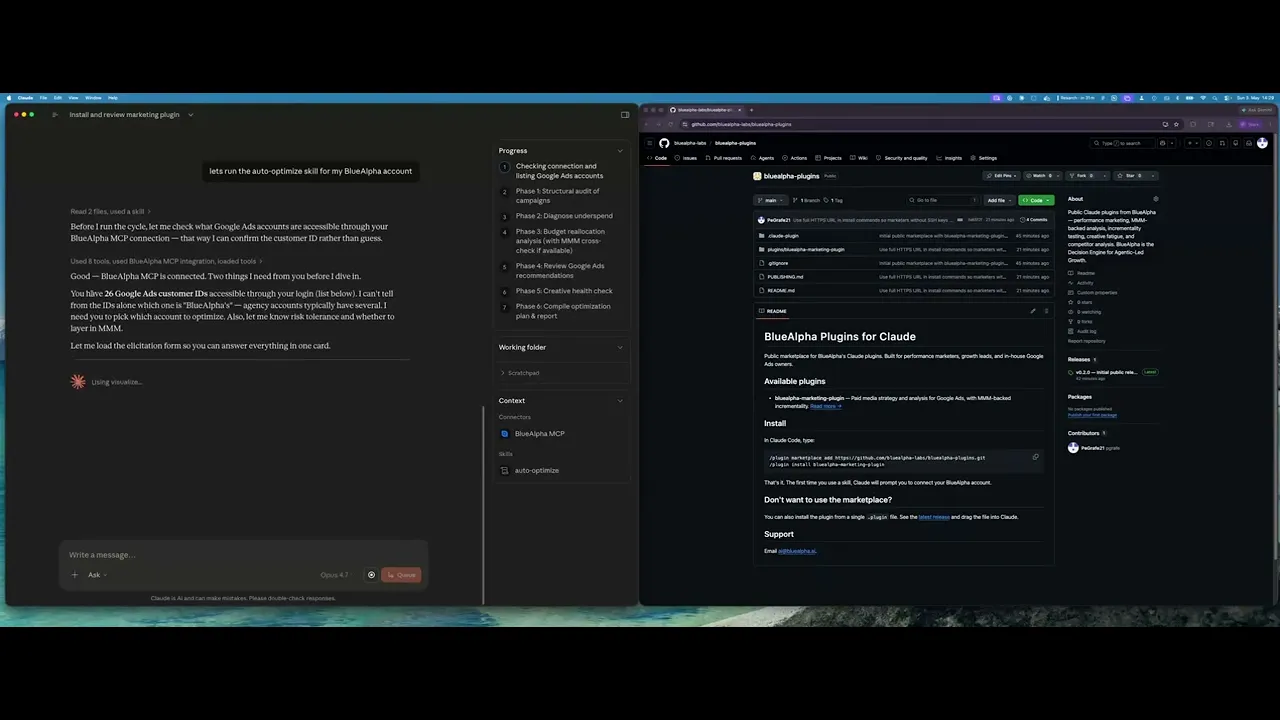
The BlueAlpha Marketing Plugin for Google Ads puts a team of specialized marketing agents inside Claude. Ten skills connect directly to the Google Ads API and handle the jobs that eat your week: account audits, budget reallocation, creative refreshes, competitive response, geo expansion, incrementality testing. Each one follows the same loop: Analyze, Decide, Plan, Act, Prove. This page is the index. Pick the skill that matches your job-to-be-done and jump to the prompt that runs it.

If you manage Google Ads, whether in-house, at an agency, or as a freelancer, you spend a lot of your week doing the same handful of things: auditing structure, reallocating budget, refreshing creative, chasing competitors, planning geo expansion, and trying to prove incrementality. The BlueAlpha Marketing Plugin turns each of those workflows into a single Claude invocation that uses live Google Ads data, not guesses.

Performance marketing has more data than it knows what to do with, and the bottleneck was never data. It's the absence of a system that turns every signal into a decision fast enough to matter, and produces a deployment-ready spec. That's what BlueAlpha built: agents delivered through Claude via MCP, where each skill owns a specific decision surface. Your growth lead asks the decision; they don't dig for it.


All ten Google Ads skills in the BlueAlpha Marketing Plugin

Each skill is an agent that owns a specific decision surface, grouped by the type of decision it makes.


Analysis & optimization:

  • auto-optimize: Runs a full optimization cycle: structural audit, underspend diagnosis, budget reallocation, recommendations review, and creative health check. The weekly pulse.

  • full-monty: Orchestrates every skill in sequence for a comprehensive top-to-bottom audit plus a strategic deployment plan for the next quarter.

  • audience-intelligence: Analyzes audience performance across Google Ads and recommends bid modifiers, new segments, exclusions, and observation-to-targeting moves.

  • seo-paid-bridge: Finds where organic and paid search overlap or leave gaps, then specs complementary paid campaigns that maximize total search click share.


Creative:

  • brand-refresh-pipeline: Detects creative fatigue, audits brand voice, and generates fresh responsive search ad copy for any campaign.

  • content-to-campaign: Turns any piece of content (blog, case study, webinar, comparison page) into a paid campaign complete with keywords and ad copy.


Competitive:

  • competitive-conquest: Researches competitors, identifies messaging gaps, and designs conquest campaign specs that target competitor brand terms.

  • competitive-counterpunch: Detects when competitors gain auction share on your brand and plans a proportional defensive response.


Budget & expansion:

  • geo-expansion-scout: Identifies new geographic markets worth entering by analyzing geo performance, keyword volume, and competitive density.


Testing & measurement:

  • incrementality-test-runner: Designs and monitors geo-based incrementality tests in Google Ads with integrity checks and lift analysis.


Analyze > Decide > Plan > Act > Prove

Every agent skill follows the same loop:

1. Analyze. The agent surfaces what needs attention. Anomalies, fatigue, budget drift, incrementality shifts, competitive moves. You don't go looking for problems; the agent brings them to you.

2. Decide. The agent produces a recommendation with the signal that backs it. Every decision is auditable: you see the data, the logic, and the confidence level.

3. Plan. Every recommendation comes with a sequenced action plan that separates what to do now from what to test first. Budget moves, creative swaps, and structural changes are ordered by impact and risk so nothing ships out of sequence.

4. Act. The agent produces a deployment-ready output. Not a slide in a deck; a spec you can build in Google Ads Editor the same day.

5. Prove. After changes ship, the loop closes with a measurement check: did the move produce the predicted lift? Geo holdout results, MMM refits, and period-over-period reads feed back into the next cycle so every subsequent recommendation is sharper than the last.

A single Head of Growth with BlueAlpha manages what used to require a team of ten.


Who the Plugin Is For

The plugin was built for working marketers, not for analysts who want to write GAQL queries by hand.

  • You manage one or more Google Ads accounts and can't keep up with weekly optimization.

  • You run an agency and want every account to get the same senior-level audit cadence without hiring more strategists.

  • You're a Head of Growth running seven channels and need ten times the capacity without ten times the headcount.

  • You're an in-house marketer who wants causal measurement underneath every decision, not platform attribution you don't fully trust.

Every skill is designed around the same principle: the human stays in the loop, Claude does the heavy lifting.

BlueAlpha delivers the plugin through forward-deployed engineering. A senior growth partner embeds with your team, builds the measurement and execution stack directly, and trains your team to run the agents independently. You keep the seat. The agents eliminate the hours. The knowledge base stays yours.


How to Pick the Right Skill

If you need to…

Run this skill

Do a weekly or bi-weekly health check

auto-optimize

Rebuild the account from scratch with a full strategy

full-monty

Figure out which audiences are wasting budget

audience-intelligence

Refresh tired ad copy

brand-refresh-pipeline

Attack a competitor's brand term inventory

competitive-conquest

Defend against a competitor bidding on your brand

competitive-counterpunch

Turn a blog post, case study, or comparison page into a paid campaign

content-to-campaign

Expand into new cities, states, or DMAs

geo-expansion-scout

Prove (or disprove) incrementality with a geo holdout

incrementality-test-runner

Stop bidding on keywords you already own organically — or start bidding where organic is weak

seo-paid-bridge


How Does the BlueAlpha Marketing Plugin Connect to Google Ads?

Every skill in the BlueAlpha Marketing Plugin is backed by an MCP connector that gives Claude direct, permissioned access to the Google Ads API. MCP-native means the whole system lives inside Claude, Codex, or any AI workspace your team already uses. No separate login, no dashboard to check. The decision lives where the conversation happens.

The BlueAlpha Google Ads connector gives Claude the ability to:

  • Audit campaign structure and score every campaign

  • Diagnose underspend across five layers (hard issues, reach, bidding, quality, other)

  • Analyze audience and creative performance with built-in benchmarks

  • Pull auction insights, geographic performance, and keyword coverage

  • Generate keyword ideas from a URL or seed terms

  • Prepare exact specs for campaigns, ad groups, keywords, and RSAs

  • Apply or dismiss Google recommendations with a critical eye

  • Monitor incrementality tests for geo leakage and change-history contamination

Where relevant, skills also cross-reference a Meridian MMM (marketing mix model) via the BlueAlpha MMM connector to validate platform attribution against causal incrementality data. The MMM is optional. Every skill works without it, but the recommendations get sharper when causal measurement is underneath.

Google released its own official Google Ads MCP server in April 2026, which validates the category. That server is read-only and ships three tools: list accounts, search (run a GAQL query), and get resource metadata. It is a solid foundation for pulling reports, but it cannot create campaigns, change bids, or push optimization decisions. The BlueAlpha connector gives Claude authenticated access to your Google Ads data. Skills can audit, diagnose, and produce deployment-ready recommendations. Setup is also different. Most open-source Google Ads MCP implementations require you to provision a developer token (a process that Google's own documentation warns can take weeks), configure OAuth credentials, and manage token refresh. The BlueAlpha connector handles all of that behind a single sign-in. One URL, no tokens, no config files.

The same plugin also ships Meta Ads skills, LinkedIn Ads skills, TikTok Ads skills, and Meridian MMM skills. For a side-by-side comparison of all MCP servers for performance marketing, see the full MCP comparison.


Getting Connected

There are two pieces to install: the BlueAlpha MCP connector (so Claude can read your Google Ads data and your Meridian MMM) and the BlueAlpha Marketing Plugin itself (the ten skills that put that data to work). Total setup time is about a minute.


Step 1: Install the BlueAlpha MCP connector

  1. Open Settings in the Claude desktop app

  2. Go to Connectors > Add custom connector

  3. Name it: BlueAlpha MCP

  4. URL: https://mcp.bluealpha.ai/mcp

  5. Click Connect and sign in with your BlueAlpha account

That single sign-in wires Claude up to your Google Ads accounts (and your Meridian MMM, if you have one). No keys, no IDs, no config files.


Step 2: Install the plugin

Option A: Cowork (drag-and-drop)

  1. Go to github.com/bluealpha-labs/bluealpha-plugins

  2. Click Releases on the right rail and open the latest release

  3. Expand Assets and click bluealpha-marketing-plugin.plugin to download

  4. Drag the downloaded file into an open Cowork session and click Install when prompted

Option B: Claude Code (slash commands)

/plugin marketplace add <https://github.com/bluealpha-labs/bluealpha-plugins.git>

/plugin marketplace add <https://github.com/bluealpha-labs/bluealpha-plugins.git>


Step 3: Try a skill

"Run auto-optimize on customer 123-456-7890, moderate risk tolerance, and cross-check with our Meridian MMM."


Skill Reference: Example Prompts

Every skill is invoked with a sentence. Below is a copy-paste prompt for each one, with placeholders you can fill in (<customer_id>, <competitor>, <URL>, <domain>). Claude routes each prompt to the right skill automatically.


auto-optimize: the weekly pulse

Audit my Google Ads account <customer_id>. Last 30 days, moderate risk tolerance. Cross-check budget recommendations with our Meridian MMM if available.


full-monty: quarterly top-to-bottom

Run a full top-to-bottom Google Ads review on <customer_id>. Include audit, audience analysis, competitive scan, creative health, geo opportunities, SEO/paid coverage, and an incrementality test recommendation. Output a quarterly deployment plan.


audience-intelligence: who's actually converting

Analyze audience performance across <customer_id> over the last 60 days. Show me which segments are converting, which are wasting spend, and recommend bid modifiers, observation-to-targeting moves, and exclusions.


brand-refresh-pipeline: fix fatigue before it costs you

Detect creative fatigue in <customer_id> and generate fresh responsive search ad copy for any campaign where current ads are degrading.


competitive-conquest: go on offense

Build a conquest campaign spec targeting <competitor>'s brand terms in <customer_id>. Research their messaging gaps and design RSAs that exploit them.


competitive-counterpunch: defend your brand

Check auction insights on my brand terms in <customer_id> for the last 14 days. Flag any competitor that's gained share and plan a proportional defensive response.


content-to-campaign: turn content into campaigns

Take this blog post <URL> and turn it into a paid campaign for <customer_id>. Generate keywords, RSA copy, audience targeting, and a budget recommendation.


geo-expansion-scout: find the next market

Identify new geographic markets worth entering for <customer_id>. Look at geo performance in current markets, keyword volume in adjacent geos, and competitive density. Rank the top 5 with rationale.


incrementality-test-runner: prove what's real

Design a geo-based incrementality test for <customer_id>. Recommend treatment vs control geos, test duration, MDE, budget, and success criteria. Then monitor it weekly with integrity checks.


seo-paid-bridge: close search gaps

Find where organic and paid search overlap or leave gaps for <domain> in <customer_id>. Spec complementary paid campaigns that maximize total search click share.


Why BlueAlpha Isn't Just Another Marketing Tool

There are two kinds of products in performance marketing, and BlueAlpha is neither.

The first is rigorous but passive: statistically sound measurement that stops at the dashboard. The insight is accurate; nothing happens with it. The second is actionable but shallow: AI tools with fast recommendations built on correlational attribution that doesn't survive iOS privacy or a skeptical CFO.

BlueAlpha is the third option: causal measurement underneath, real agents producing deployment-ready specs, MCP-native. Not a measurement vendor. Not a dashboard with a chatbot. The decision layer under the next generation of marketing.

The difference shows up in results. When BlueAlpha ran incrementality tests for Cann, AppLovin's own dashboard swung between 2x and 16x ROAS and the third-party tool Triple Whale showed 4.77x, but the measured incremental lift was zero, saving Cann $480K per year in misallocated spend. For Klover, BlueAlpha's measurement cut Meta iOS spend by 50% with zero lost conversions, freeing budget to scale Apple Search Ads by 10x. For beehiiv, causal measurement caught a channel overreporting performance by 345%. For Pettable, nine months of causal measurement reduced blended CAC by 14%, unlocking $2.12M in annualized savings.

FAQ

What is the BlueAlpha Marketing Plugin for Claude?

It's a plugin for Claude that packages ten marketing workflows (audit, optimization, competitive, creative, content, geo, incrementality, and SEO-paid) into skills you can invoke with a sentence. Each skill is backed by the Google Ads API via an MCP connector.

Do I need MMM data to use the plugin?

No. Every skill works on Google Ads data alone. If you have an MMM connected, the skills use it to validate platform attribution and sharpen their recommendations, but it's optional.

Will the plugin make changes to my Google Ads account automatically?

Not currently. The plugin reads your Google Ads data and produces recommendations, campaign specs, and optimization plans. You execute the changes in Google Ads Editor or the Ads UI. On-platform execution is on the roadmap.

How often should I run each skill?

auto-optimize: weekly or bi-weekly. brand-refresh-pipeline: 6-8 week rhythm. audience-intelligence: monthly. full-monty: quarterly. Everything else is triggered by a specific event (new competitor, new content, new market).

Can I use the plugin with multiple Google Ads accounts?

Yes. The plugin supports MCC (manager) access and can switch between customer IDs within a single session.

What can the BlueAlpha plugin do that Google's official Google Ads MCP can't?

Google's official MCP (released April 2026) is read-only and ships three tools: listing accounts, running a GAQL query, and getting resource metadata. The BlueAlpha plugin ships ten skills that go beyond querying: full-account audit with scoring, budget reallocation with causal measurement validation, creative fatigue detection and RSA generation, competitive conquest campaign design, geo expansion analysis, and incrementality test design with integrity monitoring. The BlueAlpha connector also handles authentication behind a single sign-in.

Where can I find the full setup documentation?

The complete installation walkthrough, authentication scopes, troubleshooting, and the full tool reference live on the BlueAlpha MCP documentation page.

Does the plugin audit Performance Max campaigns?

Yes. The auto-optimize skill audits PMax alongside every other campaign type. It specifically flags PMax campaigns where reported conversions look inflated relative to the account baseline, and routes suspicious cases to the incrementality-test-runner for a geo holdout that measures PMax's true incremental contribution.


Your Next Step

Pick the skill that matches the job you're trying to get done today, copy the prompt above, and run it in Claude. If you're new to the plugin, start with auto-optimize. It's the most common entry point and the easiest way to see the Analyze > Decide > Plan > Act > Prove loop in action.

If you haven't installed the plugin yet, setup takes about a minute. If you'd rather see the skills run on your account before installing, book a walkthrough.

The BlueAlpha Marketing Plugin for Google Ads puts a team of specialized marketing agents inside Claude. Ten skills connect directly to the Google Ads API and handle the jobs that eat your week: account audits, budget reallocation, creative refreshes, competitive response, geo expansion, incrementality testing. Each one follows the same loop: Analyze, Decide, Plan, Act, Prove. This page is the index. Pick the skill that matches your job-to-be-done and jump to the prompt that runs it.

If you manage Google Ads, whether in-house, at an agency, or as a freelancer, you spend a lot of your week doing the same handful of things: auditing structure, reallocating budget, refreshing creative, chasing competitors, planning geo expansion, and trying to prove incrementality. The BlueAlpha Marketing Plugin turns each of those workflows into a single Claude invocation that uses live Google Ads data, not guesses.

Performance marketing has more data than it knows what to do with, and the bottleneck was never data. It's the absence of a system that turns every signal into a decision fast enough to matter, and produces a deployment-ready spec. That's what BlueAlpha built: agents delivered through Claude via MCP, where each skill owns a specific decision surface. Your growth lead asks the decision; they don't dig for it.


All ten Google Ads skills in the BlueAlpha Marketing Plugin

Each skill is an agent that owns a specific decision surface, grouped by the type of decision it makes.


Analysis & optimization:

  • auto-optimize: Runs a full optimization cycle: structural audit, underspend diagnosis, budget reallocation, recommendations review, and creative health check. The weekly pulse.

  • full-monty: Orchestrates every skill in sequence for a comprehensive top-to-bottom audit plus a strategic deployment plan for the next quarter.

  • audience-intelligence: Analyzes audience performance across Google Ads and recommends bid modifiers, new segments, exclusions, and observation-to-targeting moves.

  • seo-paid-bridge: Finds where organic and paid search overlap or leave gaps, then specs complementary paid campaigns that maximize total search click share.


Creative:

  • brand-refresh-pipeline: Detects creative fatigue, audits brand voice, and generates fresh responsive search ad copy for any campaign.

  • content-to-campaign: Turns any piece of content (blog, case study, webinar, comparison page) into a paid campaign complete with keywords and ad copy.


Competitive:

  • competitive-conquest: Researches competitors, identifies messaging gaps, and designs conquest campaign specs that target competitor brand terms.

  • competitive-counterpunch: Detects when competitors gain auction share on your brand and plans a proportional defensive response.


Budget & expansion:

  • geo-expansion-scout: Identifies new geographic markets worth entering by analyzing geo performance, keyword volume, and competitive density.


Testing & measurement:

  • incrementality-test-runner: Designs and monitors geo-based incrementality tests in Google Ads with integrity checks and lift analysis.


Analyze > Decide > Plan > Act > Prove

Every agent skill follows the same loop:

1. Analyze. The agent surfaces what needs attention. Anomalies, fatigue, budget drift, incrementality shifts, competitive moves. You don't go looking for problems; the agent brings them to you.

2. Decide. The agent produces a recommendation with the signal that backs it. Every decision is auditable: you see the data, the logic, and the confidence level.

3. Plan. Every recommendation comes with a sequenced action plan that separates what to do now from what to test first. Budget moves, creative swaps, and structural changes are ordered by impact and risk so nothing ships out of sequence.

4. Act. The agent produces a deployment-ready output. Not a slide in a deck; a spec you can build in Google Ads Editor the same day.

5. Prove. After changes ship, the loop closes with a measurement check: did the move produce the predicted lift? Geo holdout results, MMM refits, and period-over-period reads feed back into the next cycle so every subsequent recommendation is sharper than the last.

A single Head of Growth with BlueAlpha manages what used to require a team of ten.


Who the Plugin Is For

The plugin was built for working marketers, not for analysts who want to write GAQL queries by hand.

  • You manage one or more Google Ads accounts and can't keep up with weekly optimization.

  • You run an agency and want every account to get the same senior-level audit cadence without hiring more strategists.

  • You're a Head of Growth running seven channels and need ten times the capacity without ten times the headcount.

  • You're an in-house marketer who wants causal measurement underneath every decision, not platform attribution you don't fully trust.

Every skill is designed around the same principle: the human stays in the loop, Claude does the heavy lifting.

BlueAlpha delivers the plugin through forward-deployed engineering. A senior growth partner embeds with your team, builds the measurement and execution stack directly, and trains your team to run the agents independently. You keep the seat. The agents eliminate the hours. The knowledge base stays yours.


How to Pick the Right Skill

If you need to…

Run this skill

Do a weekly or bi-weekly health check

auto-optimize

Rebuild the account from scratch with a full strategy

full-monty

Figure out which audiences are wasting budget

audience-intelligence

Refresh tired ad copy

brand-refresh-pipeline

Attack a competitor's brand term inventory

competitive-conquest

Defend against a competitor bidding on your brand

competitive-counterpunch

Turn a blog post, case study, or comparison page into a paid campaign

content-to-campaign

Expand into new cities, states, or DMAs

geo-expansion-scout

Prove (or disprove) incrementality with a geo holdout

incrementality-test-runner

Stop bidding on keywords you already own organically — or start bidding where organic is weak

seo-paid-bridge


How Does the BlueAlpha Marketing Plugin Connect to Google Ads?

Every skill in the BlueAlpha Marketing Plugin is backed by an MCP connector that gives Claude direct, permissioned access to the Google Ads API. MCP-native means the whole system lives inside Claude, Codex, or any AI workspace your team already uses. No separate login, no dashboard to check. The decision lives where the conversation happens.

The BlueAlpha Google Ads connector gives Claude the ability to:

  • Audit campaign structure and score every campaign

  • Diagnose underspend across five layers (hard issues, reach, bidding, quality, other)

  • Analyze audience and creative performance with built-in benchmarks

  • Pull auction insights, geographic performance, and keyword coverage

  • Generate keyword ideas from a URL or seed terms

  • Prepare exact specs for campaigns, ad groups, keywords, and RSAs

  • Apply or dismiss Google recommendations with a critical eye

  • Monitor incrementality tests for geo leakage and change-history contamination

Where relevant, skills also cross-reference a Meridian MMM (marketing mix model) via the BlueAlpha MMM connector to validate platform attribution against causal incrementality data. The MMM is optional. Every skill works without it, but the recommendations get sharper when causal measurement is underneath.

Google released its own official Google Ads MCP server in April 2026, which validates the category. That server is read-only and ships three tools: list accounts, search (run a GAQL query), and get resource metadata. It is a solid foundation for pulling reports, but it cannot create campaigns, change bids, or push optimization decisions. The BlueAlpha connector gives Claude authenticated access to your Google Ads data. Skills can audit, diagnose, and produce deployment-ready recommendations. Setup is also different. Most open-source Google Ads MCP implementations require you to provision a developer token (a process that Google's own documentation warns can take weeks), configure OAuth credentials, and manage token refresh. The BlueAlpha connector handles all of that behind a single sign-in. One URL, no tokens, no config files.

The same plugin also ships Meta Ads skills, LinkedIn Ads skills, TikTok Ads skills, and Meridian MMM skills. For a side-by-side comparison of all MCP servers for performance marketing, see the full MCP comparison.


Getting Connected

There are two pieces to install: the BlueAlpha MCP connector (so Claude can read your Google Ads data and your Meridian MMM) and the BlueAlpha Marketing Plugin itself (the ten skills that put that data to work). Total setup time is about a minute.


Step 1: Install the BlueAlpha MCP connector

  1. Open Settings in the Claude desktop app

  2. Go to Connectors > Add custom connector

  3. Name it: BlueAlpha MCP

  4. URL: https://mcp.bluealpha.ai/mcp

  5. Click Connect and sign in with your BlueAlpha account

That single sign-in wires Claude up to your Google Ads accounts (and your Meridian MMM, if you have one). No keys, no IDs, no config files.


Step 2: Install the plugin

Option A: Cowork (drag-and-drop)

  1. Go to github.com/bluealpha-labs/bluealpha-plugins

  2. Click Releases on the right rail and open the latest release

  3. Expand Assets and click bluealpha-marketing-plugin.plugin to download

  4. Drag the downloaded file into an open Cowork session and click Install when prompted

Option B: Claude Code (slash commands)

/plugin marketplace add <https://github.com/bluealpha-labs/bluealpha-plugins.git>


Step 3: Try a skill

"Run auto-optimize on customer 123-456-7890, moderate risk tolerance, and cross-check with our Meridian MMM."


Skill Reference: Example Prompts

Every skill is invoked with a sentence. Below is a copy-paste prompt for each one, with placeholders you can fill in (<customer_id>, <competitor>, <URL>, <domain>). Claude routes each prompt to the right skill automatically.


auto-optimize: the weekly pulse

Audit my Google Ads account <customer_id>. Last 30 days, moderate risk tolerance. Cross-check budget recommendations with our Meridian MMM if available.


full-monty: quarterly top-to-bottom

Run a full top-to-bottom Google Ads review on <customer_id>. Include audit, audience analysis, competitive scan, creative health, geo opportunities, SEO/paid coverage, and an incrementality test recommendation. Output a quarterly deployment plan.


audience-intelligence: who's actually converting

Analyze audience performance across <customer_id> over the last 60 days. Show me which segments are converting, which are wasting spend, and recommend bid modifiers, observation-to-targeting moves, and exclusions.


brand-refresh-pipeline: fix fatigue before it costs you

Detect creative fatigue in <customer_id> and generate fresh responsive search ad copy for any campaign where current ads are degrading.


competitive-conquest: go on offense

Build a conquest campaign spec targeting <competitor>'s brand terms in <customer_id>. Research their messaging gaps and design RSAs that exploit them.


competitive-counterpunch: defend your brand

Check auction insights on my brand terms in <customer_id> for the last 14 days. Flag any competitor that's gained share and plan a proportional defensive response.


content-to-campaign: turn content into campaigns

Take this blog post <URL> and turn it into a paid campaign for <customer_id>. Generate keywords, RSA copy, audience targeting, and a budget recommendation.


geo-expansion-scout: find the next market

Identify new geographic markets worth entering for <customer_id>. Look at geo performance in current markets, keyword volume in adjacent geos, and competitive density. Rank the top 5 with rationale.


incrementality-test-runner: prove what's real

Design a geo-based incrementality test for <customer_id>. Recommend treatment vs control geos, test duration, MDE, budget, and success criteria. Then monitor it weekly with integrity checks.


seo-paid-bridge: close search gaps

Find where organic and paid search overlap or leave gaps for <domain> in <customer_id>. Spec complementary paid campaigns that maximize total search click share.


Why BlueAlpha Isn't Just Another Marketing Tool

There are two kinds of products in performance marketing, and BlueAlpha is neither.

The first is rigorous but passive: statistically sound measurement that stops at the dashboard. The insight is accurate; nothing happens with it. The second is actionable but shallow: AI tools with fast recommendations built on correlational attribution that doesn't survive iOS privacy or a skeptical CFO.

BlueAlpha is the third option: causal measurement underneath, real agents producing deployment-ready specs, MCP-native. Not a measurement vendor. Not a dashboard with a chatbot. The decision layer under the next generation of marketing.

The difference shows up in results. When BlueAlpha ran incrementality tests for Cann, AppLovin's own dashboard swung between 2x and 16x ROAS and the third-party tool Triple Whale showed 4.77x, but the measured incremental lift was zero, saving Cann $480K per year in misallocated spend. For Klover, BlueAlpha's measurement cut Meta iOS spend by 50% with zero lost conversions, freeing budget to scale Apple Search Ads by 10x. For beehiiv, causal measurement caught a channel overreporting performance by 345%. For Pettable, nine months of causal measurement reduced blended CAC by 14%, unlocking $2.12M in annualized savings.

FAQ

What is the BlueAlpha Marketing Plugin for Claude?

It's a plugin for Claude that packages ten marketing workflows (audit, optimization, competitive, creative, content, geo, incrementality, and SEO-paid) into skills you can invoke with a sentence. Each skill is backed by the Google Ads API via an MCP connector.

Do I need MMM data to use the plugin?

No. Every skill works on Google Ads data alone. If you have an MMM connected, the skills use it to validate platform attribution and sharpen their recommendations, but it's optional.

Will the plugin make changes to my Google Ads account automatically?

Not currently. The plugin reads your Google Ads data and produces recommendations, campaign specs, and optimization plans. You execute the changes in Google Ads Editor or the Ads UI. On-platform execution is on the roadmap.

How often should I run each skill?

auto-optimize: weekly or bi-weekly. brand-refresh-pipeline: 6-8 week rhythm. audience-intelligence: monthly. full-monty: quarterly. Everything else is triggered by a specific event (new competitor, new content, new market).

Can I use the plugin with multiple Google Ads accounts?

Yes. The plugin supports MCC (manager) access and can switch between customer IDs within a single session.

What can the BlueAlpha plugin do that Google's official Google Ads MCP can't?

Google's official MCP (released April 2026) is read-only and ships three tools: listing accounts, running a GAQL query, and getting resource metadata. The BlueAlpha plugin ships ten skills that go beyond querying: full-account audit with scoring, budget reallocation with causal measurement validation, creative fatigue detection and RSA generation, competitive conquest campaign design, geo expansion analysis, and incrementality test design with integrity monitoring. The BlueAlpha connector also handles authentication behind a single sign-in.

Where can I find the full setup documentation?

The complete installation walkthrough, authentication scopes, troubleshooting, and the full tool reference live on the BlueAlpha MCP documentation page.

Does the plugin audit Performance Max campaigns?

Yes. The auto-optimize skill audits PMax alongside every other campaign type. It specifically flags PMax campaigns where reported conversions look inflated relative to the account baseline, and routes suspicious cases to the incrementality-test-runner for a geo holdout that measures PMax's true incremental contribution.


Your Next Step

Pick the skill that matches the job you're trying to get done today, copy the prompt above, and run it in Claude. If you're new to the plugin, start with auto-optimize. It's the most common entry point and the easiest way to see the Analyze > Decide > Plan > Act > Prove loop in action.

If you haven't installed the plugin yet, setup takes about a minute. If you'd rather see the skills run on your account before installing, book a walkthrough.

Do next week's marketing work in the next hour.

Do next week's marketing work in the next hour.

Do next week's marketing work in the next hour.