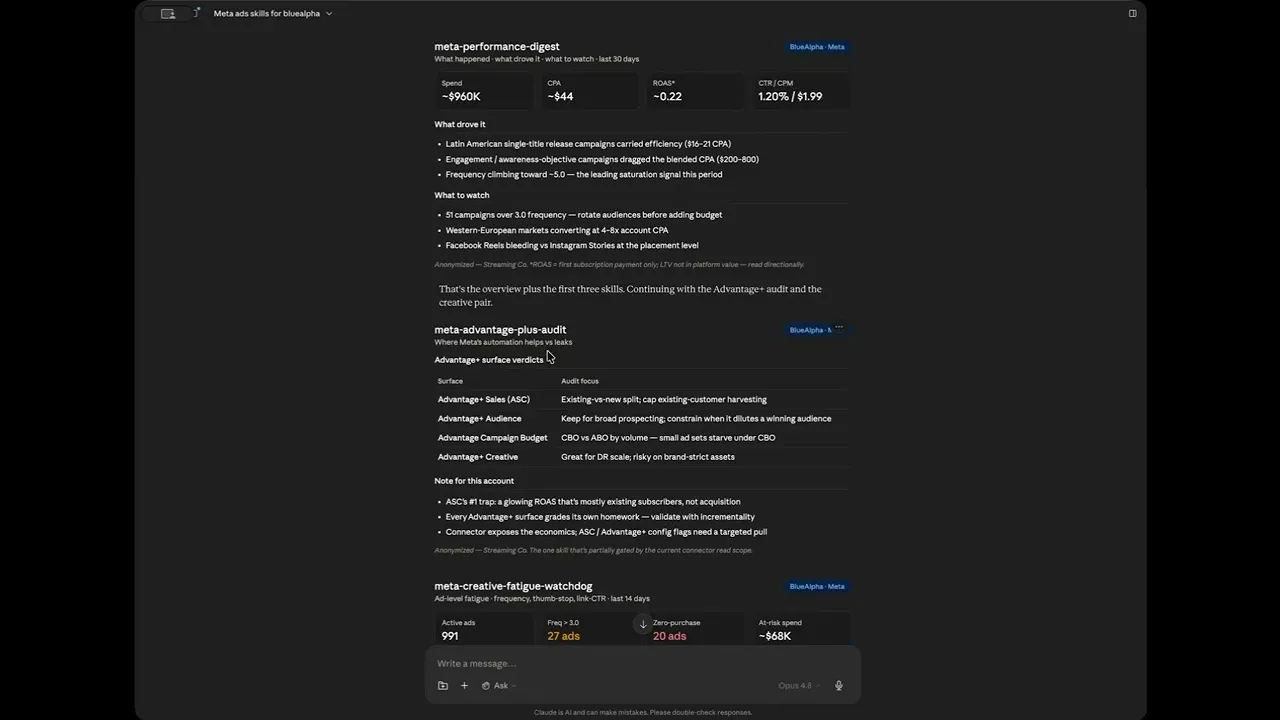
Meta Ads MCP in Claude: The BlueAlpha Marketing Plugin
Facebook and Instagram Ads inside Claude via MCP: 12 skills for account audits, creative fatigue, placement analysis, geo expansion, and incrementality.
The BlueAlpha Marketing Plugin for Meta puts a team of specialized Facebook/Instagram marketing agents inside Claude. Twelve skills connect directly to the Meta Marketing API and handle the jobs that eat your week: account audits, creative fatigue detection, placement and audience breakdowns, Advantage+ audits, geo expansion, conversion-signal (CAPI) health checks, incrementality testing, campaign creation, and automated reporting. Each one follows the same loop: Analyze, Decide, Plan, Act, Prove. Under the hood, this is the system that turns every signal in your Meta account into a real decision and produces a deployment-ready spec. All of it runs inside Claude, no Ads Manager tabs, no exports, no manual data prep.
Every Meta advertiser hits the same wall. Ads Manager tells you what happened. It doesn't tell you what to do next. You end up with a dozen tabs open: campaign view, the breakdown menu, the creative library, Events Manager, a spreadsheet someone built last quarter, trying to synthesize a decision that should take ten minutes.
The BlueAlpha Meta skills close that gap for Facebook and Instagram advertisers. Claude connects directly to your Meta Ads account via MCP (Model Context Protocol), pulls the data, runs the analysis, and returns a structured recommendation inside the conversation. You don't export anything. You don't copy-paste numbers. You type a prompt and get back a decision.
This walkthrough uses one real account end to end, anonymized here as Streaming Co, a global subscription-video brand running roughly $960K/month on Meta. Every "Real example" below is a live run against that account; the client name, exact geos, and absolute figures have been masked or rounded, but the structure of each finding is exactly what the skill produced.
All 12 Meta skills in the BlueAlpha Marketing Plugin
Measurement & trust
meta-capi-signal-health
Account health & optimization
meta-auto-optimizemeta-advantage-plus-auditmeta-full-monty
Creative performance
meta-creative-fatigue-watchdogmeta-creative-refresh
Audience, placement & geo
meta-audience-intelligencemeta-placement-performancemeta-geo-expansion
Measurement & validation
meta-incrementality-test
Campaign creation
meta-content-to-campaign
Reporting
meta-performance-digest
The Analyze > Decide > Plan > Act > Prove Loop
Every BlueAlpha skill follows the same five-step pattern:
1. Analyze. Claude calls the Meta Marketing API directly through MCP. No manual exports, no copy-paste. It pulls ad accounts, campaigns, ad sets, ads, and the Insights edge with full breakdown support (placement, age/gender, country, device) in real time.
2. Decide. The skill applies BlueAlpha's decision logic: efficiency scores, severity tiers, frequency/saturation thresholds, spend-waste estimates, and signal-trust gates. You get a tier map (Gold/Silver/Bronze/Cut or Critical/High/Moderate/Healthy), not a data dump.
3. Plan. Every recommendation comes with a sequenced action plan that separates what to do now from what to test first. Budget moves, creative swaps, and structural changes are ordered by impact and risk so nothing ships out of sequence.
4. Act. The output ends with a three-bucket deployment spec: Auto-approve (safe to execute now), Recommend (needs a quick review), Needs discussion (bigger structural moves). You know exactly what to do and in what order.
5. Prove. After changes ship, the loop closes with a measurement check: did the move produce the predicted lift? Geo holdout results, MMM refits, and period-over-period reads feed back into the next cycle so every subsequent recommendation is sharper than the last.
Who is the BlueAlpha Meta plugin for?
Performance marketers running Meta spend above $10K/month who want a faster weekly optimization cycle
Media buyers managing multiple ad accounts who need a structured read without manually pulling breakdowns
Growth leads who own the full funnel and need to tie Meta creative health and frequency back to CPA trends
Agency teams who want to show clients a clear, documented optimization rationale, not just a screenshot of Ads Manager
BlueAlpha delivers the plugin through forward-deployed engineering. A senior growth partner embeds with your team, builds the measurement and execution stack directly, and trains your team to run the agents independently. You keep the seat. The agents eliminate the hours. The knowledge base stays yours.
How to Pick the Right Meta Ads Skill
If you want to... | Use this skill |
|---|---|
Check whether you can even trust your Meta conversions |
|
Get a full account health check in one shot |
|
Decide where Meta's automation is helping vs leaking |
|
Find which ads are dying before CPA blows out |
|
Get a brief for net-new creative based on what's working |
|
Understand who's actually converting (age, gender, device) |
|
See where spend converts vs leaks (Reels/Feed/Stories/Audience Network) |
|
Identify new geos to scale and bleeding geos to cut |
|
Validate that Meta is driving real incremental revenue |
|
Send leadership a weekly Meta performance narrative |
|
Turn a blog post or launch into a Meta campaign spec |
|
Run everything at once |
|
How Does the BlueAlpha Meta Ads MCP Plugin Work?
Every Meta skill in the BlueAlpha Marketing Plugin is backed by an MCP connector that gives Claude direct, permissioned access to the Meta Marketing API through the facebook_ads_* tool family. MCP-native means the whole system lives inside Claude, Codex, or any AI workspace your team already uses. No separate login, no dashboard to check. The decision lives where the conversation happens, not in a separate dashboard you check after the fact.
The BlueAlpha Meta connector gives Claude the ability to:
List every ad account the user can manage (including Business Manager and client-access accounts)
Pull campaigns, ad sets, and ads with full configuration (objective, budget, status)
Read the Insights edge at any level (account, campaign, ad set, or ad) with breakdowns for placement (
publisher_platformxplatform_position), age, gender, country, and deviceCompute frequency, thumb-stop/ThruPlay, link-CTR, CPM, and relevance signals across the active creative set
Compare any entity period-over-period in a single call
Resolve conversions and revenue from the
actions/action_valuesarrays, with attribution windows (7-day click / 1-day view)
Where relevant, skills also cross-reference a Meridian MMM (marketing mix model) via the BlueAlpha MMM connector to validate Meta platform ROAS against causal incrementality data. The MMM is optional. Every skill works without it, but the recommendations get sharper when causal measurement is underneath.
Meta has its own Marketing API, and there are generic "connect your Facebook ads" MCP wrappers that simply expose it. The BlueAlpha plugin sits at a different layer. It ships twelve Meta-specific skills that turn API access into decisions: a signal-trust gate, full-account audit with severity tiers, leading-indicator creative fatigue detection, placement and audience tier maps, an Advantage+ audit, geo expansion analysis, and incrementality test design. Setup is also different. The BlueAlpha connector handles authentication behind a single sign-in: no app review, no system-user token, no token refresh management.
The same plugin powers Google Ads, LinkedIn Ads, and TikTok Ads skills inside the same Claude session. For a side-by-side comparison of Meta Ads MCP options, see the full MCP comparison.
How Do I Install the BlueAlpha Marketing Plugin?
There are two pieces to install: the BlueAlpha MCP connector (so Claude can read your Meta Ads data and your Meridian MMM) and the BlueAlpha Marketing Plugin itself (the skills that put that data to work). Total setup time is about a minute. Steps 1 and 3 are the same regardless of which Claude product you use; Step 2 has two paths depending on whether you're in Cowork or Claude Code.
Step 1: Install the BlueAlpha MCP connector
Open Settings in the Claude desktop app
Go to Connectors > Add custom connector
Name it:
BlueAlpha MCPURL:
https://mcp.bluealpha.ai/mcpClick Connect and sign in with your BlueAlpha account
That single sign-in wires Claude up to your Meta Ads accounts (and your Meridian MMM, if you have one). No keys, no IDs, no config files.
Step 2: Install the plugin
Pick the path that matches the Claude product you're using.
Option A: Cowork (drag-and-drop)
Click Releases on the right rail and open the latest release
Expand Assets and click
bluealpha-marketing-plugin.pluginto downloadDrag the downloaded file into an open Cowork session and click Install when prompted
That's it. No CLI, no settings menu. One drag.
Option B: Claude Code (slash commands)
Inside Claude Code, run these two commands:
The first registers the GitHub repo as a marketplace; the second installs the plugin from it.
Step 3: Try a skill
Invoking a skill is as simple as typing something like:
"Run meta-auto-optimize on my Meta account, last 30 days, moderate risk tolerance."
Claude will route that to the right skill, load the workflow, and walk you through the Analyze > Decide > Plan > Act > Prove loop.
Meta Skill Reference: Example Prompts and Outputs
meta-capi-signal-health
/meta-capi-signal-health or can I trust my Meta conversions?
Run this first. Every CPA and ROAS number downstream is only as good as the conversion signal feeding it. The skill reads the live data to confirm purchases are actually firing (pixel + Conversions API), that they're deduplicated to a single count, and that iOS/SKAN delivery looks sane, then hands you an Events Manager checklist for the config layer the read API can't see (Event Match Quality, the Aggregated Event Measurement 8-event priority order).
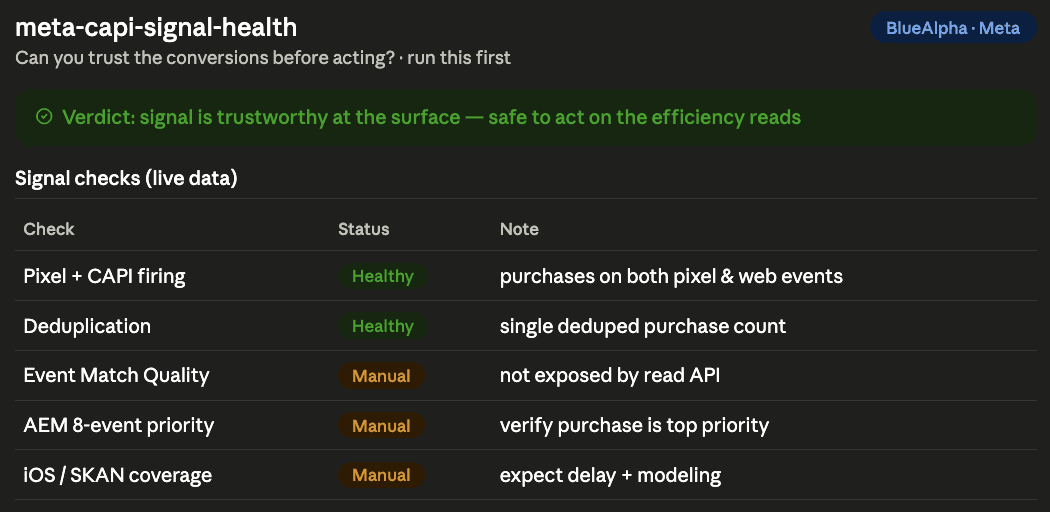
Real example, Streaming Co: Purchases were firing through both the pixel and server-side web events and deduplicating to a single number. The surface signal is healthy, so the rest of the audit can be trusted. The skill flagged the three config checks it can't read (EMQ, AEM priority, SKAN coverage) as manual Events-Manager verifications and gated nothing as Critical. That's the green light to act on the efficiency reads that follow.
meta-auto-optimize
/meta-auto-optimize or optimize my Meta account
Runs a complete optimization cycle across your entire Meta account. It audits campaign and ad-set structure (objective alignment, CBO vs ABO, learning-phase and fragmentation), diagnoses pacing and underspend, identifies budget reallocation opportunities, scans creative health, and compiles a risk-tiered action plan. The output separates what you can approve immediately from what needs a conversation.
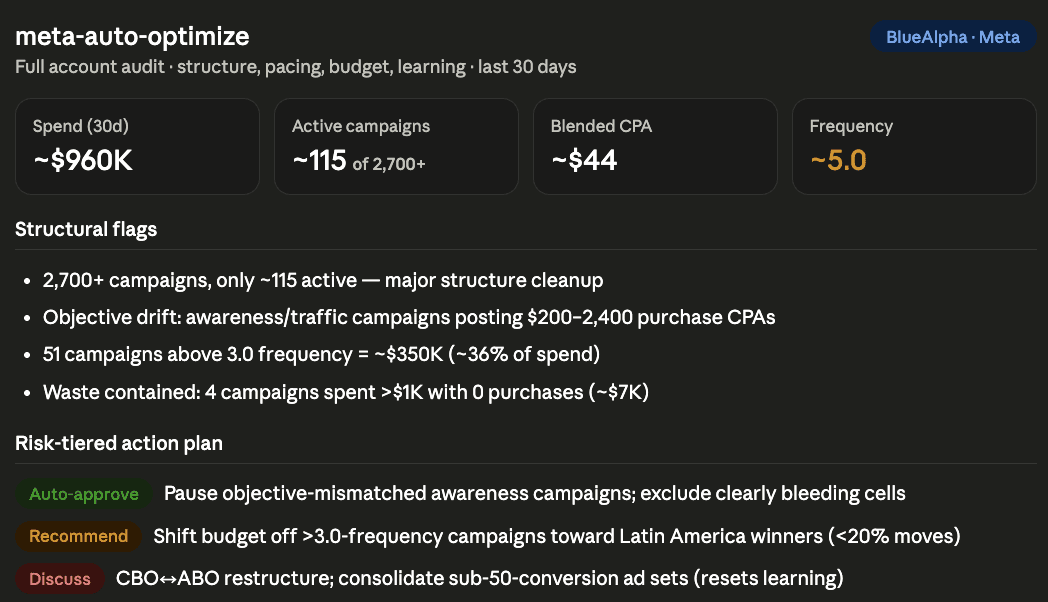
Real example, Streaming Co (~$960K/30d, subscription video): Auto-Optimize pulled the account and immediately surfaced structural debt: 2,700+ campaigns, only ~115 active, and the dominant efficiency risk: frequency ~5.0 account-wide, with 51 campaigns above 3.0 frequency representing ~36% of spend (~$350K). It flagged the objective drift (awareness- and traffic-objective campaigns posting $200-2,400 purchase CPAs) and confirmed waste was otherwise contained: only four campaigns spent over $1K with zero purchases. The 8-item action plan sorted cleanly into auto-approve, recommend, and needs-discussion. The whole run took under two minutes inside Claude.
meta-advantage-plus-audit
/meta-advantage-plus-audit or is Meta's automation helping or hurting?
Meta's Advantage+ suite is where the platform takes control, and where the most spend silently leaks or silently scales. This skill grades each surface: Advantage+ Sales (ASC), Advantage+ Audience (auto-expansion), Advantage Campaign Budget (CBO), and Advantage+ Creative. It decides keep / constrain / test / roll-back for each, with the existing-vs-new-customer split as the headline ASC check.
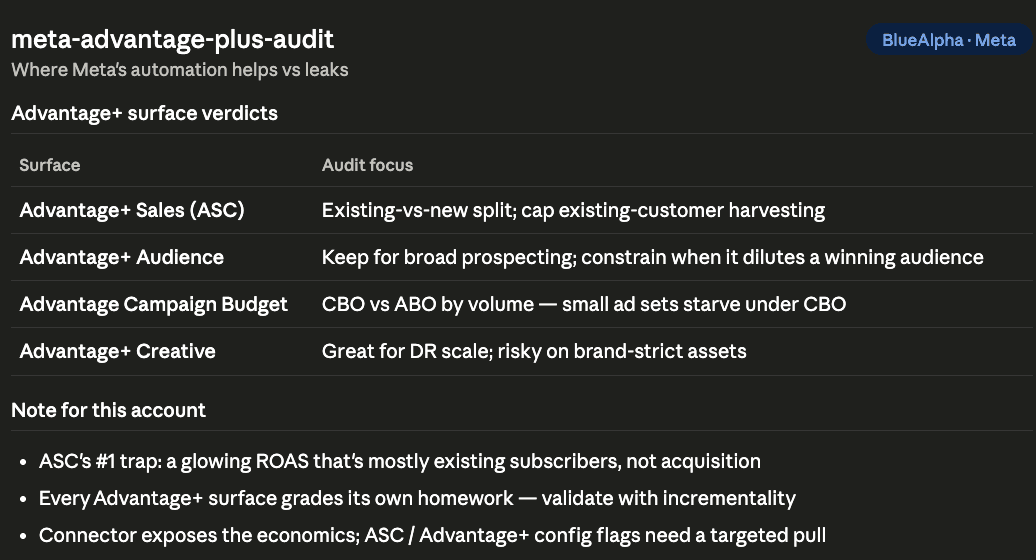
Why it matters: ASC's number-one trap is a glowing ROAS that's mostly existing subscribers being harvested, not new acquisition. Every Advantage+ surface grades its own homework, so the skill always pairs the economics with an incrementality recommendation.
meta-creative-fatigue-watchdog
/meta-creative-fatigue-watchdog or check my Meta creatives for fatigue — last 14 days
Pulls ad-level performance for a recent window and computes the Meta-specific fatigue panel: frequency (the dominant signal), thumb-stop / ThruPlay rate, link-CTR decay, CPM spikes, and Meta's relevance diagnostics. It fuses this with BlueAlpha's own creative-fatigue engine and classifies every ad Critical / High / Moderate / Healthy. The output is a prioritized refresh queue with at-risk spend.
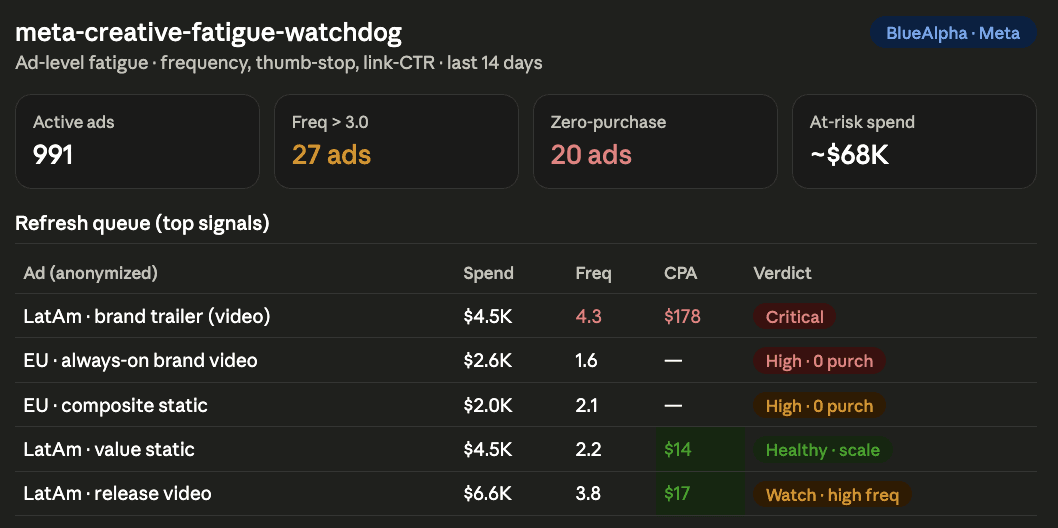
On Meta, frequency leads the CPA blowout. By the time you see CPA rise in Ads Manager, the audience has already been over-served for days.
Real example, Streaming Co (991 active ads, ~$550K / 14d): The Watchdog found 27 ads above 3.0 frequency (~$46K exposed) and 20 ads that spent over $500 with zero purchases (~$22K of waste), concentrated in brand/always-on video that earns clicks but no subscriptions. The clearest true-fatigue case was a LatAm brand-trailer video at frequency 4.3 and a $178 CPA, while the winning static "promos" creative held a $14 CPA at safe frequency, exactly the DNA to scale.
meta-creative-refresh
/meta-creative-refresh or generate a Meta creative brief from my fatigue results
Takes the Watchdog output (or runs it fresh) and turns it into a production-ready brief. It extracts the winning attributes from Healthy-tier ads (format, aspect ratio, hook style, CTA) and uses them as the foundation. Output is 3-5 concepts, each tied to a specific fatigue insight, with a launch plan that preserves learning (new ads into existing winning ad sets, not new ad sets).

Real example, Streaming Co: The brief retired the high-frequency LatAm brand trailer, replaced the click-but-no-purchase BAU video with a sound-off "why subscribe" value hook, and scaled the proven LatAm static DNA into the underperforming European markets with localized 9:16 + 4:5 assets.
meta-audience-intelligence
/meta-audience-intelligence or run audience intelligence on my Meta account — last 30 days
Pulls the Meta breakdowns that actually report (age x gender, device, geo) plus an audience-construct read (prospecting vs retargeting, lookalike vs broad vs Advantage+ Audience), and builds a tier map. It's explicit about the Meta reality: you can't see per-interest performance once an ad set runs, and retargeting's flattering platform CPA is the least incremental number in the account.
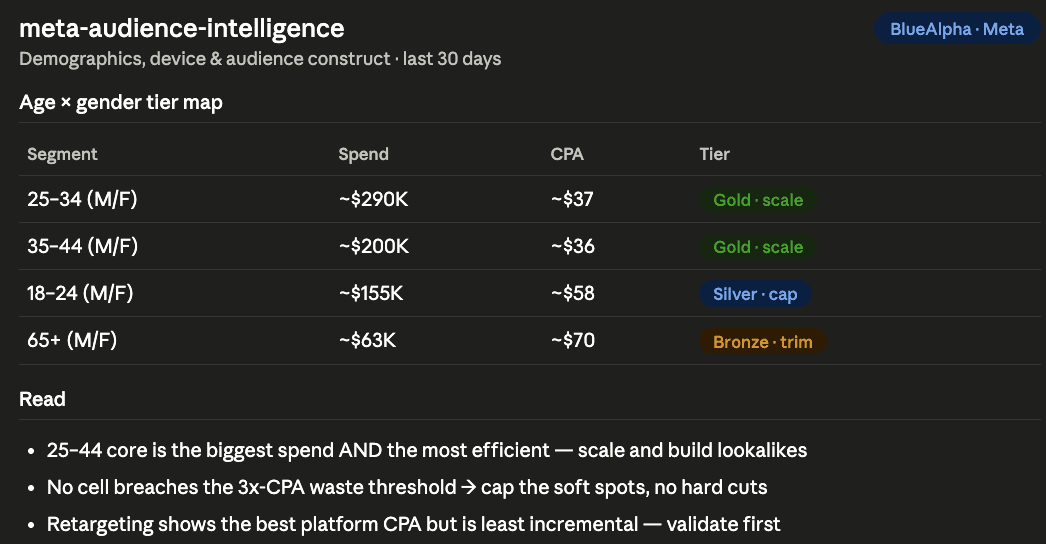
Real example, Streaming Co (30-day window): The 25-44 core was both the biggest spend and the most efficient (~$36 CPA), the segment to scale and build lookalikes from. The 18-24 and 65+ brackets were the soft spots (~$58 and ~$70 CPA), but no cell breached the 3x-CPA waste threshold, so the call was to cap, not cut. The skill flagged retargeting's strong platform CPA as "validate before scaling, least incremental."
meta-placement-performance
/meta-placement-performance or break my Meta spend down by placement
Breaks performance down by publisher_platform x platform_position(Facebook vs Instagram, Feed vs Reels vs Stories vs Explore vs Audience Network) to find where spend converts vs leaks, and decides Advantage+ Placements vs manual control. The Audience Network audit is a standard, high-confidence savings check.
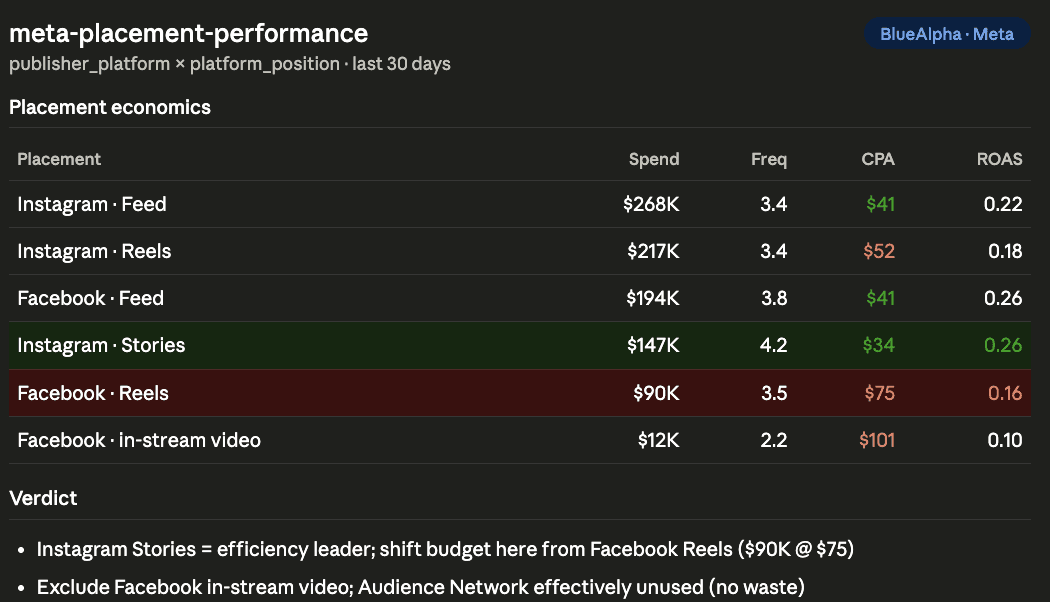
Real example, Streaming Co: Instagram Stories was the efficiency leader (~$34 CPA), while Facebook Reels was the biggest drain: ~$90K at a ~$75 CPA and 0.16 ROAS, the worst of any major placement, with Facebook in-stream video close behind (~$101 CPA). Audience Network was effectively unused, so it wasn't a waste source here. The move: shift Reels budget toward Stories and Feed, and exclude in-stream video.
meta-geo-expansion
/meta-geo-expansion or where should I scale and cut on Meta?
Analyzes geo performance by country and region, tiers each market Star / Volume / Drain, and surfaces expansion candidates that resemble your winners, with the operational-fit caveat that a cheap CPM in an unserviceable market is a trap.
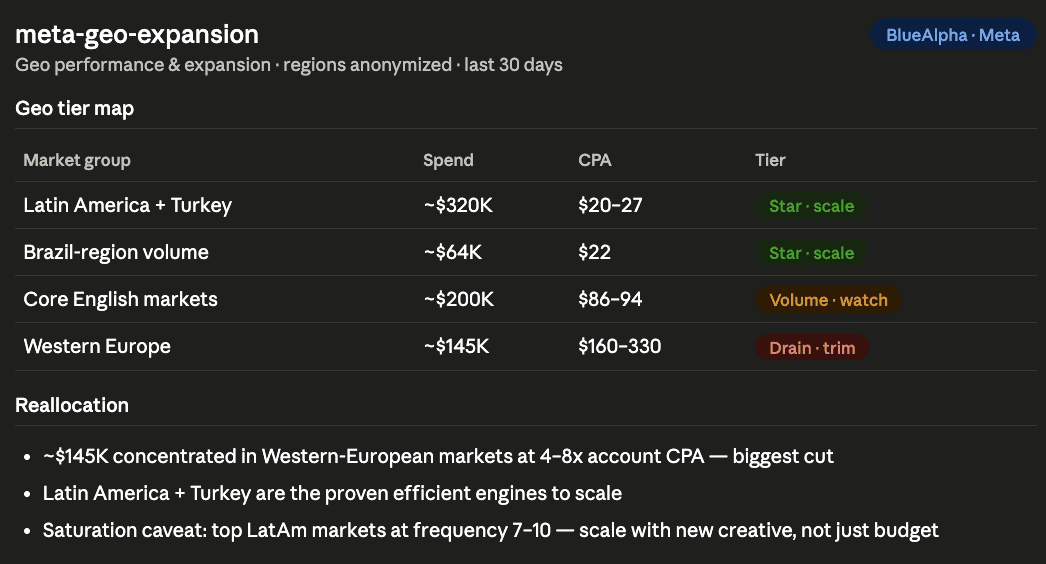
Real example, Streaming Co: The headline was a clean reallocation. ~$145K was concentrated in Western-European markets converting at 4-8x the account CPA, the single biggest cut. Latin America and Turkey were the efficient engines (~$20-27 CPA) to scale, with one caveat the skill surfaced: the top LatAm markets were already running at frequency 7-10, so scaling needs to be paired with fresh creative, not just more budget.
meta-incrementality-test
/meta-incrementality-test or design a geo holdout for Meta
Designs a geo-split holdout (or frames a Meta Conversion Lift test) to measure true incremental lift, not platform-reported credit. It selects matched control regions, sizes the minimum detectable effect for your budget and timeline, and produces a pre-registered plan with integrity checks. After the test runs, it reads the result and gives you a calibrated, incremental CPA you can defend to a CFO.
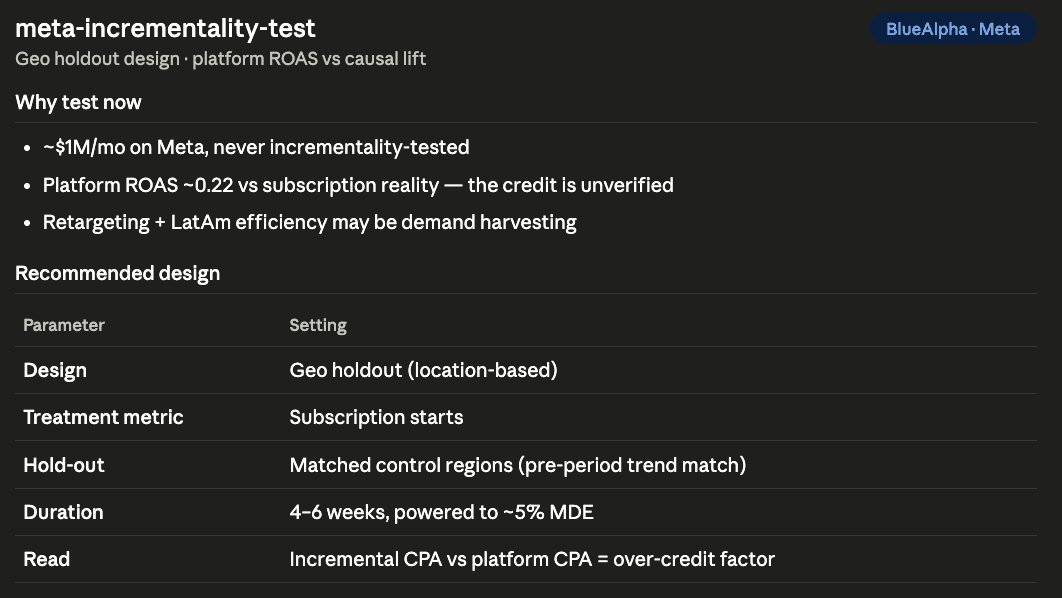
Real example, Streaming Co: No incrementality test was on record despite ~$1M/month on Meta and a platform ROAS of ~0.22 that doesn't reflect subscription reality, a textbook trigger. The skill recommended a 4-6 week geo holdout on subscription starts with matched control regions, mirroring the structure of live BlueAlpha Meta holdouts already running for other accounts.
meta-performance-digest
/meta-performance-digest or generate my weekly Meta performance digest
Produces a weekly (or monthly) narrative in the BlueAlpha format: what happened, what drove it, what to watch. It pulls period-over-period account, campaign, and creative trends, attributes the movement to specific entities (not just "CPA rose 18%"), and writes a leadership-ready summary alongside a structured metrics table. Built to paste straight into a Slack update or client report.
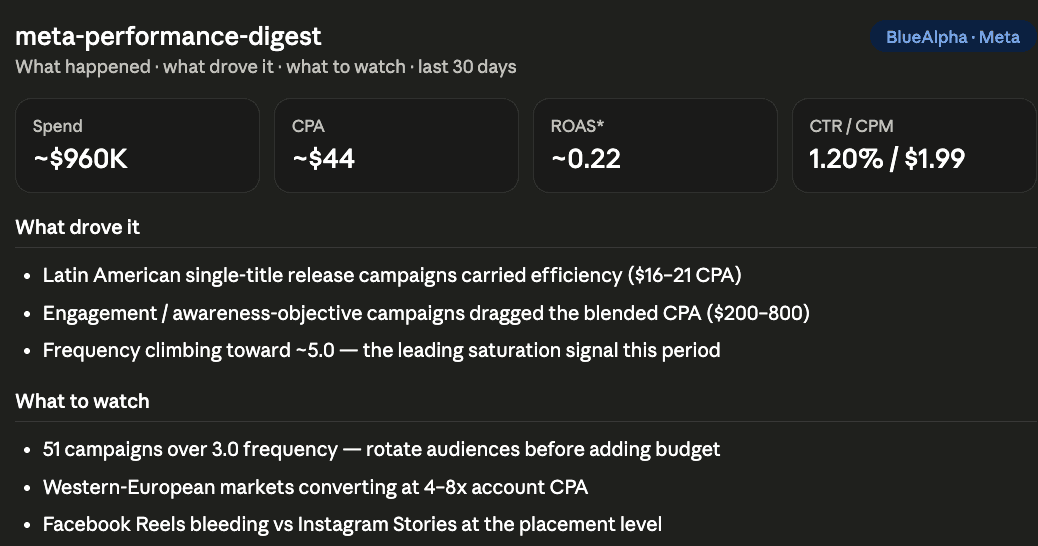
Real example, Streaming Co: The digest led with the headline: ~$960K spend, ~21,800 subscriptions at ~$44 CPA. Then explained it: LatAm single-title releases carried efficiency while awareness-objective campaigns dragged the blend, and frequency creeping to ~5.0 was the leading signal to watch. It closed with three forward-looking flags (saturated campaigns, the European drains, the Facebook Reels placement) tied to specific entities.
meta-content-to-campaign
/meta-content-to-campaign or turn this launch into a Meta campaign spec
Turns any content piece (a film/product launch, a blog post, an organic post) into a complete, build-ready Meta campaign spec: objective and ad-set optimization goal, CBO vs ABO structure, audiences, placements, a creative brief, budget, and a measurement plan. The output goes straight to a media buyer. No reformatting.
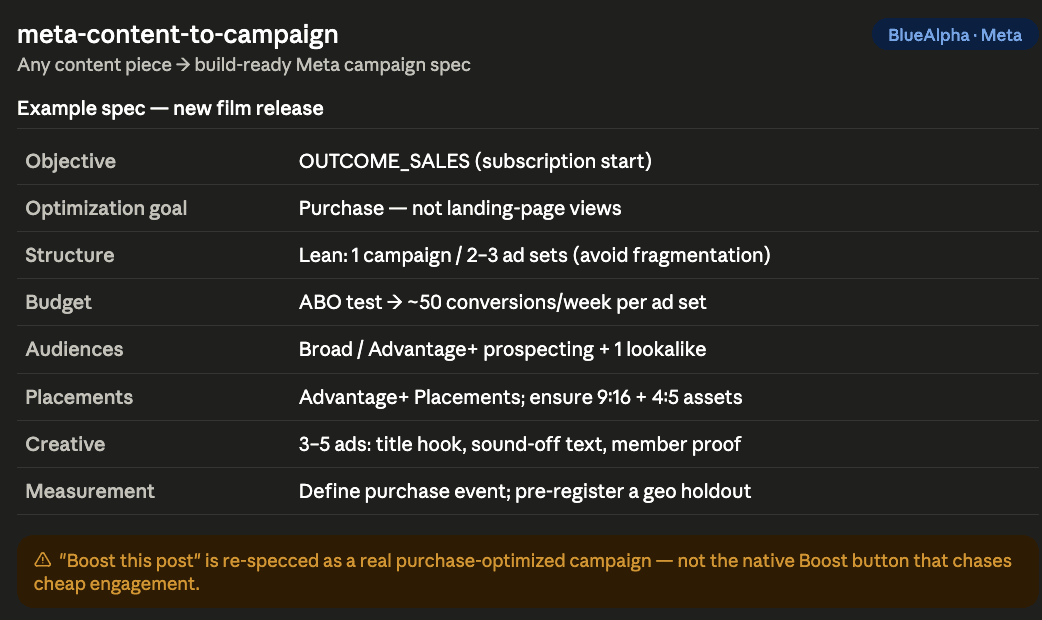
The Meta-specific catch it always fixes: "boost this post" almost always maps to a real OUTCOME_SALES objective optimizing for the purchase event, not the native Boost button that optimizes for cheap engagement. The skill also keeps the structure lean so the ad set can clear Meta's ~50-conversion learning threshold instead of fragmenting.
meta-full-monty
/meta-full-monty or run the full Meta analysis on my account
Runs the full suite in dependency order: signal health first, then performance digest, auto-optimize, Advantage+ audit, creative fatigue, placement, audience, geo, creative refresh (if needed), and incrementality design. It composes one leadership-ready report with cross-skill callouts and a single prioritized, risk-tiered action plan. Use it for quarterly reviews or onboarding a new account.
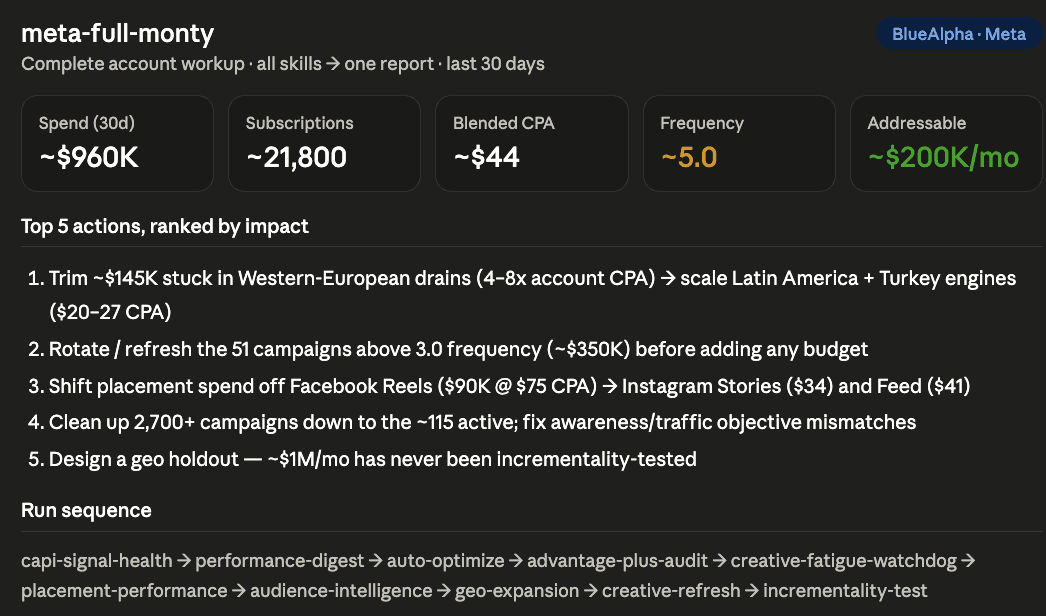
Real example, Streaming Co: The unified report quantified roughly $200K/month of addressable improvement: trim the ~$145K in Western-European drains and scale LatAm/Turkey, rotate the 51 high-frequency campaigns before adding budget, move spend off Facebook Reels, clean up 2,700 campaigns down to the ~115 active, and design the geo holdout that ~$1M/month has never had.
Why BlueAlpha Skills Beat Meta's Built-In Optimization
Meta's native tools (Advantage+ automation, automated rules, the Audience and breakdown reports) are designed to optimize within Meta's own attribution model and toward Meta's objective (more spend, more reported conversions). They're useful, but they have three structural limits:
They can't see across channels. Meta's tools only know about Meta. BlueAlpha skills can cross-reference your Meta reads against a Meridian MMM in the same session, so when a placement or geo looks efficient on platform CPA, you can immediately check whether Meta-as-a-channel is actually driving incremental revenue or just claiming credit.
They grade their own homework. Advantage+ Sales reports a glowing ROAS that often bundles existing-customer harvesting with new acquisition. Platform conversions over-credit Meta through the 7-day-click / 1-day-view window and modeled iOS conversions. The Signal Health and Incrementality skills exist precisely to check the number before you act on it.
They optimize for metrics, not decisions. Auto-Optimize didn't just report a high frequency: it tied ~36% of spend to campaigns above the saturation threshold and routed the fix (rotate/refresh before budget) ahead of the reallocation. Meta's automated rules would have suggested raising budgets on the same campaigns.
How BlueAlpha Runs Your Meta Budget Like a Portfolio
There are two kinds of products in performance marketing, and BlueAlpha is neither.
The first is rigorous but passive: statistically sound measurement that stops at the dashboard. The insight is accurate; nothing happens with it. The second is actionable but shallow: AI tools with fast recommendations built on platform attribution that doesn't survive iOS gaps or a skeptical CFO.
BlueAlpha is the third option: causal measurement underneath, real agents producing deployment-ready specs, MCP-native. Not a measurement vendor. Not a dashboard with a chatbot. The decision layer under the next generation of marketing.
FAQ
Do I need a Meta Business Manager account or just an Ads Manager login?
You need Business Manager (Business Portfolio) access so the connector can enumerate your ad accounts. If you're an agency, you'll need partner/client access granted to the ad accounts you want to analyze. The connector lists every act_ account you can manage and asks which one to run.
Will the skills make changes to my Meta account automatically?
The skills are read-only. Every output is a recommendation or deployment-ready spec. Write functions (pausing ads, adjusting budgets) are on the roadmap and will route through the BlueAlpha pipeline with per-action approval when they ship.
How does the iOS / SKAN attribution gap affect the analysis?
Meta reports a mix of pixel, Conversions API, and modeled/SKAN conversions, and its default reporting window is 7-day click / 1-day view, which systematically over-credits Meta. meta-capi-signal-health reads whether your purchase events are firing and deduplicating, and for any account where Meta is a material share of spend the skills push you toward the MMM cross-check or an incrementality test rather than trusting platform CPA at face value.
Can I run the skills on multiple Meta ad accounts?
Yes. The connector surfaces every ad account associated with your Business Manager login. When you run a skill, Claude lists the available accounts and asks you to confirm which act_ to analyze.
Why do some Meta pulls take a few seconds longer?
Meta's Insights responses carry a rich actions array on every row, so account-wide, ad-level, or breakdown pulls are large. The skills handle this by processing the data out-of-context and returning only the ranked, decision-ready slice, which is why you get a tier map instead of a 2,000-row export.
How often should I run each skill?
Performance Digest and Creative Fatigue Watchdog: weekly. Auto-Optimize: bi-weekly, or before any significant budget change. Advantage+ Audit, Placement, Audience, and Geo: monthly. Signal Health: any time conversion trust is in question. Incrementality: per test. Full Monty: quarterly.
What if I don't have a Meridian MMM connected?
The MMM cross-check step in each skill is optional. If no model is connected, the skills skip the incrementality validation section and note it as a gap in the output. All other analysis runs normally.
Where can I find the full setup documentation?
The complete installation walkthrough, authentication scopes, troubleshooting, and the full tool reference live on the BlueAlpha MCP documentation page.
Does this work with Facebook Ads and Instagram Ads?
Yes. "Meta Ads" is the umbrella term for Facebook Ads, Instagram Ads, Messenger Ads, and Audience Network. All twelve skills work across the full Meta ad platform. When you connect the BlueAlpha MCP, Claude has access to every campaign, adgroup, and creative across all Meta placements.
What is the Meta Ads MCP and how does it work?
MCP (Model Context Protocol) is the standard that lets Claude connect directly to external services. The BlueAlpha Meta Ads MCP gives Claude permissioned, real-time access to the Meta Marketing API through a single sign-in. Once connected, Claude can pull campaigns, ad sets, ads, and the full Insights breakdown (placement, age, gender, country, device) without leaving the conversation. The difference from a generic Facebook Ads MCP server is that BlueAlpha ships twelve specialized skills on top of the connection, each producing a tiered, actionable recommendation rather than a raw data dump.
How is BlueAlpha different from Meta's official MCP server?
Meta's official MCP server (launched April 2026) gives Claude raw access to the Marketing API. BlueAlpha's Meta connector does the same, but adds twelve decision-layer skills that score, tier, and cross-validate the data before presenting it. A signal-health gate runs before any efficiency read. Creative fatigue uses frequency as a leading indicator, not lagging CPA. Geo and placement analyses produce ranked reallocation queues. And every skill can optionally cross-reference a Meridian MMM to check whether Meta's platform-reported numbers survive causal validation.
Is this the same as a Facebook Ads MCP server?
The BlueAlpha Meta Ads MCP connects Claude to the same Meta Marketing API that powers Facebook Ads, Instagram Ads, and the Audience Network. If you're searching for a Facebook Ads MCP server, this is it. The difference is that BlueAlpha goes beyond raw API access: twelve specialized skills score, tier, and cross-validate your data before presenting a decision. A generic Facebook Ads MCP connector gives Claude the data; BlueAlpha gives Claude the judgment layer on top of it.
Your next step
If you have the BlueAlpha Marketing Plugin installed, run:
If you don't have the plugin yet, install it from the Cowork plugin marketplace and connect your Meta Ads account in Settings, Connectors. The first Auto-Optimize run on a live account typically surfaces 3-5 actionable items within two minutes.
Questions? Book a demo or find us on the Cowork plugin marketplace.

