Peter Grafe

Google Ads Incrementality Testing in Claude: BlueAlpha Tutorial

Design a geo-based incrementality test for Google Ads in one conversation: holdout selection, power assessment, monitoring config, and decision framework.

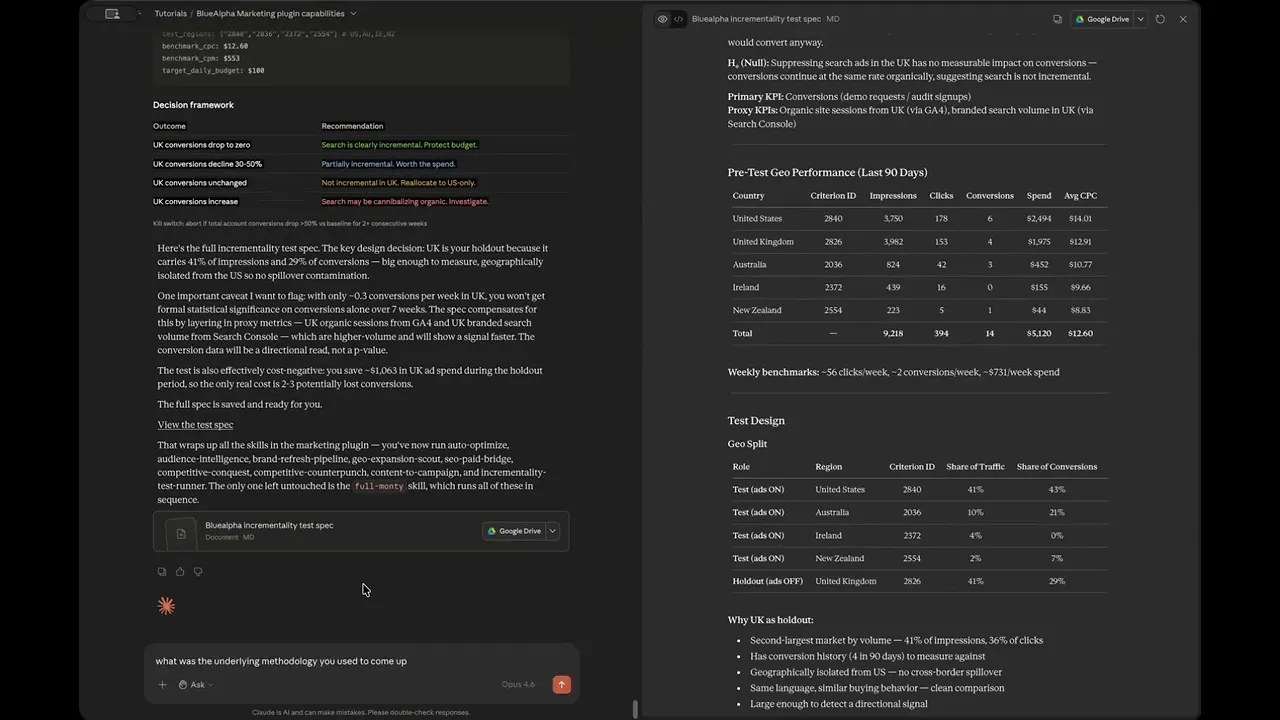
TL;DR — incrementality-test-runner designs a complete geo-based incrementality experiment for your Google Ads campaigns in a single conversation. It pulls 90 days of geo performance data, selects the optimal holdout region based on traffic share and geographic isolation, assesses statistical power (flagging when conversion volume is too low and recommending proxy metrics like GA4 organic sessions and Search Console branded volume), builds a week-by-week timeline with pre-test baseline, holdout period, and recovery window, produces a monitoring config with campaign IDs, geo targets, and benchmark CPCs, and delivers a decision framework that maps every possible test outcome to a concrete budget recommendation.


Watch the full walkthrough (6 min):

Most incrementality tests fail before they start. Either the holdout region is too small to produce a measurable signal, the test runs too short to reach significance, or nobody decides in advance what outcome would actually change the budget. This skill solves all three.


All ten Google Ads skills in the BlueAlpha Marketing Plugin

  • auto-optimize — Full optimization cycle: structural audit, underspend diagnosis, budget reallocation, recommendations review, creative health check.

  • full-monty — Runs every skill in sequence for a comprehensive top-to-bottom audit.

  • audience-intelligence — Analyzes audience performance and recommends bid modifiers, new segments, and exclusions.

  • brand-refresh-pipeline — Detects creative fatigue, audits brand voice, generates fresh RSA copy.

  • competitive-conquest — Researches competitors, identifies messaging gaps, designs conquest campaign specs.

  • competitive-counterpunch — Detects when competitors gain auction share and plans defensive response.

  • content-to-campaign — Turns content into a paid campaign with keywords and ad copy.

  • geo-expansion-scout — Identifies new geographic markets worth entering.

  • incrementality-test-runner — Designs and monitors geo-based incrementality tests with integrity checks and lift analysis.

  • seo-paid-bridge — Finds organic/paid overlap or gaps and specs complementary campaigns.

This article is part of the full series.


Why use Claude for Google Ads incrementality testing?

Designing an incrementality test manually means pulling geo performance data, figuring out which region is large enough to be a meaningful holdout but isolated enough to avoid spillover, calculating statistical power, writing a monitoring protocol, and defining decision criteria — all before the test even starts. Claude with the BlueAlpha Google Ads Plugin compresses this into a single conversation.


How does Claude connect to your Google Ads data for incrementality tests?

The BlueAlpha Marketing Plugin uses the Model Context Protocol (MCP) — an open standard that lets Claude talk directly to external tools and APIs. For incrementality-test-runner, Claude uses one connector: the BlueAlpha MCP (Google Ads API for geo performance data, campaign details, weekly trends, and budget information).


What the skill does

The skill runs in five phases:

  1. Configure the test parameters — Widget with 5 questions: campaign type, hypothesis, geo split approach, duration, MMM baseline.

  2. Pull geo performance and baseline data — Parallel data pulls for 90-day geo performance, weekly trends, campaign budgets, baseline integrity.

  3. Select the holdout region — Evaluates each region for traffic share, conversion history, and geographic isolation.

  4. Assess statistical power — Flags low conversion volume and recommends proxy metrics when needed.

  5. Build monitoring config and decision framework — Campaign IDs, geo codes, benchmarks, outcome-to-recommendation mapping, kill switch.


When to use it

  • When leadership asks "is our search spend actually incremental?"

  • After auto-optimize recommends budget increases

  • When you suspect search is cannibalizing organic

  • On a quarterly or bi-annual cadence as part of measurement strategy

  • Before renewing or expanding a channel


What you'll need

  • A campaign to test (typically nonbrand)

  • Google Ads customer ID

  • A hypothesis

  • At least 90 days of geo performance data


Step-by-step: running incrementality-test-runner in Claude

Video walkthrough of this entire flow:


1. Discover the skill

Type the slash command with the content URL directly in the prompt:

/incrementality-test-runner

Or ask Claude about the incrementality test runner. It explains the concept: turn off ads in one region, keep them running everywhere else, measure the difference.


2. Launch the skill and configure

The widget asks 5 questions with smart pre-fills: nonbrand campaign, search_drives_incremental_conversions hypothesis, regional_holdout approach, 7 weeks duration, no MMM baseline.


3. Claude pulls data in parallel

Four simultaneous data pulls: geo performance, weekly trends, campaign budgets, baseline integrity check.


4. Review the visual results

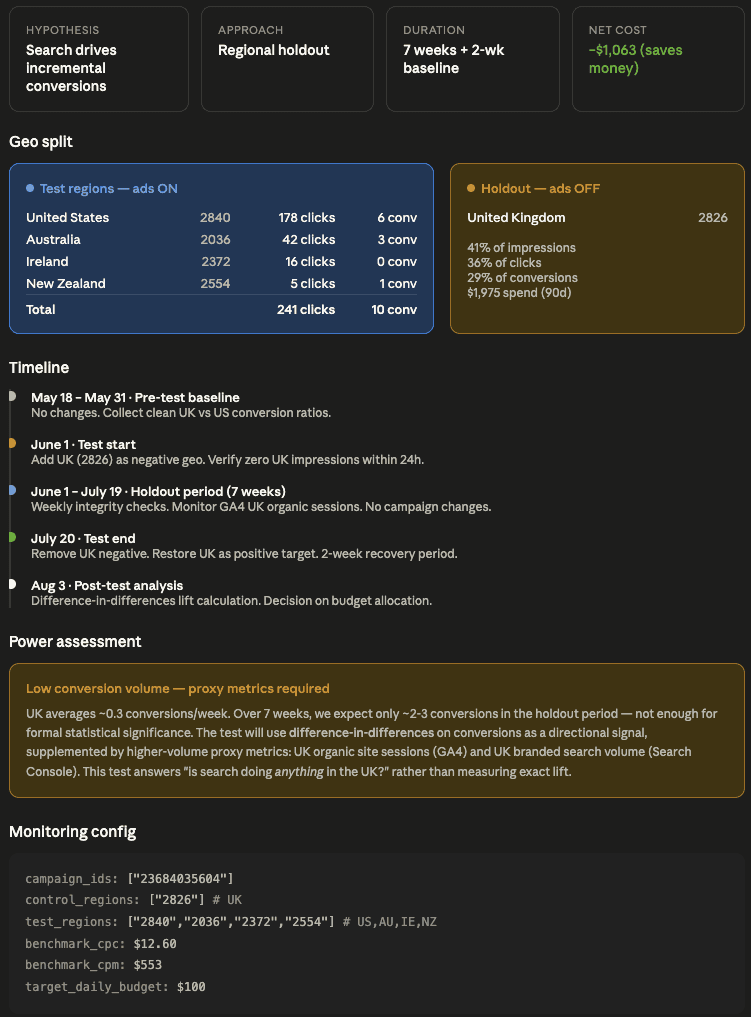
Structured widget with headline cards, geo split table, 5-phase timeline, power assessment, monitoring config, and decision framework.

Key outputs from the demo:

  • Holdout: United Kingdom (2826) — 41% impressions, 36% clicks, 29% conversions

  • Test regions: US, AU, IE, NZ — ads stay on

  • Duration: 7 weeks + 2-week baseline + 2-week recovery

  • Net cost: -$1,063 (saves money)

  • Power assessment: Low conversion volume, proxy metrics required (GA4 organic sessions, Search Console branded volume)
Google Ads Incrementality Testing in Claude


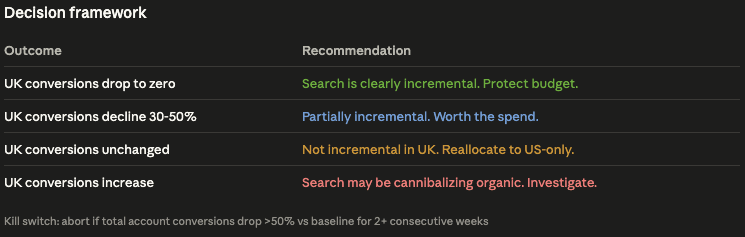
5. Decision framework

Outcome

Recommendation

UK conversions drop to zero

Search is clearly incremental. Protect budget.

UK conversions decline 30-50%

Partially incremental. Worth the spend.

UK conversions unchanged

Not incremental in UK. Reallocate to US-only.

UK conversions increase

Search may be cannibalizing organic. Investigate.

Kill switch: Abort if total account conversions drop >50% vs baseline for 2+ consecutive weeks.
Google Ads Incrementality Testing in Claude 2


6. Follow-up: choosing the right metric

Claude explains the tradeoffs between conversions (~0.3/week, too sparse), clicks/sessions (~25-30/week, enough for 20-30% lift detection), and impressions (~310+/week, enough for 10-15% effect). Recommends organic site sessions from UK (GA4) as the primary test metric.


Gotchas

  1. Low conversion volume doesn't mean don't test — design around it with proxy metrics

  2. Geographic isolation matters more than population

  3. The pre-test baseline period is non-negotiable

  4. Don't touch campaigns during the holdout

  5. The kill switch is real — use it

  6. Set up proxy metric pipelines before the test starts

  7. Allow 1-2 weeks for recovery after removing the holdout

  8. This answers "is search doing anything?" not "what is the exact ROAS"


FAQ

What is a geo-based incrementality test?

You turn off ads in one region (the holdout), keep them running everywhere else (the test regions), and measure the difference. If conversions drop in the holdout, the ads were driving incremental results. If conversions stay flat, the ads weren't doing anything that organic wouldn't have captured on its own.

How long should a geo-based incrementality test run?

The skill designs a three-phase timeline: a 2-week pre-test baseline (measure normal performance before changing anything), the holdout period itself (7 weeks in the demo), and a 2-week recovery window after turning ads back on. Total duration in the demo was 11 weeks. Shorter tests risk missing the signal; longer tests cost more in opportunity.

How does the skill choose the holdout region?

It evaluates each region for three things: traffic share (large enough to produce a measurable signal), conversion history (enough baseline data to compare against), and geographic isolation (minimal spillover from adjacent regions). In the demo, the UK was selected because it carried 41% of impressions but is geographically isolated from the other active markets (US, AU, IE, NZ).

What if my conversion volume is too low for the test?

Low conversion volume doesn't mean you can't test. The skill assesses statistical power and, when conversion volume is too sparse (0.3 conversions per week in the demo), it recommends proxy metrics: GA4 organic sessions from the holdout region and Search Console branded search volume. These higher-frequency signals (25-30 sessions per week) can detect a 20-30% lift even when conversions alone can't.

Does running the test cost money?

It typically saves money during the test period because you're turning off spend in the holdout region. In the demo, the net cost was negative $1,063. The real cost is opportunity cost: if search is genuinely incremental, the holdout region loses conversions for the duration of the test.

What happens if the test goes wrong?

The skill includes a kill switch: abort the test if total account conversions drop more than 50% versus baseline for two or more consecutive weeks. This prevents a test designed to measure incrementality from accidentally destroying business results.

What does this test actually answer?

It answers "is this search spend doing anything that wouldn't have happened without it?" It does not answer "what is the exact ROAS of this campaign?" That distinction matters. Incrementality testing tells you whether to keep spending. Attribution and MMM tell you how much credit to assign.


Related skills

  • auto-optimize — Ensure account health before designing the test

  • competitive-counterpunch — Protect remaining budget if test shows partial incrementality

  • geo-expansion-scout — Uses similar geo performance data for market identification

  • full-monty — Runs all skills including incrementality test runner


Your next step

Pick the campaign you want to test and run:

/incrementality-test-runner

The widget will walk you through hypothesis, geo split approach, duration, and MMM baseline. You'll have a complete test design with holdout selection, power assessment, monitoring config, and a decision framework by the end of the session.

Need help getting set up? See the installation guide.
Want a growth partner to run the Decision Engine for you? Book a demo.

TL;DR — incrementality-test-runner designs a complete geo-based incrementality experiment for your Google Ads campaigns in a single conversation. It pulls 90 days of geo performance data, selects the optimal holdout region based on traffic share and geographic isolation, assesses statistical power (flagging when conversion volume is too low and recommending proxy metrics like GA4 organic sessions and Search Console branded volume), builds a week-by-week timeline with pre-test baseline, holdout period, and recovery window, produces a monitoring config with campaign IDs, geo targets, and benchmark CPCs, and delivers a decision framework that maps every possible test outcome to a concrete budget recommendation.


Watch the full walkthrough (6 min):

Most incrementality tests fail before they start. Either the holdout region is too small to produce a measurable signal, the test runs too short to reach significance, or nobody decides in advance what outcome would actually change the budget. This skill solves all three.


All ten Google Ads skills in the BlueAlpha Marketing Plugin

  • auto-optimize — Full optimization cycle: structural audit, underspend diagnosis, budget reallocation, recommendations review, creative health check.

  • full-monty — Runs every skill in sequence for a comprehensive top-to-bottom audit.

  • audience-intelligence — Analyzes audience performance and recommends bid modifiers, new segments, and exclusions.

  • brand-refresh-pipeline — Detects creative fatigue, audits brand voice, generates fresh RSA copy.

  • competitive-conquest — Researches competitors, identifies messaging gaps, designs conquest campaign specs.

  • competitive-counterpunch — Detects when competitors gain auction share and plans defensive response.

  • content-to-campaign — Turns content into a paid campaign with keywords and ad copy.

  • geo-expansion-scout — Identifies new geographic markets worth entering.

  • incrementality-test-runner — Designs and monitors geo-based incrementality tests with integrity checks and lift analysis.

  • seo-paid-bridge — Finds organic/paid overlap or gaps and specs complementary campaigns.

This article is part of the full series.


Why use Claude for Google Ads incrementality testing?

Designing an incrementality test manually means pulling geo performance data, figuring out which region is large enough to be a meaningful holdout but isolated enough to avoid spillover, calculating statistical power, writing a monitoring protocol, and defining decision criteria — all before the test even starts. Claude with the BlueAlpha Google Ads Plugin compresses this into a single conversation.


How does Claude connect to your Google Ads data for incrementality tests?

The BlueAlpha Marketing Plugin uses the Model Context Protocol (MCP) — an open standard that lets Claude talk directly to external tools and APIs. For incrementality-test-runner, Claude uses one connector: the BlueAlpha MCP (Google Ads API for geo performance data, campaign details, weekly trends, and budget information).


What the skill does

The skill runs in five phases:

  1. Configure the test parameters — Widget with 5 questions: campaign type, hypothesis, geo split approach, duration, MMM baseline.

  2. Pull geo performance and baseline data — Parallel data pulls for 90-day geo performance, weekly trends, campaign budgets, baseline integrity.

  3. Select the holdout region — Evaluates each region for traffic share, conversion history, and geographic isolation.

  4. Assess statistical power — Flags low conversion volume and recommends proxy metrics when needed.

  5. Build monitoring config and decision framework — Campaign IDs, geo codes, benchmarks, outcome-to-recommendation mapping, kill switch.


When to use it

  • When leadership asks "is our search spend actually incremental?"

  • After auto-optimize recommends budget increases

  • When you suspect search is cannibalizing organic

  • On a quarterly or bi-annual cadence as part of measurement strategy

  • Before renewing or expanding a channel


What you'll need

  • A campaign to test (typically nonbrand)

  • Google Ads customer ID

  • A hypothesis

  • At least 90 days of geo performance data


Step-by-step: running incrementality-test-runner in Claude

Video walkthrough of this entire flow:


1. Discover the skill

Type the slash command with the content URL directly in the prompt:

/incrementality-test-runner

Or ask Claude about the incrementality test runner. It explains the concept: turn off ads in one region, keep them running everywhere else, measure the difference.


2. Launch the skill and configure

The widget asks 5 questions with smart pre-fills: nonbrand campaign, search_drives_incremental_conversions hypothesis, regional_holdout approach, 7 weeks duration, no MMM baseline.


3. Claude pulls data in parallel

Four simultaneous data pulls: geo performance, weekly trends, campaign budgets, baseline integrity check.


4. Review the visual results

Structured widget with headline cards, geo split table, 5-phase timeline, power assessment, monitoring config, and decision framework.

Key outputs from the demo:

  • Holdout: United Kingdom (2826) — 41% impressions, 36% clicks, 29% conversions

  • Test regions: US, AU, IE, NZ — ads stay on

  • Duration: 7 weeks + 2-week baseline + 2-week recovery

  • Net cost: -$1,063 (saves money)

  • Power assessment: Low conversion volume, proxy metrics required (GA4 organic sessions, Search Console branded volume)

Google Ads Incrementality Testing in Claude


5. Decision framework

Outcome

Recommendation

UK conversions drop to zero

Search is clearly incremental. Protect budget.

UK conversions decline 30-50%

Partially incremental. Worth the spend.

UK conversions unchanged

Not incremental in UK. Reallocate to US-only.

UK conversions increase

Search may be cannibalizing organic. Investigate.

Kill switch: Abort if total account conversions drop >50% vs baseline for 2+ consecutive weeks.

Google Ads Incrementality Testing in Claude 2


6. Follow-up: choosing the right metric

Claude explains the tradeoffs between conversions (~0.3/week, too sparse), clicks/sessions (~25-30/week, enough for 20-30% lift detection), and impressions (~310+/week, enough for 10-15% effect). Recommends organic site sessions from UK (GA4) as the primary test metric.


Gotchas

  1. Low conversion volume doesn't mean don't test — design around it with proxy metrics

  2. Geographic isolation matters more than population

  3. The pre-test baseline period is non-negotiable

  4. Don't touch campaigns during the holdout

  5. The kill switch is real — use it

  6. Set up proxy metric pipelines before the test starts

  7. Allow 1-2 weeks for recovery after removing the holdout

  8. This answers "is search doing anything?" not "what is the exact ROAS"


FAQ

What is a geo-based incrementality test?

You turn off ads in one region (the holdout), keep them running everywhere else (the test regions), and measure the difference. If conversions drop in the holdout, the ads were driving incremental results. If conversions stay flat, the ads weren't doing anything that organic wouldn't have captured on its own.

How long should a geo-based incrementality test run?

The skill designs a three-phase timeline: a 2-week pre-test baseline (measure normal performance before changing anything), the holdout period itself (7 weeks in the demo), and a 2-week recovery window after turning ads back on. Total duration in the demo was 11 weeks. Shorter tests risk missing the signal; longer tests cost more in opportunity.

How does the skill choose the holdout region?

It evaluates each region for three things: traffic share (large enough to produce a measurable signal), conversion history (enough baseline data to compare against), and geographic isolation (minimal spillover from adjacent regions). In the demo, the UK was selected because it carried 41% of impressions but is geographically isolated from the other active markets (US, AU, IE, NZ).

What if my conversion volume is too low for the test?

Low conversion volume doesn't mean you can't test. The skill assesses statistical power and, when conversion volume is too sparse (0.3 conversions per week in the demo), it recommends proxy metrics: GA4 organic sessions from the holdout region and Search Console branded search volume. These higher-frequency signals (25-30 sessions per week) can detect a 20-30% lift even when conversions alone can't.

Does running the test cost money?

It typically saves money during the test period because you're turning off spend in the holdout region. In the demo, the net cost was negative $1,063. The real cost is opportunity cost: if search is genuinely incremental, the holdout region loses conversions for the duration of the test.

What happens if the test goes wrong?

The skill includes a kill switch: abort the test if total account conversions drop more than 50% versus baseline for two or more consecutive weeks. This prevents a test designed to measure incrementality from accidentally destroying business results.

What does this test actually answer?

It answers "is this search spend doing anything that wouldn't have happened without it?" It does not answer "what is the exact ROAS of this campaign?" That distinction matters. Incrementality testing tells you whether to keep spending. Attribution and MMM tell you how much credit to assign.


Related skills

  • auto-optimize — Ensure account health before designing the test

  • competitive-counterpunch — Protect remaining budget if test shows partial incrementality

  • geo-expansion-scout — Uses similar geo performance data for market identification

  • full-monty — Runs all skills including incrementality test runner


Your next step

Pick the campaign you want to test and run:

/incrementality-test-runner

The widget will walk you through hypothesis, geo split approach, duration, and MMM baseline. You'll have a complete test design with holdout selection, power assessment, monitoring config, and a decision framework by the end of the session.

Need help getting set up? See the installation guide.
Want a growth partner to run the Decision Engine for you? Book a demo.

Do next week's marketing work in the next hour.

Do next week's marketing work in the next hour.

Do next week's marketing work in the next hour.