Peter Grafe

Turn Content into Google Ads Campaigns with Claude | BlueAlpha

Give Claude any article URL and get a complete Google Ads campaign back: intent-segmented keywords, content-aware RSA copy, budget projection, and UTM tracking.

TL;DR — content-to-campaign takes any article URL, reads the full content, runs two rounds of keyword research via Google Keyword Planner, and produces a complete paid search campaign — ad groups organized by intent (direct match, problem match, platform-specific), RSA ad copy that reflects what the article actually says, negative keywords, a budget projection at your chosen daily spend, targeting and UTM settings, and a phased optimization timeline. No widget, no configuration screen — just give Claude the URL inline with the command and it handles everything.


Watch the full walkthrough (8 min):

Content promotion is one of the most underused moves in paid search. Most content teams publish a blog post and then forget about it. Most paid teams run generic campaigns to a product page. This skill connects the two: it reads the content, understands what it says, runs real keyword research against the Keyword Planner, and builds a campaign that honors the content instead of ignoring it.


All ten Google Ads skills in the BlueAlpha Marketing Plugin

  • auto-optimize — Runs a full optimization cycle on a Google Ads account: structural audit, underspend diagnosis, budget reallocation, recommendations review, and creative health check.

  • full-monty — Runs every skill in sequence for a comprehensive top-to-bottom audit plus a strategic deployment plan for the next quarter.

  • audience-intelligence — Analyzes audience performance across Google Ads and recommends bid modifiers, new segments, exclusions, and observation-to-targeting moves.

  • brand-refresh-pipeline — Detects creative fatigue, audits brand voice, and generates fresh responsive search ad copy for any campaign.

  • competitive-conquest — Researches competitors, identifies messaging gaps, and designs conquest campaign specs that target competitor brand terms.

  • competitive-counterpunch — Detects when competitors gain auction share on your brand and plans a proportional defensive response.

  • content-to-campaign — Turns any piece of content (blog, case study, webinar, comparison page) into a paid campaign complete with keywords and ad copy.

  • geo-expansion-scout — Identifies new geographic markets worth entering by analyzing geo performance, keyword volume, and competitive density.

  • incrementality-test-runner — Designs and monitors geo-based incrementality tests in Google Ads with integrity checks and lift analysis.

  • seo-paid-bridge — Finds where organic and paid search overlap or leave gaps, then specs complementary paid campaigns that maximize total search click share.

This article is part of the full series.


Why use Claude to turn content into Google Ads campaigns?

Building a content promotion campaign manually means reading the article yourself, guessing at which keywords match the content's intent, writing ad copy that somehow reflects what the article says without being generic, and sizing a budget without real CPC data. For a single blog post, that takes half a day.

Claude with the BlueAlpha Marketing Plugin compresses this into a single conversation. It reads the article content (falling back to browser extraction if the web fetch fails), runs two rounds of keyword research via Google Keyword Planner — one seeded by the URL, one seeded by extracted topics — uses subagents to parse the large result sets, and produces a complete campaign spec with ad groups, keywords, match types, RSA copy, budget projection, and an optimization timeline.


How does Claude connect to your content and Google Ads data?

The BlueAlpha Marketing Plugin uses the Model Context Protocol (MCP) — an open standard that lets Claude talk directly to external tools and APIs. For content-to-campaign, Claude uses three connectors: the BlueAlpha MCP (Google Ads API for keyword idea generation and existing campaign data), Chrome browser (for reading article content when direct web fetch fails), and Web search (for supplemental research). Every call goes through your authenticated accounts, scoped to the customer ID you specify.


What the content-to-campaign skill does

The skill runs in five phases and produces a deployment-ready campaign spec.

  1. Read and analyze the content. Fetches the URL (with automatic fallback to Chrome browser extraction if the direct fetch fails), extracts the title, author, publish date, word count, key topics, and CTA. Classifies the content by funnel stage (top/mid/bottom) and durability (evergreen vs. time-bound).

  2. Keyword research and intent segmentation. Runs two calls to generate_keyword_ideas via Google Ads Keyword Planner — one seeded by the URL, one seeded by extracted topic keywords. Uses subagents to parse the large result sets. Segments keywords into intent-based ad groups.

  3. Campaign architecture. Builds the full campaign structure: campaign name, ad groups with keywords and match types, negative keywords, bidding strategy, and budget projection.

  4. RSA ad copy. Writes content-aware ad copy — headlines and descriptions that reflect what the article actually says, not generic product messaging.

  5. Targeting, measurement, and optimization timeline. Specifies geo, language, network, device, UTM tracking, and a phased optimization plan.


When to use it

  • You just published a blog post or case study and want to drive qualified traffic to it immediately.

  • An article covers topics with real search volume that your existing campaigns don't target.

  • You have content that functions as both thought leadership and product page. In the demo, a 3,500-word product explainer doubled as a consideration-stage landing page.

  • As part of a full-monty run. Content promotion is one of the deployment outputs from the full audit workflow.

  • You want to test a new keyword space without building a campaign from scratch.


What you'll need before you start

  • Content URL. Required — provide it inline with the slash command.

  • Google Ads customer ID. Required — carries forward automatically if you've been working in the same conversation.

That's it. No widget, no configuration screen. The skill infers budget, bidding strategy, targeting, and content classification from the article itself.


Step-by-step: running content-to-campaign in Claude

Video walkthrough of this entire flow:


1. Invoke the skill with the URL inline

Type the slash command with the content URL directly in the prompt:

/content-to-campaign I have this article from our website: /articles/ai-marketing-automation-for-google-ads-and-meta-ads-with-claude that I would like to turn into a campaign

There is no widget or form — the URL is the only input the skill needs.


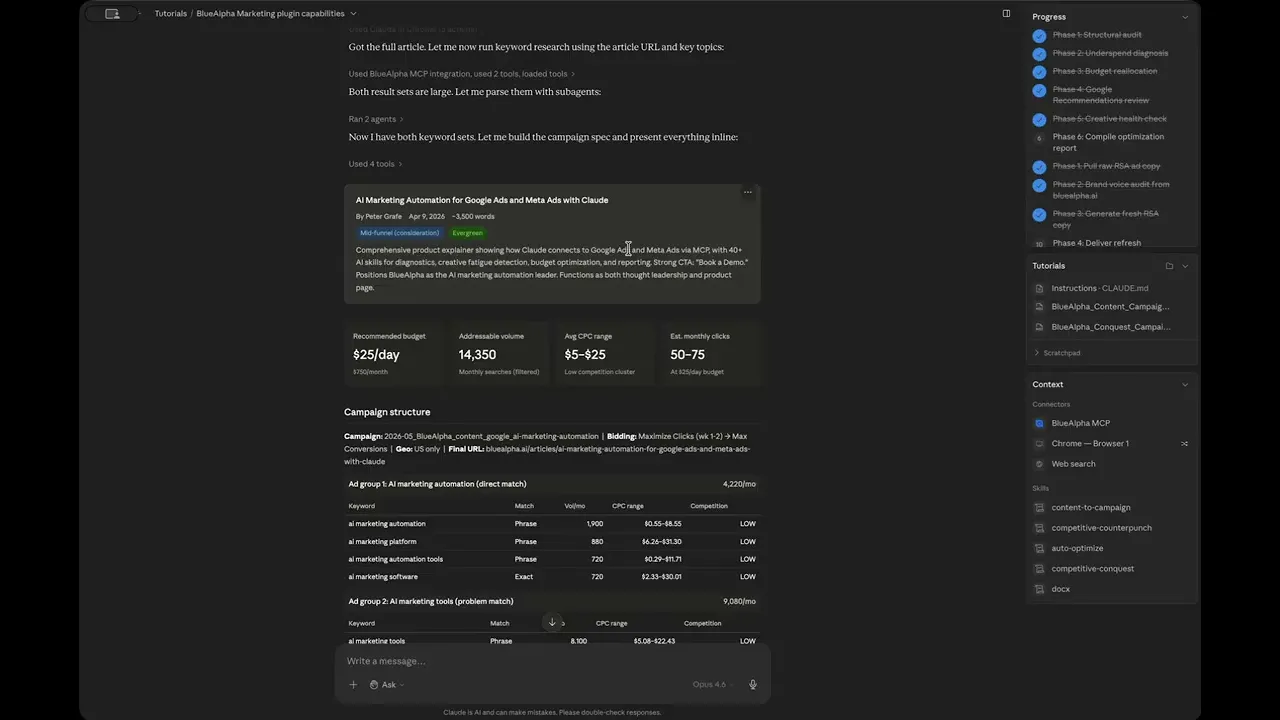
2. Watch Claude read the article content

Claude first attempts to fetch the article directly via web_fetch. If that fails (as it did in the demo), it falls back to the Chrome browser: navigating to the URL, loading the page, and extracting the full text. This fallback is automatic.


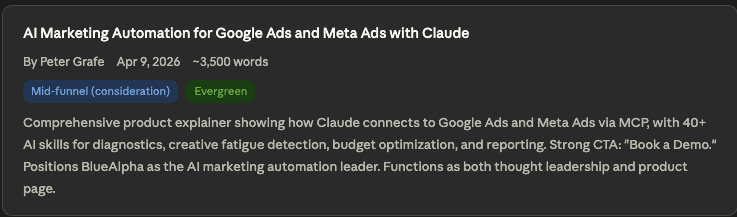
3. Review the content analysis card

Claude produces a content analysis card:

  • Title: AI Marketing Automation for Google Ads and Meta Ads with Claude

  • Author: Peter Grafe · Published: April 9, 2026

  • Length: ~3,500 words

  • Funnel stage: Mid-funnel (consideration)

  • Content type: Evergreen

Turn Content into Google Ads Campaigns with Claude


4. Review the headline metrics

Four key numbers frame the opportunity:

  • $25/day — Suggested daily budget

  • 14,350 — Total addressable monthly search volume

  • $5–$25 — Blended CPC range

  • 50–75 — Estimated monthly clicks

Turn Content into Google Ads Campaigns with Claude 2


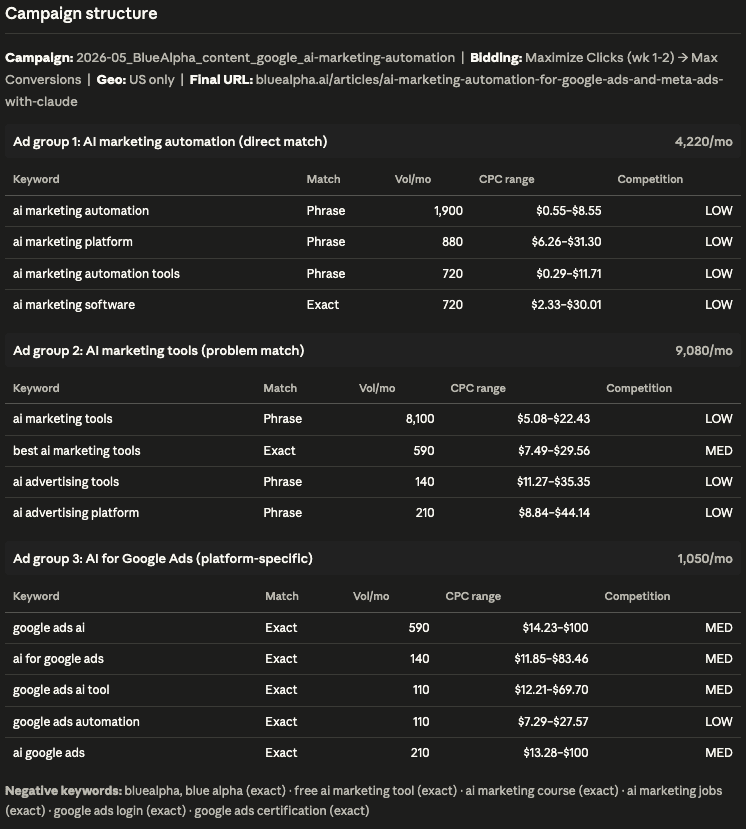
5. Review the keyword research and ad group structure

Three ad groups organized by search intent:

Ad Group 1 — AI marketing automation (direct match) · 4,220/mo

Keyword

Match

Vol/mo

CPC range

Competition

ai marketing automation

Exact

1,900

$0.55–$8.55

LOW

marketing automation ai

Exact

1,190

$0.69–$11.40

LOW

ai for marketing automation

Exact

720

$0.55–$8.55

LOW

ai digital marketing automation

Exact

410

$0.97–$7.02

LOW


Ad Group 2 — AI marketing tools (problem match) · 9,080/mo

Keyword

Match

Vol/mo

CPC range

Competition

ai marketing tools

Exact

5,400

$5.21–$18.15

MED

ai tools for marketing

Exact

1,600

$3.16–$15.83

LOW

ai tools for digital marketing

Exact

1,300

$3.19–$16.23

LOW

best ai marketing tools

Exact

780

$4.70–$17.25

LOW


Ad Group 3 — AI for Google Ads (platform-specific) · 1,050/mo

Keyword

Match

Vol/mo

CPC range

Competition

google ads ai

Exact

590

$14.23–$100

MED

ai for google ads

Exact

140

$11.85–$83.46

MED

google ads ai tool

Exact

110

$12.21–$69.70

MED

google ads automation

Exact

110

$7.29–$27.57

LOW

ai google ads

Exact

210

$13.28–$100

MED

Turn Content into Google Ads Campaigns with Claude 3


6. Review the negative keywords

[bluealpha], [blue alpha] (exact) · [free ai marketing tool] (exact) · [ai marketing course] (exact) · [ai marketing jobs] (exact) · [google ads login] (exact) · [google ads certification] (exact)


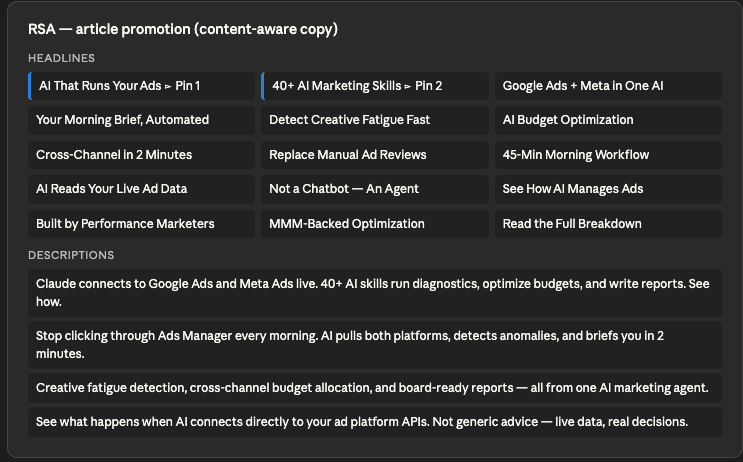
7. Review the RSA ad copy

RSA — article promotion (content-aware copy)

Headlines (15):

Column 1

Column 2

Column 3

AI That Runs Your Ads → Pin 1

40+ AI Marketing Skills → Pin 2

Google Ads + Meta in One AI

Your Morning Brief, Automated

Detect Creative Fatigue Fast

AI Budget Optimization

Cross-Channel in 2 Minutes

Replace Manual Ad Reviews

45-Min Morning Workflow

AI Reads Your Live Ad Data

Not a Chatbot — An Agent

See How AI Manages Ads

Built by Performance Marketers

MMM-Backed Optimization

Read the Full Breakdown

Descriptions (4):

  1. Claude connects to Google Ads and Meta Ads live. 40+ AI skills run diagnostics, optimize budgets, and write reports. See how.

  2. Stop clicking through Ads Manager every morning. AI pulls both platforms, detects anomalies, and briefs you in 2 minutes.

  3. Creative fatigue detection, cross-channel budget allocation, and board-ready reports — all from one AI marketing agent.

  4. See what happens when AI connects directly to your ad platform APIs. Not generic advice — live data, real decisions.
Turn Content into Google Ads Campaigns with Claude 4


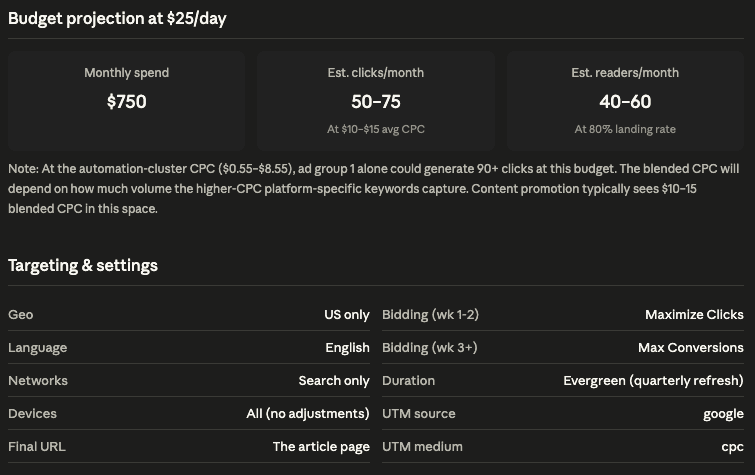
8. Review the budget projection

Monthly spend

Est. clicks/month

Est. readers/month

$750

50–75 (at $10–$15 avg CPC)

40–60 (at 80% landing rate)


9. Review targeting and settings

Setting

Value

Setting

Value

Geo

US only

Bidding (wk 1-2)

Maximize Clicks

Language

English

Bidding (wk 3+)

Max Conversions

Networks

Search only

Duration

Evergreen (quarterly refresh)

Devices

All (no adjustments)

UTM source

google

Final URL

The article page

UTM medium

cpc

Campaign name: 2026-05_BlueAlpha_content_google_ai-marketing-automation
Turn Content into Google Ads Campaigns with Claude 5


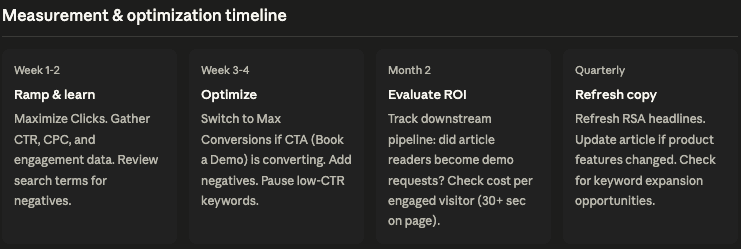
10. Review the measurement and optimization timeline

  • Week 1–2 — Ramp & learn: Maximize Clicks. Gather CTR, CPC, and engagement data. Review search terms for negatives.

  • Week 3–4 — Optimize: Switch to Max Conversions if CTA (Book a Demo) is converting. Add negatives. Pause low-CTR keywords.

  • Month 2 — Evaluate ROI: Track downstream pipeline: did article readers become demo requests? Check cost per engaged visitor (30+ sec on page).

  • Quarterly — Refresh copy: Refresh RSA headlines. Update article if product features changed. Check for keyword expansion opportunities.
Turn Content into Google Ads Campaigns with Claude 6


11. Review why the article deserves paid amplification

The skill finishes with a strategic rationale:

  • Content quality: A 3,500-word product explainer that walks through 40+ AI skills, shows a "day in the life" workflow, and ends with a clear CTA. Functions as both thought leadership and consideration-stage product page.

  • Keyword opportunity: "ai marketing automation" has 1,900 monthly searches at $0.55–$8.55 CPC with LOW competition. The broader "ai marketing tools" cluster adds 8,100 more monthly searches. Almost no overlap with existing nonbrand keywords.

  • Net-new coverage: Targets entirely different keyword space (AI + marketing automation) than existing nonbrand campaign (MMM + incrementality + geo-lift). Zero cannibalization risk.


12. Save the campaign spec

Claude saves the full spec as a Markdown document with an option to save to Google Drive.


Example prompts

Slash command with URL inline:

/content-to-campaign I have this article: /articles/ai-marketing-automation that I would like to turn into a campaign

Natural language with explicit parameters:

"Run content-to-campaign on customer 561-240-7843 with this blog post: https://bluealpha.ai/articles/ai-marketing-automation. Budget: $25/day. Evergreen."

Case study promotion:

/content-to-campaign Promote this case study: <https://example.com/case-studies/acme-reduced-cpa> — target CMOs at mid-market B2B SaaS, $50/day budget.


Gotchas and tips

  • No widget — URL goes inline. Unlike competitive-conquest or auto-optimize, this skill has no interactive configuration widget. Provide the content URL directly in your prompt.

  • Web fetch failures are handled automatically. If web_fetch can't read the article, Claude falls back to the Chrome browser to navigate and extract the page text.

  • Content quality matters more than campaign quality. If the article is thin, no amount of targeting will save the campaign.

  • The automation-cluster CPC is deceptively cheap. In the demo, "ai marketing automation" showed $0.55–$8.55 CPC — but higher-CPC platform-specific keywords drag the blended CPC up.

  • Check for cannibalization with existing campaigns. The skill checks for keyword overlap and flags net-new coverage.

  • One RSA variant, not two. Unlike competitive-conquest which generates two RSA variants, this skill generates one content-aware variant. Ask Claude for a second variant in a follow-up prompt if needed.

  • Subagents handle large keyword result sets. You'll see brief "agent" activity in the sidebar during keyword parsing. This is normal.


FAQ

How does the skill decide which keywords to include?

It runs two calls to generate_keyword_ideas via Google Keyword Planner — one seeded by the article URL, one seeded by extracted topic keywords. Results are parsed by subagents and segmented into intent-based ad groups. In the demo, 13 keywords made the final cut from hundreds of candidates.

What determines the ad group structure?

The skill organizes ad groups by search intent: direct match (keywords that exactly describe the article topic), problem match (the broader problem the article addresses), and platform-specific (keywords tied to the specific platforms covered in the article).

Why does the skill use Maximize Clicks instead of Maximize Conversions?

Content promotion is a consideration-stage play. Readers need to engage with the article before converting. Maximize Clicks gathers traffic data for the first two weeks, then the timeline shifts to Max Conversions once there are enough conversion signals from the article's CTA.

Does the skill create the campaign in Google Ads?

No. It produces a complete specification — ad groups, keywords, RSA copy, bidding strategy, budget projection, negatives, targeting, UTM tracking, and an optimization timeline. You build it in Google Ads Editor.

What if the web fetch fails and I don't have Chrome connected?

Upload the article content as a file (PDF, doc, or text) and reference it in the prompt. The skill will analyze the uploaded content the same way.

Can I change the budget after seeing the keyword data?

Yes. Ask Claude to reproject at a different daily spend and it will recalculate the clicks and readers estimates.

How is this different from a normal search campaign?

A normal search campaign is built around keywords and points to a generic landing page. content-to-campaign is built around a specific content asset — the keywords, ad copy, and structure are all tailored to what the article actually says.


Related skills


Your next step

Pick your best-performing article — the one that's already driving organic traffic and has a clear CTA. Get the URL, and run:

/content-to-campaign I have this article: <URL> that I would like to turn into a campaign

You'll have a complete campaign spec with keyword research, content-aware RSA copy, a budget projection, and a measurement timeline by the end of the session.

Need help getting set up? See the installation guide.
Want a growth partner to run the Decision Engine for you? Book a demo.

TL;DR — content-to-campaign takes any article URL, reads the full content, runs two rounds of keyword research via Google Keyword Planner, and produces a complete paid search campaign — ad groups organized by intent (direct match, problem match, platform-specific), RSA ad copy that reflects what the article actually says, negative keywords, a budget projection at your chosen daily spend, targeting and UTM settings, and a phased optimization timeline. No widget, no configuration screen — just give Claude the URL inline with the command and it handles everything.


Watch the full walkthrough (8 min):

Content promotion is one of the most underused moves in paid search. Most content teams publish a blog post and then forget about it. Most paid teams run generic campaigns to a product page. This skill connects the two: it reads the content, understands what it says, runs real keyword research against the Keyword Planner, and builds a campaign that honors the content instead of ignoring it.


All ten Google Ads skills in the BlueAlpha Marketing Plugin

  • auto-optimize — Runs a full optimization cycle on a Google Ads account: structural audit, underspend diagnosis, budget reallocation, recommendations review, and creative health check.

  • full-monty — Runs every skill in sequence for a comprehensive top-to-bottom audit plus a strategic deployment plan for the next quarter.

  • audience-intelligence — Analyzes audience performance across Google Ads and recommends bid modifiers, new segments, exclusions, and observation-to-targeting moves.

  • brand-refresh-pipeline — Detects creative fatigue, audits brand voice, and generates fresh responsive search ad copy for any campaign.

  • competitive-conquest — Researches competitors, identifies messaging gaps, and designs conquest campaign specs that target competitor brand terms.

  • competitive-counterpunch — Detects when competitors gain auction share on your brand and plans a proportional defensive response.

  • content-to-campaign — Turns any piece of content (blog, case study, webinar, comparison page) into a paid campaign complete with keywords and ad copy.

  • geo-expansion-scout — Identifies new geographic markets worth entering by analyzing geo performance, keyword volume, and competitive density.

  • incrementality-test-runner — Designs and monitors geo-based incrementality tests in Google Ads with integrity checks and lift analysis.

  • seo-paid-bridge — Finds where organic and paid search overlap or leave gaps, then specs complementary paid campaigns that maximize total search click share.

This article is part of the full series.


Why use Claude to turn content into Google Ads campaigns?

Building a content promotion campaign manually means reading the article yourself, guessing at which keywords match the content's intent, writing ad copy that somehow reflects what the article says without being generic, and sizing a budget without real CPC data. For a single blog post, that takes half a day.

Claude with the BlueAlpha Marketing Plugin compresses this into a single conversation. It reads the article content (falling back to browser extraction if the web fetch fails), runs two rounds of keyword research via Google Keyword Planner — one seeded by the URL, one seeded by extracted topics — uses subagents to parse the large result sets, and produces a complete campaign spec with ad groups, keywords, match types, RSA copy, budget projection, and an optimization timeline.


How does Claude connect to your content and Google Ads data?

The BlueAlpha Marketing Plugin uses the Model Context Protocol (MCP) — an open standard that lets Claude talk directly to external tools and APIs. For content-to-campaign, Claude uses three connectors: the BlueAlpha MCP (Google Ads API for keyword idea generation and existing campaign data), Chrome browser (for reading article content when direct web fetch fails), and Web search (for supplemental research). Every call goes through your authenticated accounts, scoped to the customer ID you specify.


What the content-to-campaign skill does

The skill runs in five phases and produces a deployment-ready campaign spec.

  1. Read and analyze the content. Fetches the URL (with automatic fallback to Chrome browser extraction if the direct fetch fails), extracts the title, author, publish date, word count, key topics, and CTA. Classifies the content by funnel stage (top/mid/bottom) and durability (evergreen vs. time-bound).

  2. Keyword research and intent segmentation. Runs two calls to generate_keyword_ideas via Google Ads Keyword Planner — one seeded by the URL, one seeded by extracted topic keywords. Uses subagents to parse the large result sets. Segments keywords into intent-based ad groups.

  3. Campaign architecture. Builds the full campaign structure: campaign name, ad groups with keywords and match types, negative keywords, bidding strategy, and budget projection.

  4. RSA ad copy. Writes content-aware ad copy — headlines and descriptions that reflect what the article actually says, not generic product messaging.

  5. Targeting, measurement, and optimization timeline. Specifies geo, language, network, device, UTM tracking, and a phased optimization plan.


When to use it

  • You just published a blog post or case study and want to drive qualified traffic to it immediately.

  • An article covers topics with real search volume that your existing campaigns don't target.

  • You have content that functions as both thought leadership and product page. In the demo, a 3,500-word product explainer doubled as a consideration-stage landing page.

  • As part of a full-monty run. Content promotion is one of the deployment outputs from the full audit workflow.

  • You want to test a new keyword space without building a campaign from scratch.


What you'll need before you start

  • Content URL. Required — provide it inline with the slash command.

  • Google Ads customer ID. Required — carries forward automatically if you've been working in the same conversation.

That's it. No widget, no configuration screen. The skill infers budget, bidding strategy, targeting, and content classification from the article itself.


Step-by-step: running content-to-campaign in Claude

Video walkthrough of this entire flow:


1. Invoke the skill with the URL inline

Type the slash command with the content URL directly in the prompt:

/content-to-campaign I have this article from our website: /articles/ai-marketing-automation-for-google-ads-and-meta-ads-with-claude that I would like to turn into a campaign

There is no widget or form — the URL is the only input the skill needs.


2. Watch Claude read the article content

Claude first attempts to fetch the article directly via web_fetch. If that fails (as it did in the demo), it falls back to the Chrome browser: navigating to the URL, loading the page, and extracting the full text. This fallback is automatic.


3. Review the content analysis card

Claude produces a content analysis card:

  • Title: AI Marketing Automation for Google Ads and Meta Ads with Claude

  • Author: Peter Grafe · Published: April 9, 2026

  • Length: ~3,500 words

  • Funnel stage: Mid-funnel (consideration)

  • Content type: Evergreen

Turn Content into Google Ads Campaigns with Claude


4. Review the headline metrics

Four key numbers frame the opportunity:

  • $25/day — Suggested daily budget

  • 14,350 — Total addressable monthly search volume

  • $5–$25 — Blended CPC range

  • 50–75 — Estimated monthly clicks

Turn Content into Google Ads Campaigns with Claude 2


5. Review the keyword research and ad group structure

Three ad groups organized by search intent:

Ad Group 1 — AI marketing automation (direct match) · 4,220/mo

Keyword

Match

Vol/mo

CPC range

Competition

ai marketing automation

Exact

1,900

$0.55–$8.55

LOW

marketing automation ai

Exact

1,190

$0.69–$11.40

LOW

ai for marketing automation

Exact

720

$0.55–$8.55

LOW

ai digital marketing automation

Exact

410

$0.97–$7.02

LOW


Ad Group 2 — AI marketing tools (problem match) · 9,080/mo

Keyword

Match

Vol/mo

CPC range

Competition

ai marketing tools

Exact

5,400

$5.21–$18.15

MED

ai tools for marketing

Exact

1,600

$3.16–$15.83

LOW

ai tools for digital marketing

Exact

1,300

$3.19–$16.23

LOW

best ai marketing tools

Exact

780

$4.70–$17.25

LOW


Ad Group 3 — AI for Google Ads (platform-specific) · 1,050/mo

Keyword

Match

Vol/mo

CPC range

Competition

google ads ai

Exact

590

$14.23–$100

MED

ai for google ads

Exact

140

$11.85–$83.46

MED

google ads ai tool

Exact

110

$12.21–$69.70

MED

google ads automation

Exact

110

$7.29–$27.57

LOW

ai google ads

Exact

210

$13.28–$100

MED

Turn Content into Google Ads Campaigns with Claude 3


6. Review the negative keywords

[bluealpha], [blue alpha] (exact) · [free ai marketing tool] (exact) · [ai marketing course] (exact) · [ai marketing jobs] (exact) · [google ads login] (exact) · [google ads certification] (exact)


7. Review the RSA ad copy

RSA — article promotion (content-aware copy)

Headlines (15):

Column 1

Column 2

Column 3

AI That Runs Your Ads → Pin 1

40+ AI Marketing Skills → Pin 2

Google Ads + Meta in One AI

Your Morning Brief, Automated

Detect Creative Fatigue Fast

AI Budget Optimization

Cross-Channel in 2 Minutes

Replace Manual Ad Reviews

45-Min Morning Workflow

AI Reads Your Live Ad Data

Not a Chatbot — An Agent

See How AI Manages Ads

Built by Performance Marketers

MMM-Backed Optimization

Read the Full Breakdown

Descriptions (4):

  1. Claude connects to Google Ads and Meta Ads live. 40+ AI skills run diagnostics, optimize budgets, and write reports. See how.

  2. Stop clicking through Ads Manager every morning. AI pulls both platforms, detects anomalies, and briefs you in 2 minutes.

  3. Creative fatigue detection, cross-channel budget allocation, and board-ready reports — all from one AI marketing agent.

  4. See what happens when AI connects directly to your ad platform APIs. Not generic advice — live data, real decisions.

Turn Content into Google Ads Campaigns with Claude 4


8. Review the budget projection

Monthly spend

Est. clicks/month

Est. readers/month

$750

50–75 (at $10–$15 avg CPC)

40–60 (at 80% landing rate)


9. Review targeting and settings

Setting

Value

Setting

Value

Geo

US only

Bidding (wk 1-2)

Maximize Clicks

Language

English

Bidding (wk 3+)

Max Conversions

Networks

Search only

Duration

Evergreen (quarterly refresh)

Devices

All (no adjustments)

UTM source

google

Final URL

The article page

UTM medium

cpc

Campaign name: 2026-05_BlueAlpha_content_google_ai-marketing-automation

Turn Content into Google Ads Campaigns with Claude 5


10. Review the measurement and optimization timeline

  • Week 1–2 — Ramp & learn: Maximize Clicks. Gather CTR, CPC, and engagement data. Review search terms for negatives.

  • Week 3–4 — Optimize: Switch to Max Conversions if CTA (Book a Demo) is converting. Add negatives. Pause low-CTR keywords.

  • Month 2 — Evaluate ROI: Track downstream pipeline: did article readers become demo requests? Check cost per engaged visitor (30+ sec on page).

  • Quarterly — Refresh copy: Refresh RSA headlines. Update article if product features changed. Check for keyword expansion opportunities.

Turn Content into Google Ads Campaigns with Claude 6


11. Review why the article deserves paid amplification

The skill finishes with a strategic rationale:

  • Content quality: A 3,500-word product explainer that walks through 40+ AI skills, shows a "day in the life" workflow, and ends with a clear CTA. Functions as both thought leadership and consideration-stage product page.

  • Keyword opportunity: "ai marketing automation" has 1,900 monthly searches at $0.55–$8.55 CPC with LOW competition. The broader "ai marketing tools" cluster adds 8,100 more monthly searches. Almost no overlap with existing nonbrand keywords.

  • Net-new coverage: Targets entirely different keyword space (AI + marketing automation) than existing nonbrand campaign (MMM + incrementality + geo-lift). Zero cannibalization risk.


12. Save the campaign spec

Claude saves the full spec as a Markdown document with an option to save to Google Drive.


Example prompts

Slash command with URL inline:

/content-to-campaign I have this article: /articles/ai-marketing-automation that I would like to turn into a campaign

Natural language with explicit parameters:

"Run content-to-campaign on customer 561-240-7843 with this blog post: https://bluealpha.ai/articles/ai-marketing-automation. Budget: $25/day. Evergreen."

Case study promotion:

/content-to-campaign Promote this case study: <https://example.com/case-studies/acme-reduced-cpa> — target CMOs at mid-market B2B SaaS, $50/day budget.


Gotchas and tips

  • No widget — URL goes inline. Unlike competitive-conquest or auto-optimize, this skill has no interactive configuration widget. Provide the content URL directly in your prompt.

  • Web fetch failures are handled automatically. If web_fetch can't read the article, Claude falls back to the Chrome browser to navigate and extract the page text.

  • Content quality matters more than campaign quality. If the article is thin, no amount of targeting will save the campaign.

  • The automation-cluster CPC is deceptively cheap. In the demo, "ai marketing automation" showed $0.55–$8.55 CPC — but higher-CPC platform-specific keywords drag the blended CPC up.

  • Check for cannibalization with existing campaigns. The skill checks for keyword overlap and flags net-new coverage.

  • One RSA variant, not two. Unlike competitive-conquest which generates two RSA variants, this skill generates one content-aware variant. Ask Claude for a second variant in a follow-up prompt if needed.

  • Subagents handle large keyword result sets. You'll see brief "agent" activity in the sidebar during keyword parsing. This is normal.


FAQ

How does the skill decide which keywords to include?

It runs two calls to generate_keyword_ideas via Google Keyword Planner — one seeded by the article URL, one seeded by extracted topic keywords. Results are parsed by subagents and segmented into intent-based ad groups. In the demo, 13 keywords made the final cut from hundreds of candidates.

What determines the ad group structure?

The skill organizes ad groups by search intent: direct match (keywords that exactly describe the article topic), problem match (the broader problem the article addresses), and platform-specific (keywords tied to the specific platforms covered in the article).

Why does the skill use Maximize Clicks instead of Maximize Conversions?

Content promotion is a consideration-stage play. Readers need to engage with the article before converting. Maximize Clicks gathers traffic data for the first two weeks, then the timeline shifts to Max Conversions once there are enough conversion signals from the article's CTA.

Does the skill create the campaign in Google Ads?

No. It produces a complete specification — ad groups, keywords, RSA copy, bidding strategy, budget projection, negatives, targeting, UTM tracking, and an optimization timeline. You build it in Google Ads Editor.

What if the web fetch fails and I don't have Chrome connected?

Upload the article content as a file (PDF, doc, or text) and reference it in the prompt. The skill will analyze the uploaded content the same way.

Can I change the budget after seeing the keyword data?

Yes. Ask Claude to reproject at a different daily spend and it will recalculate the clicks and readers estimates.

How is this different from a normal search campaign?

A normal search campaign is built around keywords and points to a generic landing page. content-to-campaign is built around a specific content asset — the keywords, ad copy, and structure are all tailored to what the article actually says.


Related skills


Your next step

Pick your best-performing article — the one that's already driving organic traffic and has a clear CTA. Get the URL, and run:

/content-to-campaign I have this article: <URL> that I would like to turn into a campaign

You'll have a complete campaign spec with keyword research, content-aware RSA copy, a budget projection, and a measurement timeline by the end of the session.

Need help getting set up? See the installation guide.
Want a growth partner to run the Decision Engine for you? Book a demo.

Do next week's marketing work in the next hour.

Do next week's marketing work in the next hour.

Do next week's marketing work in the next hour.