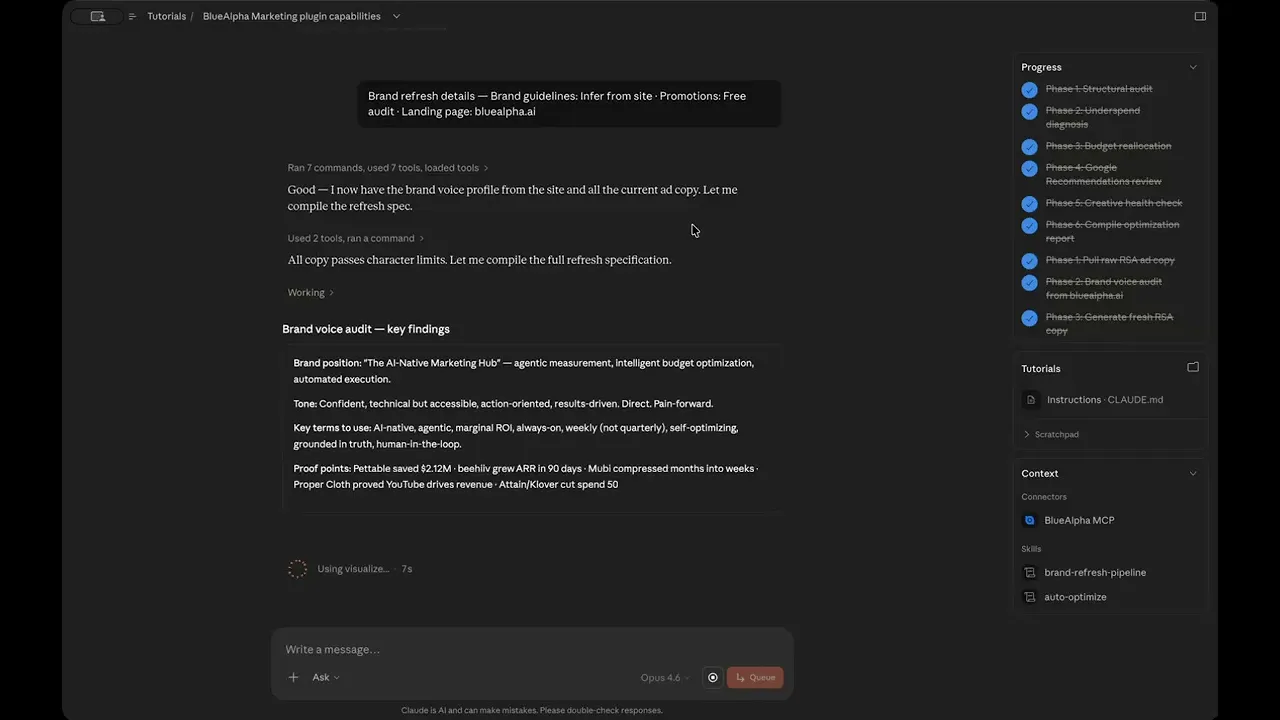
Google Ads Creative Fatigue in Claude: BlueAlpha brand-refresh Tutorial
Detect which Google Ads are fatiguing, audit your brand voice from your website, and generate deployment-ready RSA copy in one Claude conversation.
TL;DR — brand-refresh-pipeline finds the ads in your account that are burning out, audits your brand voice by scraping your website, and generates fresh responsive search ad copy you can deploy with one approval. It detects fatigue with real Google Ads performance signals, preserves the headlines and descriptions that are actually working, and rewrites the ones that aren't — all while staying on-brand. You walk away with 15 headlines and 4 descriptions per ad, a step-by-step deployment plan, and a 30-day measurement framework. This is the creative arm of what BlueAlpha calls the Decision Engine — the system that turns every signal in your ad account into a real decision.
Watch the full walkthrough (7 min):
Creative fatigue is expensive because it's slow. A fatigued ad doesn't fail all at once — it just gradually erodes your CTR and CPC over weeks until one day you notice the campaign is down 20% and can't figure out why. This skill catches the erosion before the damage is done.
All ten Google Ads skills in the BlueAlpha Marketing Plugin
auto-optimize— Runs a full optimization cycle on a Google Ads account: structural audit, underspend diagnosis, budget reallocation, recommendations review, and creative health check.full-monty— Runs every skill in sequence for a comprehensive top-to-bottom audit plus a strategic deployment plan for the next quarter.audience-intelligence— Analyzes audience performance across Google Ads and recommends bid modifiers, new segments, exclusions, and observation-to-targeting moves.brand-refresh-pipeline— Detects creative fatigue, audits brand voice, and generates fresh responsive search ad copy for any campaign.competitive-conquest— Researches competitors, identifies messaging gaps, and designs conquest campaign specs that target competitor brand terms.competitive-counterpunch— Detects when competitors gain auction share on your brand and plans a proportional defensive response.content-to-campaign— Turns any piece of content (blog, case study, webinar, comparison page) into a paid campaign complete with keywords and ad copy.geo-expansion-scout— Identifies new geographic markets worth entering by analyzing geo performance, keyword volume, and competitive density.incrementality-test-runner— Designs and monitors geo-based incrementality tests in Google Ads with integrity checks and lift analysis.seo-paid-bridge— Finds where organic and paid search overlap or leave gaps, then specs complementary paid campaigns that maximize total search click share.
This article is part of the full series.
Why use AI to detect and fix Google Ads creative fatigue?
Most teams treat creative refresh as a manual, calendar-driven chore. Someone notices CTR is down, pulls a report, rewrites headlines in a spreadsheet, cross-checks character limits, and uploads manually. The whole cycle takes days — and by the time new ads are live, you've already paid the fatigue tax for another week.
Claude with the BlueAlpha Marketing Plugin compresses this into a single conversation. It reads live Google Ads performance data through MCP, scrapes your website to understand your actual brand voice, generates RSA-compliant copy that stays on-brand, and produces a deployment plan with measurement checkpoints. The same AI that detects the fatigue also writes the fix — no handoff, no lost context.
How does Claude connect to your Google Ads account?
The BlueAlpha Marketing Plugin uses the Model Context Protocol (MCP) — an open standard that lets Claude talk directly to external tools and APIs. When you install the plugin, it registers a set of Google Ads tools (detect fatigue, analyze creatives, audit brand voice, etc.) that Claude can call during a conversation. Every tool call goes through your authenticated MCC, scoped to the customer ID you specify.
For setup instructions (installing the plugin, authenticating your MCC, and connecting your first account), see The BlueAlpha Google Ads Marketing Plugin for Claude.
What the brand-refresh-pipeline skill does
The skill runs in four phases and produces a complete refresh plan from detection through deployment.
Configure and detect fatigue. An interactive widget asks three questions — brand guidelines URL, current promotions, and landing page — then runs
detect_creative_fatigueacross your enabled campaigns. Each fatigued ad gets a severity label (critical, high, moderate, low) and the performance metrics that triggered it.Brand voice audit. Claude scrapes your website to build a brand voice profile: positioning, tone attributes, key terms, and proof points. It then compares every fatigued ad against that profile and flags off-voice copy in red.
Generate fresh RSA copy. Produces 15 headlines (≤30 chars each) and 4 descriptions (≤90 chars each) per fatigued ad group — with pinning strategy, rationale for each asset, and character counts verified.
Deployment plan + measurement framework. Lays out the exact steps to deploy (create new ads first, then pause old), captures performance baselines, and sets Day 7/14/30 checkpoints.
When to use it
On a 6–8 week cadence for top-spending campaigns. That's long enough to see fatigue accumulate, short enough to act before it damages CPA.
When
auto-optimizeflags creative fatigue in its creative health check — this is the natural follow-up skill.Before a major product update or promotion. The skill can weave new proof points and promotional angles into the copy.
When CTR is declining but bids and targeting are unchanged. Nine times out of ten, this is creative fatigue.
What you'll need before you start
Google Ads customer ID. Required — the skill needs an account to scan.
Brand guidelines or website URL. Optional but recommended. If you don't provide explicit guidelines, the skill will infer your brand voice by scraping your homepage.
Current promotions. Any offers or pricing to feature in the new copy. Optional.
Landing page URL. If different from your existing final URLs. Optional; defaults to existing.
Step-by-step: running brand-refresh-pipeline in Claude
Video walkthrough of this entire flow:
Here's exactly what happens when you invoke the skill, matching the flow shown in the video walkthrough.
1. Invoke the skill
Type the slash command or use natural language:
/bluealpha-marketing-plugin:brand-refresh-pipeline let's run it
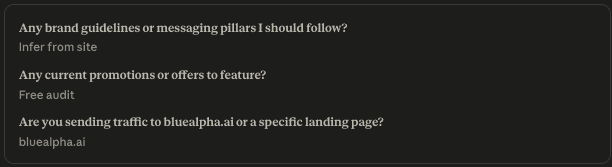
Claude acknowledges the skill and opens an interactive widget titled "Brand refresh details" with three configuration questions.
2. Configure the brand direction
The widget asks:
Do you have specific brand guidelines? — Paste a URL or document reference. If you answer "infer from website," the skill will scrape your site to build the voice profile.
Any current promotions to feature? — Enter active offers (e.g., "Free audit") or leave blank.
Landing page for new ads? — Enter a URL if you want to change the destination, or confirm the existing page.
In the demo, the configuration was: Infer from bluealpha.ai · Free audit · bluealpha.ai homepage.
3. Review the brand voice audit
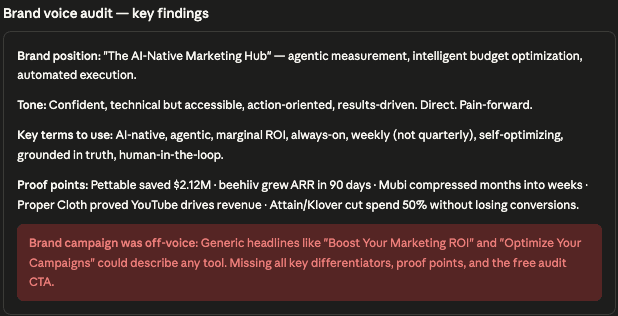
Claude scrapes your website and produces a structured brand voice profile. In the demo, this included:
Positioning: "The AI-Native Marketing Hub"
Tone: Confident, technical, pain-forward
Key terms: Decision Engine, Agentic-Led Growth, MCP
Proof points: Specific client results and capabilities
The skill then compares every RSA in your fatigued campaigns against this profile. Ads that match your voice pass. Ads that don't get flagged in red with a specific explanation of what's off-voice — for example, generic headlines that don't reflect your positioning or differentiation.
4. Review the RSA specifications
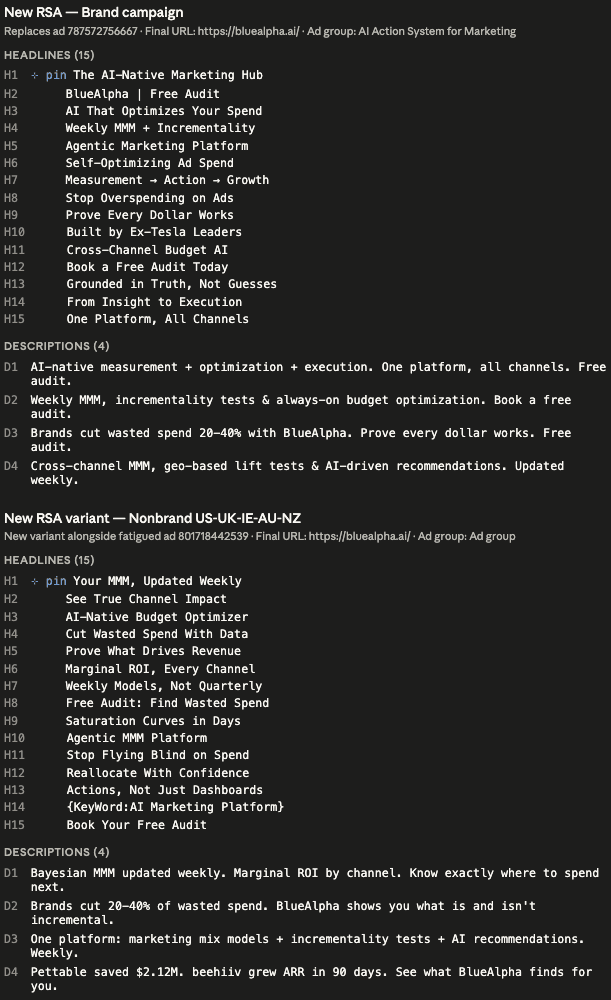
For each fatigued ad, the skill produces a complete RSA spec:
15 headlines (each ≤30 characters) with pinning notes
4 descriptions (each ≤90 characters) with role assignments
Character counts verified for every asset
Rationale explaining the angle for each headline/description
The specs come in two flavors depending on the situation: replacement ads (for critically fatigued copy that needs to be swapped entirely) and variant ads (deployed alongside moderately fatigued ads to let Google's rotation naturally shift impressions).
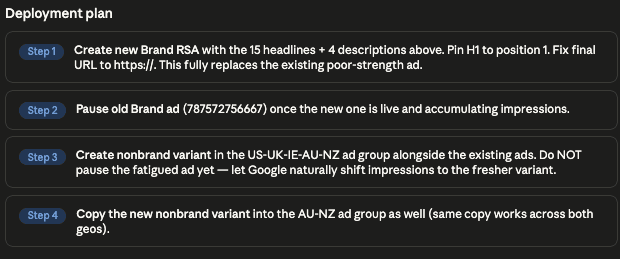
5. Review the deployment plan
The skill produces a numbered deployment sequence. The key principle: create new ads first, then pause old ones — never leave an ad group empty. For variant ads, the explicit instruction is "do NOT pause the fatigued ad" — let Google's rotation handle the transition naturally.
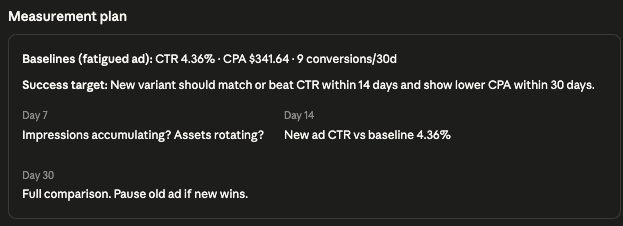
6. Review the measurement framework
The skill captures current baselines and sets future checkpoints:
Baselines: Current CTR, CPA, and conversion volume (e.g., CTR 4.36%, CPA $341.64, 9 conversions/30d)
Day 7: Is Google rotating the new assets? Are impressions flowing?
Day 14: Early CTR comparison against baseline
Day 30: Full performance comparison — CTR, CPA, conversion rate
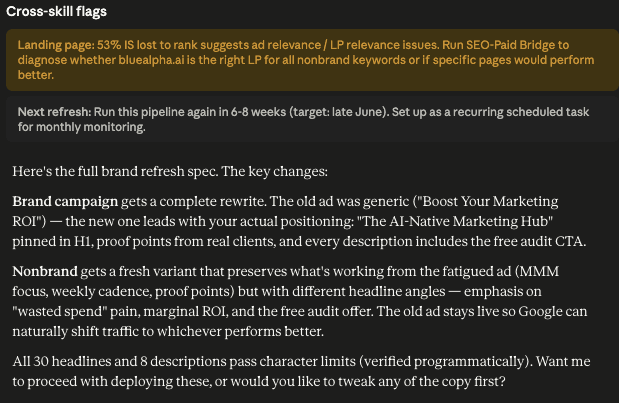
7. Approve and act on cross-skill flags
The skill finishes by flagging related work for other skills — for example, recommending the seo-paid-bridge skill to audit the landing page, or noting the 6–8 week cadence for the next refresh cycle.
Once you approve the plan, you can deploy the new ads manually in Google Ads Editor or ask Claude to help with the next step.
Example prompts
Kick-off prompt (slash command):
/bluealpha-marketing-plugin:brand-refresh-pipeline let's run it
Kick-off prompt (natural language):
"Run brand-refresh-pipeline on customer 561-240-7843. Infer brand voice from our website. Current promo is a free audit. Landing page is bluealpha.ai."
Scoped to specific campaigns:
"Run brand-refresh-pipeline on the Brand and Nonbrand search campaigns only. Our tone is confident and technical. No active promotions."
After auto-optimize flags fatigue:
"Auto-optimize just flagged critical creative fatigue on two campaigns. Run brand-refresh-pipeline as the follow-up."
Gotchas and tips
Character limits are hard constraints. Headlines must be ≤30 characters, descriptions ≤90 characters. A single violation rejects the entire ad in Google Ads Editor. The skill verifies automatically, but double-check before uploading.
Don't pause variant ads. When the skill recommends a "variant" deployment (alongside the fatigued ad), do NOT pause the existing ad. Let Google's rotation handle the transition — a sudden swap re-triggers the learning period.
Respect the learning period. After deploying new RSAs, Google needs 1–2 weeks to test asset combinations. Don't make further changes during this window.
Brand voice is only as good as your inputs. If you point the skill at a homepage that hasn't been updated in a year, the inferred voice profile will be stale. Point it at your best, most current page.
Creative is only one lever. If CTR is declining but your landing page hasn't been updated in months, fresh ad copy will only partially solve the problem. The skill's cross-skill flags (like the
seo-paid-bridgerecommendation) are telling you something — follow up on them.Run it on a 6–8 week cadence. This came directly from the skill's own recommendation. Set a recurring reminder.
FAQ
How does the skill detect creative fatigue?
It runs detect_creative_fatigue via the Google Ads MCP connection, analyzing CTR trends, conversion rate trends, impression frequency, and ad age. Each ad gets a severity label (critical, high, moderate, low) based on a weighted combination of these signals.
Does the skill automatically deploy the new ads?
No. It produces complete RSA specifications ready to deploy, but you approve each one before execution. The deployment plan tells you exactly what to do in what order.
What's the difference between a replacement and a variant ad?
A replacement ad fully replaces a critically fatigued ad (you pause the old one after the new one is live). A variant ad runs alongside a moderately fatigued ad, letting Google's rotation naturally shift impressions to the better-performing creative over time.
How does the brand voice audit work?
Claude scrapes your website (or reads provided guidelines) and builds a structured voice profile: positioning statement, tone attributes, key terms, and proof points. It then compares every headline and description in your fatigued ads against this profile and flags anything that doesn't match.
Can I use my own brand guidelines instead of website scraping?
Yes. Paste a URL to your brand guide, upload a document, or describe your voice in the prompt. The more specific the guidance, the better the output.
How long does the whole process take?
About 7–8 minutes end-to-end in a single Claude session. The longest step is the brand voice audit (website scraping and comparison).
What if auto-optimize already flagged fatigue — do I still need to run this?
Yes. auto-optimize detects fatigue but doesn't write new copy. brand-refresh-pipeline is the dedicated follow-up that takes the detection and turns it into a complete refresh plan with deployment-ready RSA specs.
How do you know when a Google Ads creative is fatigued?
The brand-refresh-pipeline skill looks at four signals in combination: CTR declining over consecutive periods, CPA rising without changes to bids or targeting, conversion rate dropping on stable traffic, and ad age exceeding expected lifecycle for the campaign type. A single signal in the warning zone triggers a review. Two or more signals crossing threshold at the same time confirms fatigue. Each ad gets a severity label — critical, high, moderate, or low — and the skill acts accordingly: critical ads get full replacement specs, moderate ads get variant specs that run alongside the existing creative.
Related skills
If
auto-optimizeflags creative fatigue in its report → this is the follow-up skill.If the landing page needs work → run
seo-paid-bridgeas the skill recommends.If you need competitive angles in your new copy → run
competitive-conquestfirst and feed the angles into the refresh.If the issue is bigger than creative →
auto-optimizeorfull-montyto find the real bottleneck.
Your next step
Pick your highest-spend campaign and run:
/bluealpha-marketing-plugin:brand-refresh-pipeline let's run it
The interactive widget will walk you through configuration. You'll have new ad copy, a deployment sequence, and measurement checkpoints ready to ship by the end of the session.
Need help getting set up? See the installation guide.
Want a growth partner to run the Decision Engine for you? Book a demo.

