Peter Grafe

How to Analyze Google Ads Audience Targeting with Claude: The audience-intelligence Tutorial

Scan your Google Ads account for missing audience signals, analyze demographic performance, and get prioritized recommendations for segments to add or cut.

TL;DR — audience-intelligence checks every audience signal attached to your Google Ads account, pulls demographic performance data via GAQL, identifies waste in non-converting age and gender segments, and recommends specific in-market and affinity audiences to add in Observation mode — with a prioritized action plan and estimated impact. If your account has existing audience data, it tiers them into Gold/Silver/Bronze/Cut with bid modifier recommendations. If your account has zero audience segments (which is more common than you'd think), it tells you exactly what to add, what demographics to exclude, and when to re-run the skill to start tiering. This is the targeting arm of what BlueAlpha calls the Decision Engine — the system that turns every signal in your ad account into a real decision.


Watch the full walkthrough (6 min):


Audience targeting is the most-neglected lever in most Google Ads accounts. Everyone tweaks keywords and bids. Almost nobody looks at who is actually clicking and converting — even though Google collects that data automatically. The result: you're bidding the same amount on someone actively researching marketing mix modeling as you are on a retired hobbyist who will never buy. This skill fixes that in one conversation.


All ten Google Ads skills in the BlueAlpha Marketing Plugin

  • auto-optimize — Runs a full optimization cycle on a Google Ads account: structural audit, underspend diagnosis, budget reallocation, recommendations review, and creative health check.

  • full-monty — Runs every skill in sequence for a comprehensive top-to-bottom audit plus a strategic deployment plan for the next quarter.

  • audience-intelligence — Analyzes audience performance across Google Ads and recommends bid modifiers, new segments, exclusions, and observation-to-targeting moves.

  • brand-refresh-pipeline — Detects creative fatigue, audits brand voice, and generates fresh responsive search ad copy for any campaign.

  • competitive-conquest — Researches competitors, identifies messaging gaps, and designs conquest campaign specs that target competitor brand terms.

  • competitive-counterpunch — Detects when competitors gain auction share on your brand and plans a proportional defensive response.

  • content-to-campaign — Turns any piece of content (blog, case study, webinar, comparison page) into a paid campaign complete with keywords and ad copy.

  • geo-expansion-scout — Identifies new geographic markets worth entering by analyzing geo performance, keyword volume, and competitive density.

  • incrementality-test-runner — Designs and monitors geo-based incrementality tests in Google Ads with integrity checks and lift analysis.

  • seo-paid-bridge — Finds where organic and paid search overlap or leave gaps, then specs complementary paid campaigns that maximize total search click share.

This article is part of the full series.


Why use Claude for Google Ads audience analysis?

Most teams skip audience analysis because it's tedious. You'd need to check what audience segments are attached (if any), export demographic reports from the Google Ads UI, cross-reference age and gender performance against your ICP, figure out which in-market segments exist for your category, and then manually add them one by one. It takes hours — and most people don't know where to start.

Claude with the BlueAlpha Marketing Plugin does this in a single conversation. It checks your audience segments via MCP, pulls demographic performance through GAQL queries, cross-references the data against your ICP and impression share breakdown, recommends specific audiences to add with rationale and priority levels, and produces a step-by-step action plan with estimated impact.


How does Claude connect to your Google Ads account?

The BlueAlpha Marketing Plugin uses the Model Context Protocol (MCP) — an open standard that lets Claude talk directly to external tools and APIs. For audience-intelligence, Claude uses two key tools: google_ads_analyze_audiences (checks what audience segments are attached to your account) and google_ads_execute_query_stream (runs GAQL queries for demographic performance data like age ranges, gender, and device splits). Every tool call goes through your authenticated MCC, scoped to the customer ID you specify.


What the audience-intelligence skill does

The skill runs in four phases and produces a complete audience optimization plan.

  1. Audience segment scan. Runs google_ads_analyze_audiences to check what audience segments are attached to the account — in-market audiences, affinity audiences, remarketing lists, and whether they're in Observation or Targeting mode.

  2. Demographic performance analysis. Pulls age range, gender, and impression share data via GAQL queries across a 90-day lookback window.

  3. Audience recommendations. Recommends specific in-market and affinity audiences to add in Observation mode — each with a rationale and priority tier (Must add / Recommended / Optional).

  4. Action plan + estimated impact. Produces a prioritized, time-boxed action plan with estimated savings from demographic exclusions, number of new audience signals to collect, and timeline for when actionable data will be available.


When to use it

  • After auto-optimize flags impression share lost to rank. Audience bid modifiers let you bid more aggressively on high-value segments without raising your overall budget.

  • When launching new campaigns. Before adding new budget, check whether your current targeting is efficient.

  • On a monthly cadence for any account spending $5K+/month.

  • When you suspect you have no audience signals at all. Many accounts have zero audience segments attached. This skill confirms that and tells you exactly what to add.


What you'll need before you start

  • Google Ads customer ID. Required.

  • Scope. Full account or specific campaigns. Optional; defaults to full account.

  • MMM model ID. Optional. If you have a Meridian model connected, the skill can validate whether high-performing audiences are actually incremental.


Step-by-step: running audience-intelligence in Claude

Video walkthrough of this entire flow:


1. Invoke the skill

Type the slash command or use natural language:

/audience-intelligence

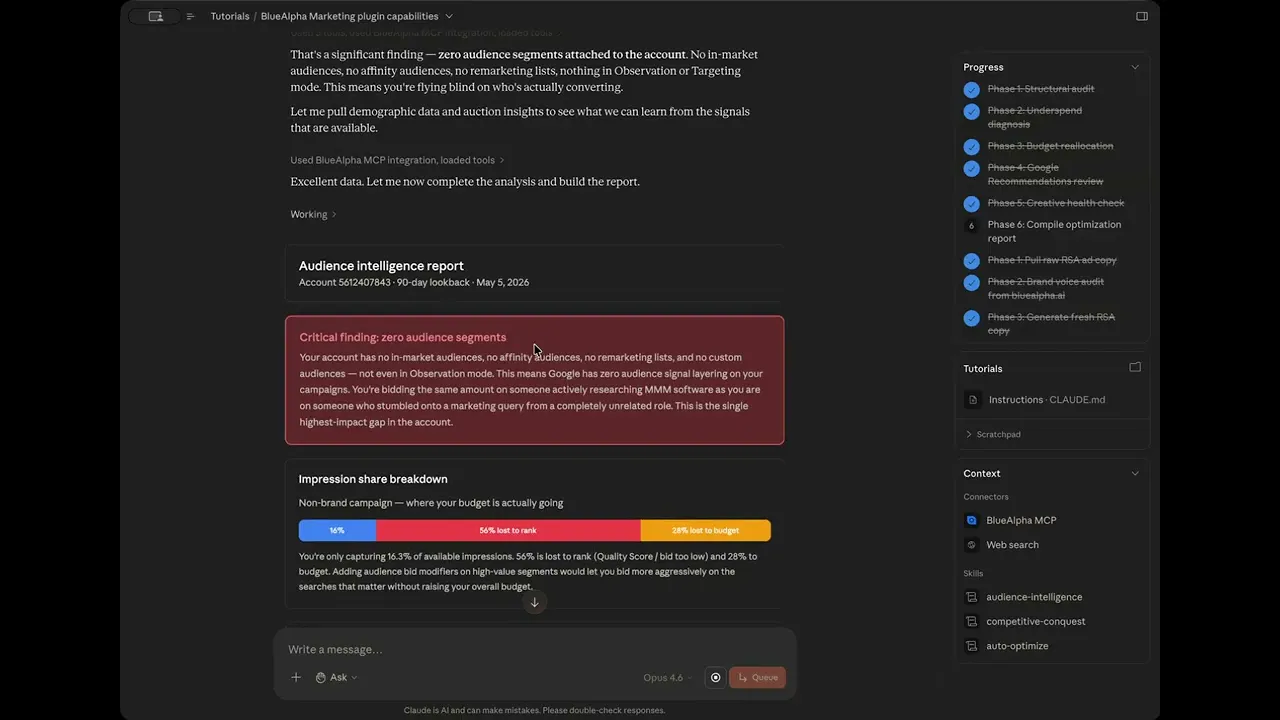
In the demo, this skill was invoked immediately after auto-optimize and competitive-conquest in the same session. Because Claude already had context — account 5612407843, full account scope, no MMM — it skipped the interactive widget entirely.


2. Review the critical finding: audience segments

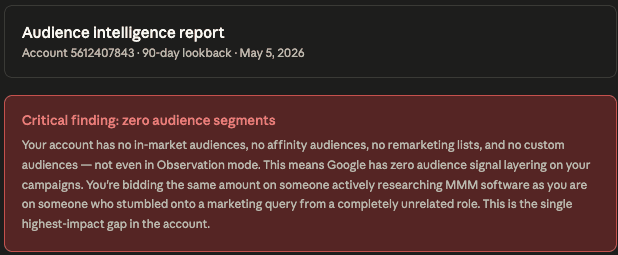
Claude runs google_ads_analyze_audiences and reports what it finds. In the demo, the result was stark: Zero audience segments attached to the account. No in-market audiences. No affinity audiences. No remarketing lists. Nothing in Observation or Targeting mode.
How to Analyze Google Ads Audience Targeting with Claude 1


3. Review the impression share breakdown

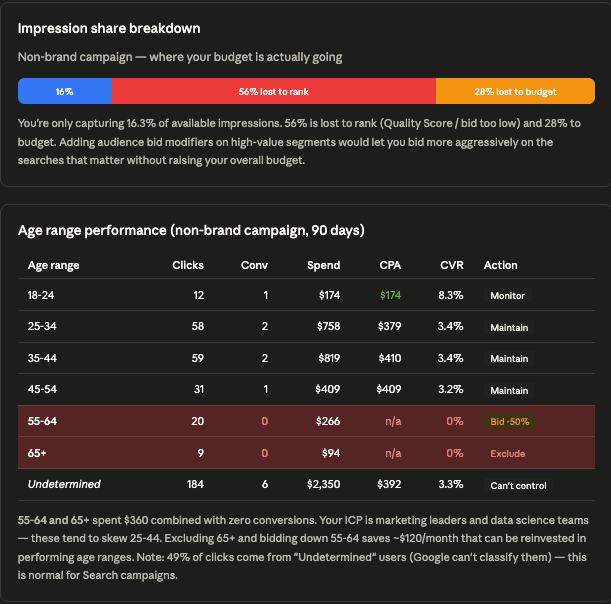
Claude pulls impression share data and visualizes it as a horizontal bar chart for the non-brand campaign: 16% captured, 56% lost to rank, 28% lost to budget. Adding audience bid modifiers on high-value segments lets you bid more aggressively on the searches that matter without raising your overall budget.
How to Analyze Google Ads Audience Targeting with Claude 2


4. Review the age range performance table

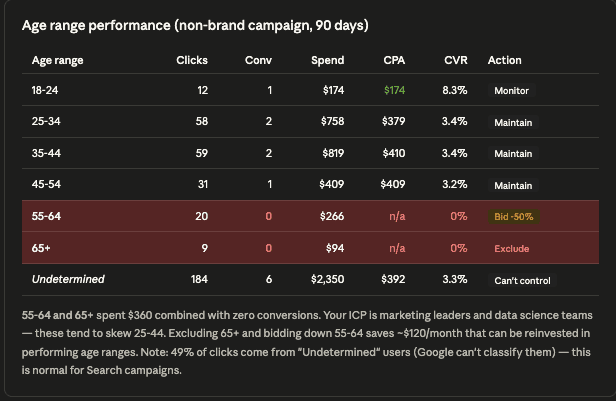
Claude pulls demographic data via GAQL across a 90-day lookback. Key finding: 55-64 and 65+ spent $360 combined with zero conversions. Action: Exclude 65+, bid -50% on 55-64. Saves ~$120/month.
How to Analyze Google Ads Audience Targeting with Claude 3


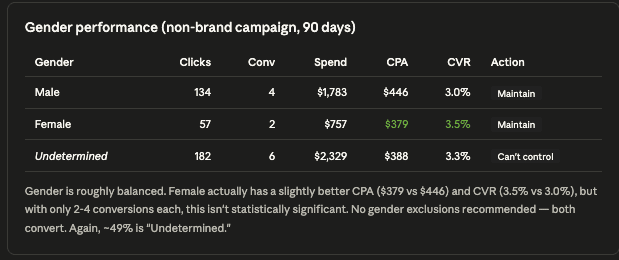
5. Review the gender performance table

Gender is roughly balanced. No gender exclusions recommended — both convert. ~49% is "Undetermined," which is normal for Search campaigns.
How to Analyze Google Ads Audience Targeting with Claude 4


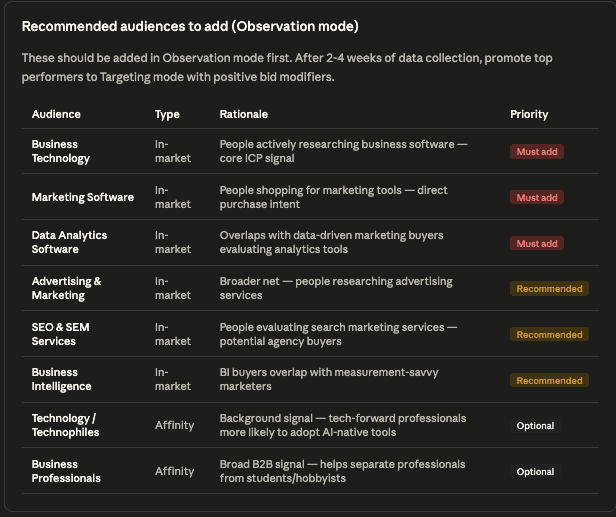
6. Review the recommended audiences to add

Claude recommends 8 specific audiences organized by priority: 3 Must-add in-market audiences (Business Technology, Marketing Software, Data Analytics Software), 3 Recommended in-market audiences (Advertising & Marketing, SEO & SEM Services, Business Intelligence), and 2 Optional affinity audiences (Technology/Technophiles, Business Professionals). All should be added in Observation mode first.
How to Analyze Google Ads Audience Targeting with Claude 5


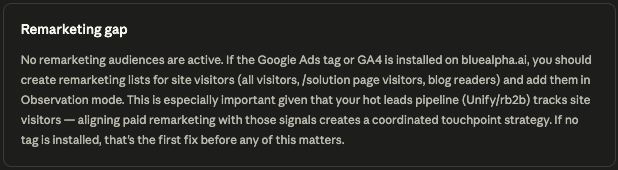
7. Review the remarketing gap

No remarketing audiences are active. If the Google Ads tag or GA4 is installed, create remarketing lists for site visitors and add them in Observation mode.
How to Analyze Google Ads Audience Targeting with Claude 6


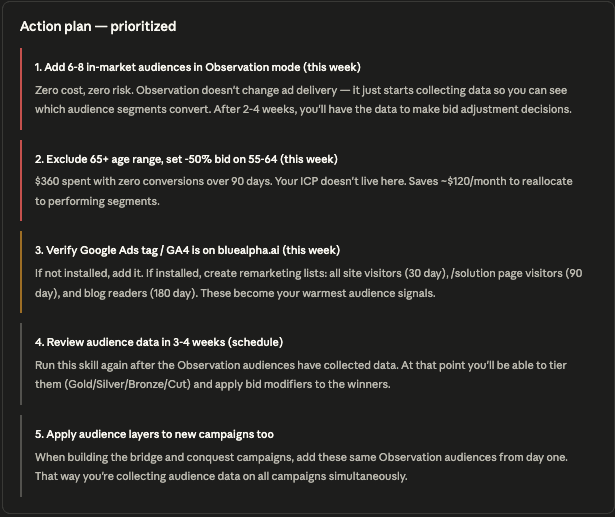
8. Review the prioritized action plan

5-step action plan: (1) Add 6-8 in-market audiences in Observation mode, (2) Exclude 65+ and bid -50% on 55-64, (3) Verify Google Ads tag/GA4, (4) Review audience data in 3-4 weeks, (5) Apply audience layers to new campaigns too.
How to Analyze Google Ads Audience Targeting with Claude 7


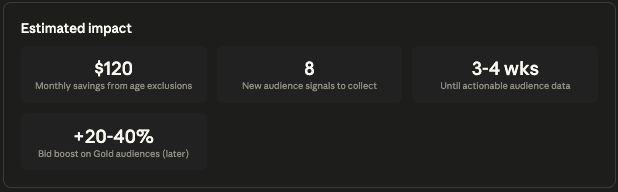
9. Review the estimated impact

$120 monthly savings from age exclusions, 8 new audience signals to collect, 3-4 weeks until actionable audience data, +20-40% bid boost on Gold audiences (later).
How to Analyze Google Ads Audience Targeting with Claude 8


Example prompts

Kick-off prompt (slash command):

/audience-intelligence

After auto-optimize flags impression share issues:

"Auto-optimize found 53% impression share lost to rank. Run audience-intelligence to see if audience bid modifiers can help us bid smarter without spending more."

Re-run after Observation data collection:

"It's been 4 weeks since we added Observation audiences. Run audience-intelligence again and tier them — I want Gold/Silver/Bronze/Cut with bid modifier recommendations."


Gotchas and tips

  • Observation mode is free data collection. Zero risk. Don't skip this step.

  • 49% "Undetermined" is normal. Google can't classify about half of Search campaign users into age/gender buckets.

  • Don't bid-adjust on thin data. If an audience or demographic has fewer than 10 conversions, monitor, don't act.

  • Re-run the skill in 3-4 weeks. This is when the Observation data becomes actionable. The skill will produce Gold/Silver/Bronze/Cut tiers with bid modifier recommendations at that point.

  • Apply Observation audiences to new campaigns too. This accelerates data collection across your entire account.


FAQ

What if my account has zero audience segments?

This is exactly what the demo showed. The skill identifies the gap, recommends specific audiences to add, and produces an action plan to start collecting data.

How does the skill pull demographic data?

Claude runs GAQL queries against your Google Ads account via MCP — for example, querying age_range_view with metrics like impressions, clicks, conversions, and cost.

Does the skill automatically add audiences or change bids?

No. It produces recommendations for review. You approve each change before execution.

How often should I run this?

Run it once to set up Observation audiences, again 3-4 weeks later to tier them. After that, monthly for most accounts.

What are the best in-market audiences for Google Ads?

It depends on your product and ICP. The skill analyzes your account, your keywords, and your conversion data, then recommends specific in-market and affinity audiences tailored to your business. In the demo (a B2B marketing SaaS account), the skill recommended Business Technology, Marketing Software, and Data Analytics Software as must-add in-market audiences, with Advertising & Marketing, SEO & SEM Services, and Business Intelligence as secondary recommendations. Your account will get different recommendations based on what you sell and who converts.

What is Observation mode in Google Ads audience targeting?

Observation mode attaches an audience segment to your campaign without restricting who sees your ads. Google collects performance data on that audience (impressions, clicks, conversions) while your targeting stays unchanged. It is free data collection with zero risk. After 3-4 weeks, you have enough data to tier audiences into Gold, Silver, Bronze, or Cut and apply bid modifiers accordingly. The skill recommends starting every new audience in Observation mode before switching high-performers to Targeting mode.


Related skills


Your next step

Pick your biggest account and run:

/audience-intelligence

You'll know within 6 minutes whether your account has audience signals at all, which demographics are wasting budget, and exactly what to add to start collecting actionable targeting data.

Need help getting set up? See the installation guide.
Want a growth partner to run the Decision Engine for you? Book a demo.

TL;DR — audience-intelligence checks every audience signal attached to your Google Ads account, pulls demographic performance data via GAQL, identifies waste in non-converting age and gender segments, and recommends specific in-market and affinity audiences to add in Observation mode — with a prioritized action plan and estimated impact. If your account has existing audience data, it tiers them into Gold/Silver/Bronze/Cut with bid modifier recommendations. If your account has zero audience segments (which is more common than you'd think), it tells you exactly what to add, what demographics to exclude, and when to re-run the skill to start tiering. This is the targeting arm of what BlueAlpha calls the Decision Engine — the system that turns every signal in your ad account into a real decision.


Watch the full walkthrough (6 min):


Audience targeting is the most-neglected lever in most Google Ads accounts. Everyone tweaks keywords and bids. Almost nobody looks at who is actually clicking and converting — even though Google collects that data automatically. The result: you're bidding the same amount on someone actively researching marketing mix modeling as you are on a retired hobbyist who will never buy. This skill fixes that in one conversation.


All ten Google Ads skills in the BlueAlpha Marketing Plugin

  • auto-optimize — Runs a full optimization cycle on a Google Ads account: structural audit, underspend diagnosis, budget reallocation, recommendations review, and creative health check.

  • full-monty — Runs every skill in sequence for a comprehensive top-to-bottom audit plus a strategic deployment plan for the next quarter.

  • audience-intelligence — Analyzes audience performance across Google Ads and recommends bid modifiers, new segments, exclusions, and observation-to-targeting moves.

  • brand-refresh-pipeline — Detects creative fatigue, audits brand voice, and generates fresh responsive search ad copy for any campaign.

  • competitive-conquest — Researches competitors, identifies messaging gaps, and designs conquest campaign specs that target competitor brand terms.

  • competitive-counterpunch — Detects when competitors gain auction share on your brand and plans a proportional defensive response.

  • content-to-campaign — Turns any piece of content (blog, case study, webinar, comparison page) into a paid campaign complete with keywords and ad copy.

  • geo-expansion-scout — Identifies new geographic markets worth entering by analyzing geo performance, keyword volume, and competitive density.

  • incrementality-test-runner — Designs and monitors geo-based incrementality tests in Google Ads with integrity checks and lift analysis.

  • seo-paid-bridge — Finds where organic and paid search overlap or leave gaps, then specs complementary paid campaigns that maximize total search click share.

This article is part of the full series.


Why use Claude for Google Ads audience analysis?

Most teams skip audience analysis because it's tedious. You'd need to check what audience segments are attached (if any), export demographic reports from the Google Ads UI, cross-reference age and gender performance against your ICP, figure out which in-market segments exist for your category, and then manually add them one by one. It takes hours — and most people don't know where to start.

Claude with the BlueAlpha Marketing Plugin does this in a single conversation. It checks your audience segments via MCP, pulls demographic performance through GAQL queries, cross-references the data against your ICP and impression share breakdown, recommends specific audiences to add with rationale and priority levels, and produces a step-by-step action plan with estimated impact.


How does Claude connect to your Google Ads account?

The BlueAlpha Marketing Plugin uses the Model Context Protocol (MCP) — an open standard that lets Claude talk directly to external tools and APIs. For audience-intelligence, Claude uses two key tools: google_ads_analyze_audiences (checks what audience segments are attached to your account) and google_ads_execute_query_stream (runs GAQL queries for demographic performance data like age ranges, gender, and device splits). Every tool call goes through your authenticated MCC, scoped to the customer ID you specify.


What the audience-intelligence skill does

The skill runs in four phases and produces a complete audience optimization plan.

  1. Audience segment scan. Runs google_ads_analyze_audiences to check what audience segments are attached to the account — in-market audiences, affinity audiences, remarketing lists, and whether they're in Observation or Targeting mode.

  2. Demographic performance analysis. Pulls age range, gender, and impression share data via GAQL queries across a 90-day lookback window.

  3. Audience recommendations. Recommends specific in-market and affinity audiences to add in Observation mode — each with a rationale and priority tier (Must add / Recommended / Optional).

  4. Action plan + estimated impact. Produces a prioritized, time-boxed action plan with estimated savings from demographic exclusions, number of new audience signals to collect, and timeline for when actionable data will be available.


When to use it

  • After auto-optimize flags impression share lost to rank. Audience bid modifiers let you bid more aggressively on high-value segments without raising your overall budget.

  • When launching new campaigns. Before adding new budget, check whether your current targeting is efficient.

  • On a monthly cadence for any account spending $5K+/month.

  • When you suspect you have no audience signals at all. Many accounts have zero audience segments attached. This skill confirms that and tells you exactly what to add.


What you'll need before you start

  • Google Ads customer ID. Required.

  • Scope. Full account or specific campaigns. Optional; defaults to full account.

  • MMM model ID. Optional. If you have a Meridian model connected, the skill can validate whether high-performing audiences are actually incremental.


Step-by-step: running audience-intelligence in Claude

Video walkthrough of this entire flow:


1. Invoke the skill

Type the slash command or use natural language:

/audience-intelligence

In the demo, this skill was invoked immediately after auto-optimize and competitive-conquest in the same session. Because Claude already had context — account 5612407843, full account scope, no MMM — it skipped the interactive widget entirely.


2. Review the critical finding: audience segments

Claude runs google_ads_analyze_audiences and reports what it finds. In the demo, the result was stark: Zero audience segments attached to the account. No in-market audiences. No affinity audiences. No remarketing lists. Nothing in Observation or Targeting mode.

How to Analyze Google Ads Audience Targeting with Claude 1


3. Review the impression share breakdown

Claude pulls impression share data and visualizes it as a horizontal bar chart for the non-brand campaign: 16% captured, 56% lost to rank, 28% lost to budget. Adding audience bid modifiers on high-value segments lets you bid more aggressively on the searches that matter without raising your overall budget.

How to Analyze Google Ads Audience Targeting with Claude 2


4. Review the age range performance table

Claude pulls demographic data via GAQL across a 90-day lookback. Key finding: 55-64 and 65+ spent $360 combined with zero conversions. Action: Exclude 65+, bid -50% on 55-64. Saves ~$120/month.

How to Analyze Google Ads Audience Targeting with Claude 3


5. Review the gender performance table

Gender is roughly balanced. No gender exclusions recommended — both convert. ~49% is "Undetermined," which is normal for Search campaigns.

How to Analyze Google Ads Audience Targeting with Claude 4


6. Review the recommended audiences to add

Claude recommends 8 specific audiences organized by priority: 3 Must-add in-market audiences (Business Technology, Marketing Software, Data Analytics Software), 3 Recommended in-market audiences (Advertising & Marketing, SEO & SEM Services, Business Intelligence), and 2 Optional affinity audiences (Technology/Technophiles, Business Professionals). All should be added in Observation mode first.

How to Analyze Google Ads Audience Targeting with Claude 5


7. Review the remarketing gap

No remarketing audiences are active. If the Google Ads tag or GA4 is installed, create remarketing lists for site visitors and add them in Observation mode.

How to Analyze Google Ads Audience Targeting with Claude 6


8. Review the prioritized action plan

5-step action plan: (1) Add 6-8 in-market audiences in Observation mode, (2) Exclude 65+ and bid -50% on 55-64, (3) Verify Google Ads tag/GA4, (4) Review audience data in 3-4 weeks, (5) Apply audience layers to new campaigns too.

How to Analyze Google Ads Audience Targeting with Claude 7


9. Review the estimated impact

$120 monthly savings from age exclusions, 8 new audience signals to collect, 3-4 weeks until actionable audience data, +20-40% bid boost on Gold audiences (later).

How to Analyze Google Ads Audience Targeting with Claude 8


Example prompts

Kick-off prompt (slash command):

/audience-intelligence

After auto-optimize flags impression share issues:

"Auto-optimize found 53% impression share lost to rank. Run audience-intelligence to see if audience bid modifiers can help us bid smarter without spending more."

Re-run after Observation data collection:

"It's been 4 weeks since we added Observation audiences. Run audience-intelligence again and tier them — I want Gold/Silver/Bronze/Cut with bid modifier recommendations."


Gotchas and tips

  • Observation mode is free data collection. Zero risk. Don't skip this step.

  • 49% "Undetermined" is normal. Google can't classify about half of Search campaign users into age/gender buckets.

  • Don't bid-adjust on thin data. If an audience or demographic has fewer than 10 conversions, monitor, don't act.

  • Re-run the skill in 3-4 weeks. This is when the Observation data becomes actionable. The skill will produce Gold/Silver/Bronze/Cut tiers with bid modifier recommendations at that point.

  • Apply Observation audiences to new campaigns too. This accelerates data collection across your entire account.


FAQ

What if my account has zero audience segments?

This is exactly what the demo showed. The skill identifies the gap, recommends specific audiences to add, and produces an action plan to start collecting data.

How does the skill pull demographic data?

Claude runs GAQL queries against your Google Ads account via MCP — for example, querying age_range_view with metrics like impressions, clicks, conversions, and cost.

Does the skill automatically add audiences or change bids?

No. It produces recommendations for review. You approve each change before execution.

How often should I run this?

Run it once to set up Observation audiences, again 3-4 weeks later to tier them. After that, monthly for most accounts.

What are the best in-market audiences for Google Ads?

It depends on your product and ICP. The skill analyzes your account, your keywords, and your conversion data, then recommends specific in-market and affinity audiences tailored to your business. In the demo (a B2B marketing SaaS account), the skill recommended Business Technology, Marketing Software, and Data Analytics Software as must-add in-market audiences, with Advertising & Marketing, SEO & SEM Services, and Business Intelligence as secondary recommendations. Your account will get different recommendations based on what you sell and who converts.

What is Observation mode in Google Ads audience targeting?

Observation mode attaches an audience segment to your campaign without restricting who sees your ads. Google collects performance data on that audience (impressions, clicks, conversions) while your targeting stays unchanged. It is free data collection with zero risk. After 3-4 weeks, you have enough data to tier audiences into Gold, Silver, Bronze, or Cut and apply bid modifiers accordingly. The skill recommends starting every new audience in Observation mode before switching high-performers to Targeting mode.


Related skills


Your next step

Pick your biggest account and run:

/audience-intelligence

You'll know within 6 minutes whether your account has audience signals at all, which demographics are wasting budget, and exactly what to add to start collecting actionable targeting data.

Need help getting set up? See the installation guide.
Want a growth partner to run the Decision Engine for you? Book a demo.

Do next week's marketing work in the next hour.

Do next week's marketing work in the next hour.

Do next week's marketing work in the next hour.